4-18
To remove a measurement from being displayed on the Parameter screen, press the X located next
to the units for that measurement.
Press the orange X button in the right navigation bar at any time to disregard all changes
and return to the Parameter screen.
Press the green checkmark button in the right navigation bar to save changes and return
you to the Parameter screen.
Z e r o i n g a n d C a l i b r a t i o n
Zero Pressure Sensors
The Plus 4081 High Flow Module contains embedded low pressure and high pressure
sensors. TSI
®
recommends zeroing these transducers before each pressure measurement to ensure
the most accurate readings. Note that if two 4081 Flow Modules are connected to the 4089, the
pressure transducers for both modules are simultaneously able to be zeroed.
To zero the pressure sensors, perform the following steps:
1. Disconnect any pressure tubing from the low pressure and high pressure ports to expose the
sensors to the ambient air.
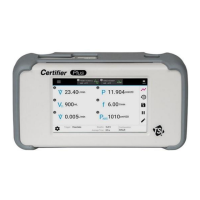
2. Press the zero icon located in the right navigation bar of the display (see below left).
3. Select the sensor(s) to be zeroed by checking their boxes and press the Zero Selected button, or
press the Zero All button to select and zero all pressure sensors.


 To Next Page