Page 51
7. Checking and Changing
Parameters and Other Data
Bacsoft control panel allows changing parameters of the cycle
and of the system, exporting various data to, and importing from,
a USB device or to the printer, and some other options.
Cycle parameters are changeable for Custom programs only (see
Duplicate cycles), with the exception of the Temperature sensors,
Displayed inputs, and Dry Time.
7.1 Browsing through the menus
Now you will learn how to browse through the folders. When you
read the Directories and subdirectories chapter with links to
specific menus, you will need to know how to browse through the
folders using the autoclave control panel. Below is the instruction.
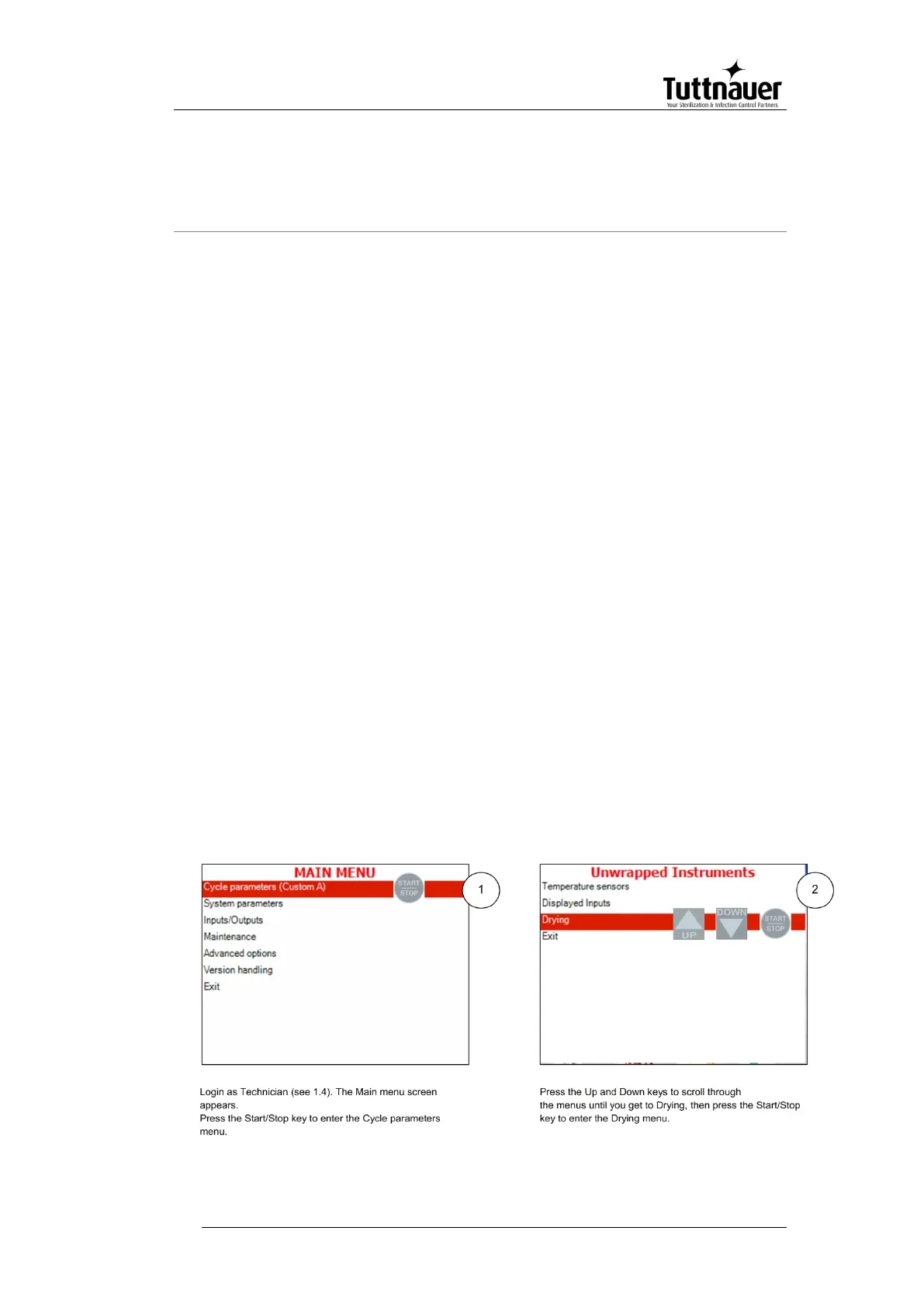
Login as User (see 7.4). The Main menu screen appears. To
browse through the menus:
1. Press the Up and Down keys to scroll through the menus.
2. Press the Start/Stop key to enter the next screen (i.e. to get one
level down).
3. Repeat steps 1 and 2 to enter the next screen until you get to
required screen.
Below are the example screens for the following menu:
Cycle Parameters\ Drying\ Dry Time:



 To Next Page