26
DATA & CAPACITY PLATES AND DECALS
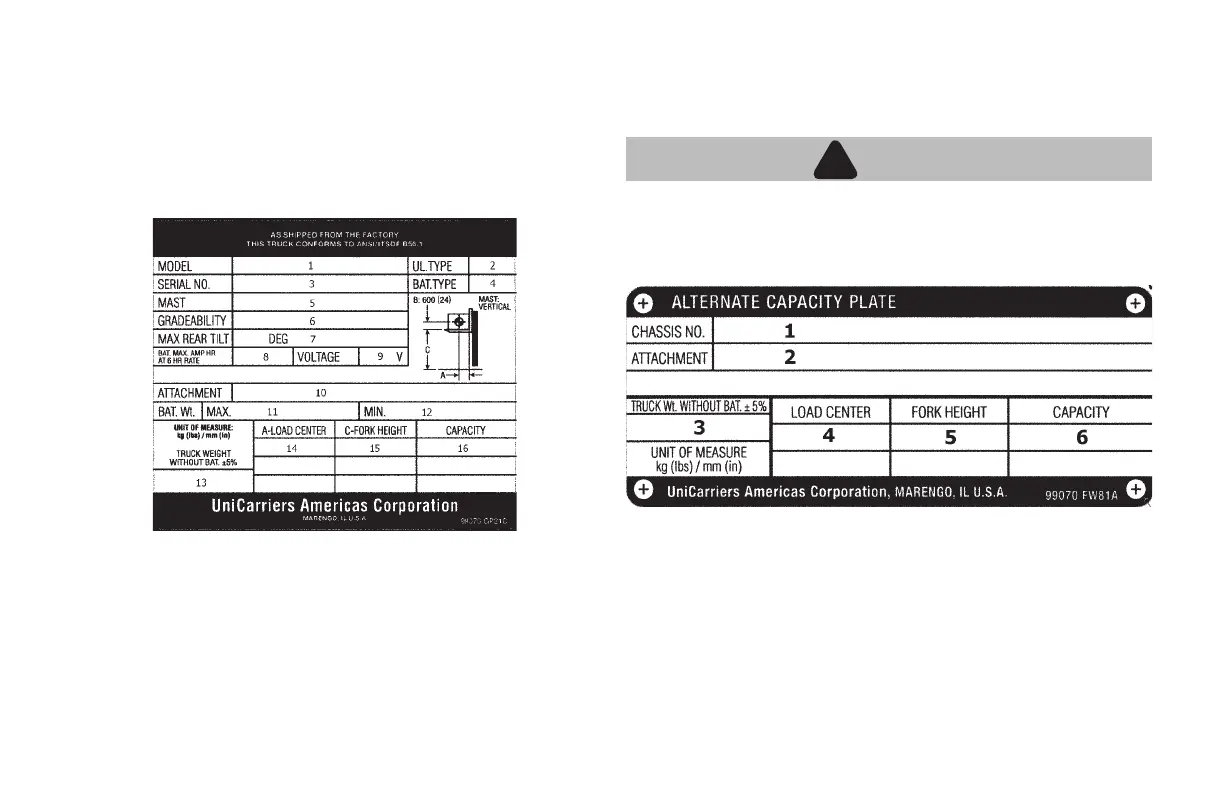
Know your unit. The data plate indicates all necessary information
regarding the type of attachments, lifting capacity, etc. Always check
the unit’s data plate and understand areas 1 through 16 as shown in
the illustration below.
Knowing the model and serial number for this unit is very helpful
whenever ordering repair parts. For any further information and
specications on this unit or any other, contact your Local Authorized
Dealer.
SAFETY RULES AND PRACTICES
DATA PLATE
ALTERNATE CAPACITY PLATE
4. Load Center
5. Fork Height
6. Capacity
Actual Capacity will vary with forklift conguration and load center. Mast
conguration will determine the maximum lifting distance. These values
are stamped on the data plate.
WARNING
!
!
• Do not exceed the actual capacity of the forklift. Note the
specications of the forklift you are using and operate the
forklift accordingly.
1. Chassis No. (Truck Serial Number)
2. Attachment
3. Truck Weight without Battery
1. Model Variation (Long Model
Code)
2. UL Type ("E" or "EE")
3. Chassis No. (Truck Serial Number)
4. Battery Type
5. Mast Type
6. Gradeability
7. Maximum Tilt Degree
8. Battery Amp Hour Max @ 6 Hours
9. Voltage (36V)
10. Attachment (Model & Serial
Number)
11. Battery Weight Maximum
12. Battery Weight Minimum
13. Truck Weight without Battery
14. Load Center
15. Fork Height
16. Maximum Lifting Capacity





 To Next Page