51
OPERATING CONTROLS AND FUNCTIONS
SWITCHES (cont’d)
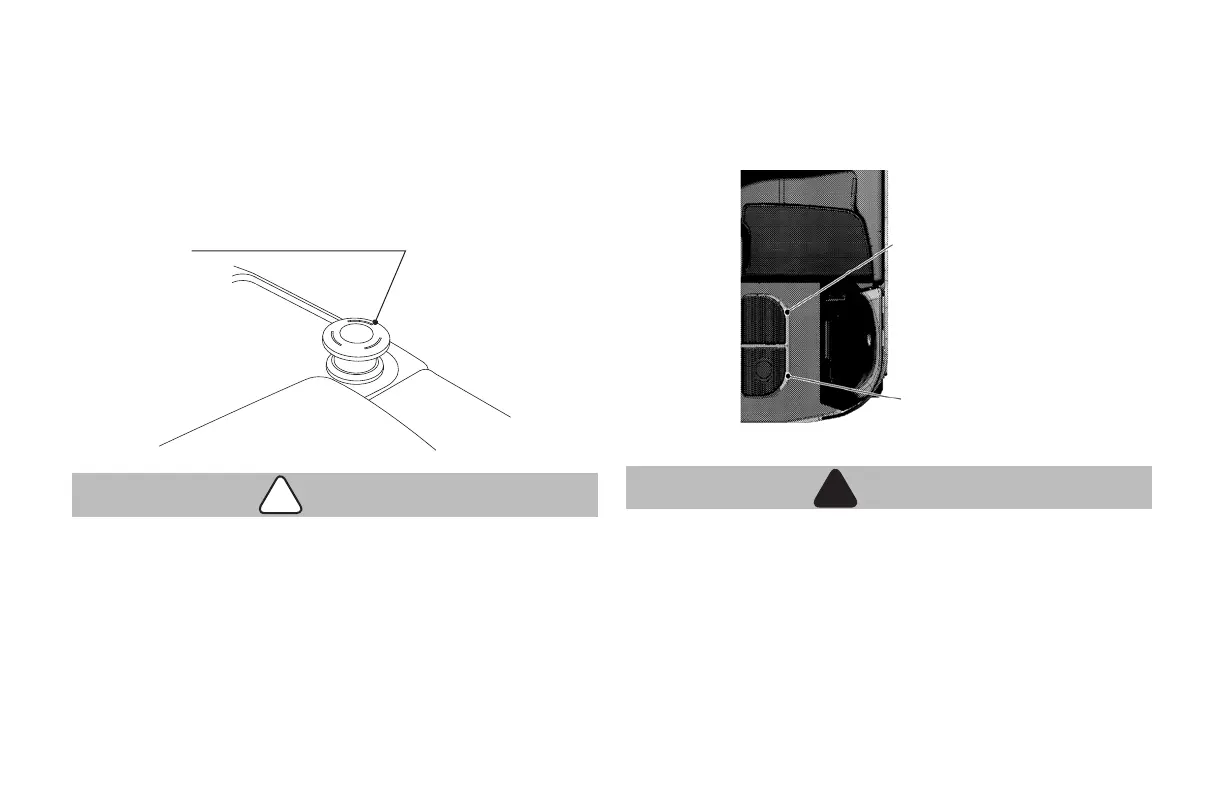
EMERGENCY SWITCH
This forklift is equipped with an emergency switch. When an accident
occurs or there is a potential hazard, press the emergency switch
to shut off the power supply. To resume the power supply, turn the
emergency switch clockwise to reconnect the electric circuit.
CAUTION
!
• When the emergency switch is depressed, the steering wheel
cannot be operated; therefore, do not press the emergency
switch unexpectedly, especially while traveling. Press the
emergency switch only in an emergency.
Emergency switch
BRAKE AND OPERATOR PRESENCE PEDALS
In the Operator's Compartment the cushion oor has 2 pedals. The
pedal on the right (farther in) is the operator presence pedal. The pedal
on the left (at the rear of the compartment) is the brake pedal.
OPERATOR PRESENCE PEDAL
WARNING
!
!
• Step down on this pedal to power up the unit, to travel or
make use of Hydraulic or Steer Systems.
Note:
If you remove your foot from this pedal for more than 0.5 seconds, the
truck will slow down to a stop and then apply the brakes.
Presence pedal
Brake pedal





 To Next Page