41
OPERATING CONTROLS AND FUNCTIONS
METERS, INDICATORS AND LAMPS (cont’d)
mODE SELECTION bUTTONS
Adjusting the Display Brightness
From the basic screen, press
the mode selection
button
(releasing it within 3 seconds) to
display the time/hour-meter display
selection screen.
Press the
button again to
display the display brightness
adjustment screen.
After adjusting the brightness, press
the
button once to return to
the basic screen.
NOTE:
BRIGHT (display brightness) can be
set in 8 stages from 0 (dimmest) to
7 (brightest).
F
E
AM 10:00
F
E
METER
TIME/HR/
PDL/LIFT
Basic screen
Clock and hour meter
display selection screen
F
E
BRIGHT
0
Display brightness adjustment screen
Pressing the button Brightness increases.
The screen returns to the basic screen.
Press the button.
(Release it within
3 seconds.)
Press the button.
Press the button.
Pressing the button Brightness decreases.
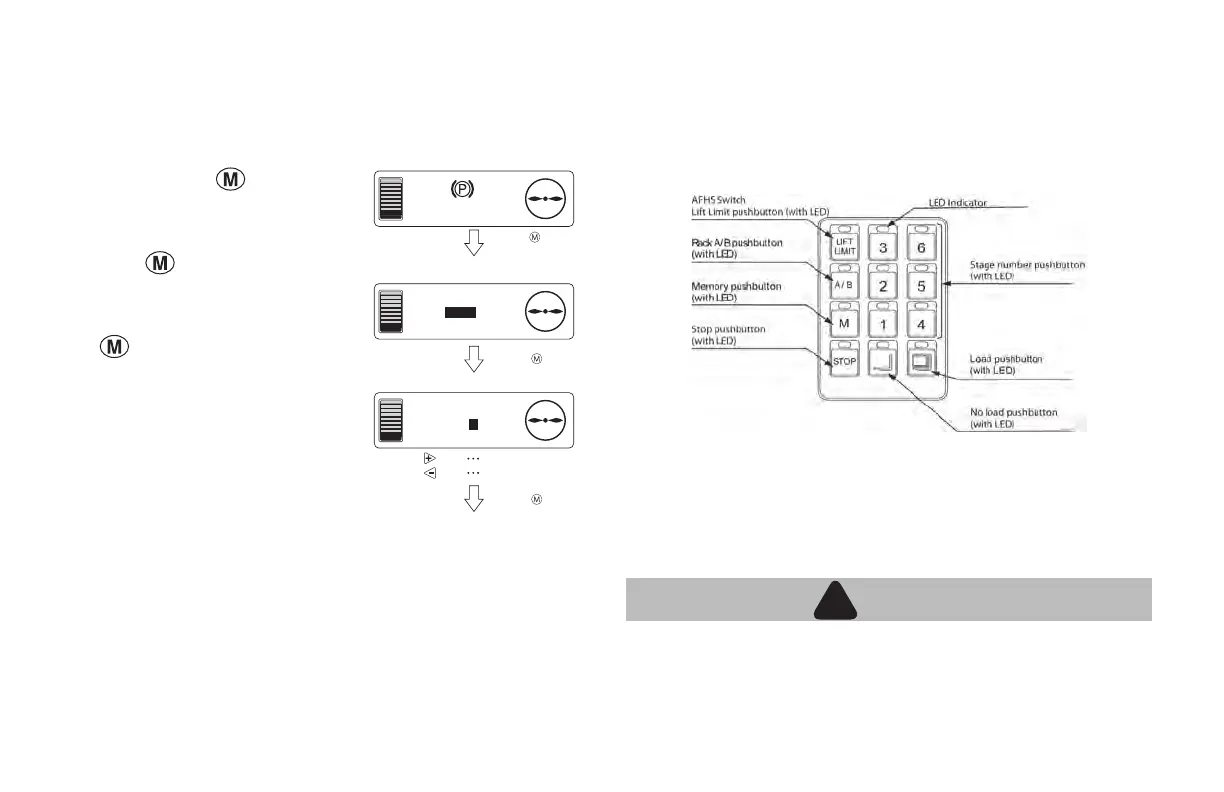
AUTOMATIC FORK HEIGHT SELECT (OPTION): AFHS
Two Maximum Lift Heights can be set up using the A/rack B/rack
buttons. Six (6) preset lift heights for picking/depositing loads may
be programmed using the A/rack button and 6 presets on the B/rack
button, for a total of 12 presets.
Programming AFHS Buttons
NOTE: PB (Push button) 1 thru 6 must be set sequentially, with 1
being the lowest rack level, 2 the next etc. If the racking is changed by
adding a lower rack level the stops will need to reset. Trying to program
a higher PB, i.e. setting PB6 at a lower level than PB 1 will cause the
following warning screen on the meter panel display.
WARNING
!
!
• When using the loaded automatic fork stop feature, make
sure there is adequate clearance between the load and the
rack immediately above where the load is being placed.





 To Next Page