34
METERS, INDICATORS AND LAMPS
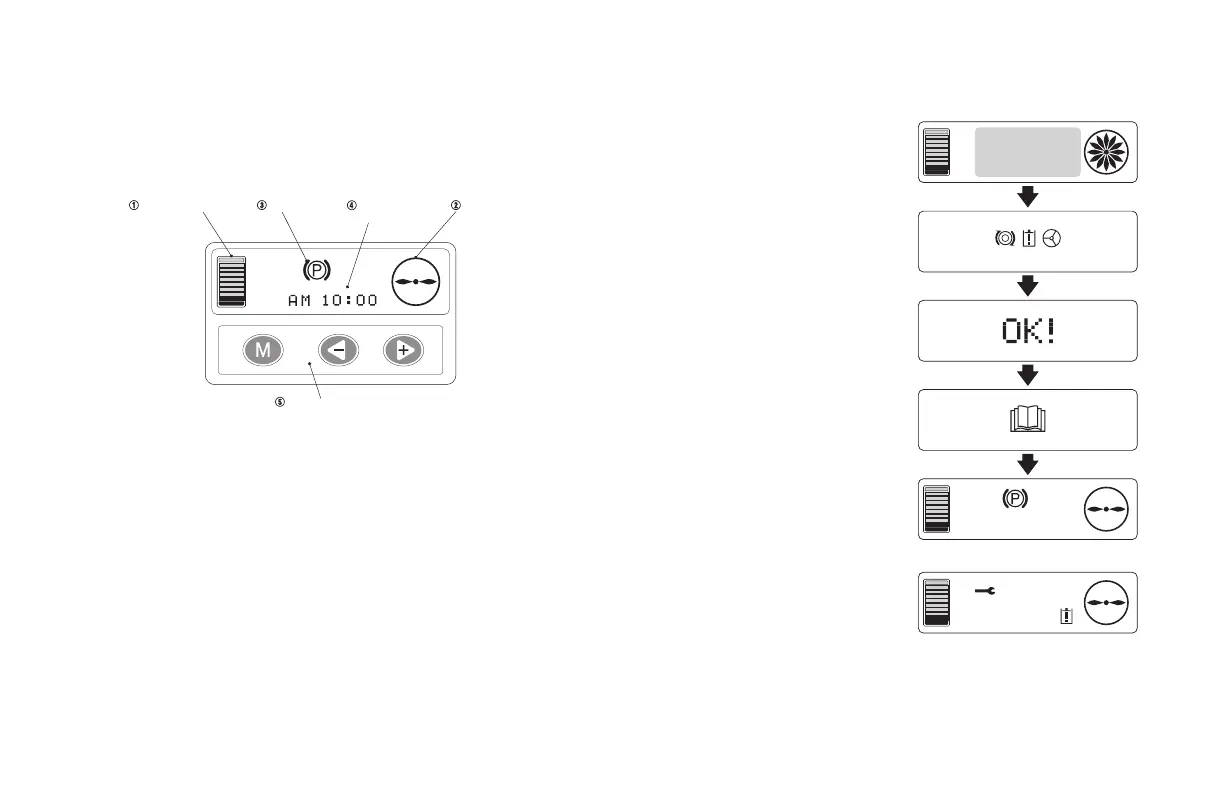
The operator compartment contains the 1H2 main functional controls
to operate the truck in a safe and controlled manner. The meter panel
consists of two sections: LCD (Liquid Crystal Display) monitor and
mode selection buttons.
1. Battery Capacity Indicator
2. Wheel Indicator
3. Status Display
4. Clock and Hour Meter Display
5. Mode Selection Buttons
OPERATING CONTROLS AND FUNCTIONS
bASIC OPERATION
1. Turn the key switch to the
[START] position to illuminate the
display monitor.
• The safety monitor symbols are
displayed.
2. Checks brake, controller &
steering system.
• If the system detects no
malfunctions, [OK!] will be
displayed
• The icon that is referred to as
“read the operator’s manual” will
be displayed.
• The basic screen will be
displayed. After the basic screen
is displayed, the forklift truck is
ready to be used.
NOTE:
If a malfunction is detected, the error
code and safety monitor symbol
appear.
F
E
Battery capacity
indicator
Mode selection buttons
Status display
Clock and hour
meter display
Wheel indicator
)
(
$0
)
(
When ignition switch is ON
(all displays illuminated)
Basic screen
Error screen
)
(
&





 To Next Page