39
OPERATING CONTROLS AND FUNCTIONS
METERS, INDICATORS AND LAMPS (cont’d)
CLOCK AND HOUR mETER DISPLAY (cont’d)
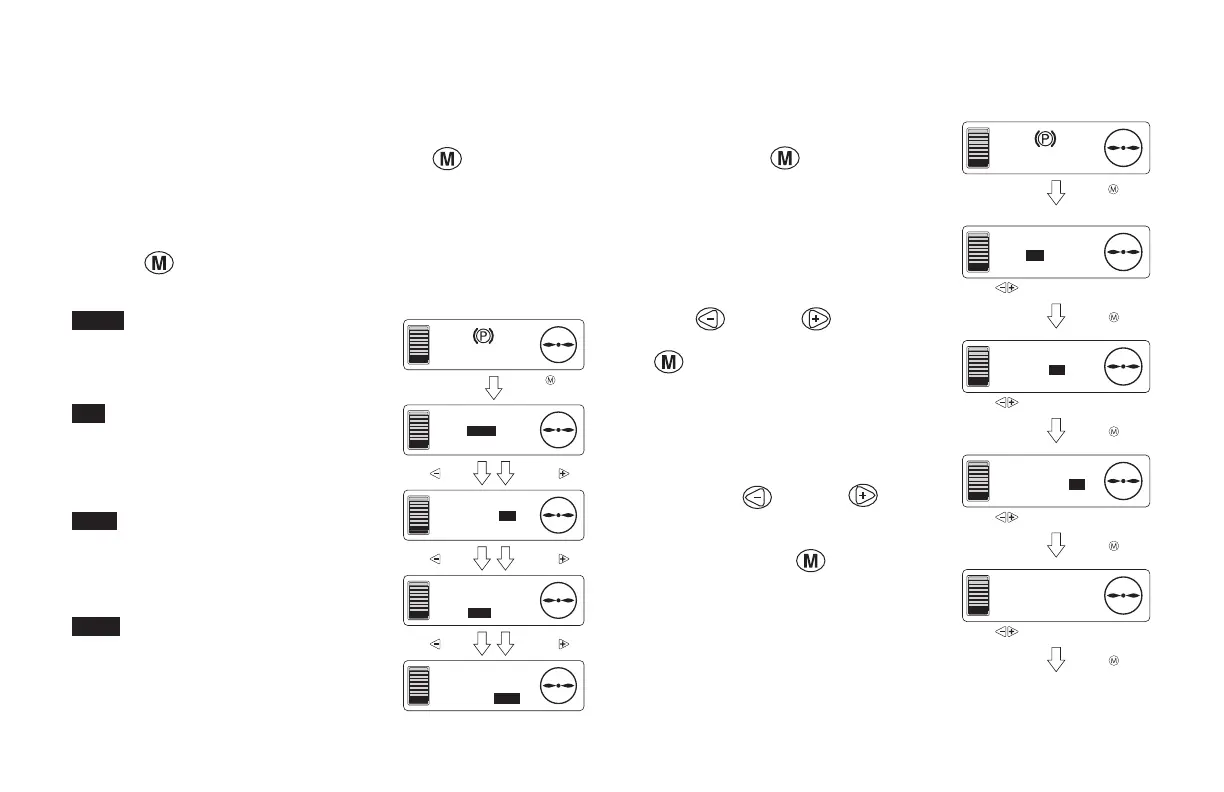
Selecting the Clock and Hour Meter Display
From the basic screen, press the mode selection
button (releasing
it within 3 seconds) to display the time/hour-meter display selection
screen.
Here you can select the item that will be displayed on the basic screen.
After selecting the item to display (the selected item is highlighted),
press the
button 2 times to return to the basic screen. On the basic
screen, the selected item will be displayed.
Indicates that the time display has been
selected.
Indicates that the display of the total
time (ignition ON time) has been
selected.
Indicates that the display of the
presence pedal ON time has been
selected.
Indicates that the digital lift height
display (optional) has been selected.
F
E
AM 10:00
F
E
METER
TIME/HR/
PDL/LIFT
Basic screen
F
E
METER
TIME/HR/
PDL/LIFT
Press the button. Press the b
Press the button. Press the b
Press the button. Press the b
F
E
METER
TIME/HR/
PDL/LIFT
F
E
METER
TIME/HR/
PDL/LIFT
Press the button.
(Release it within
3 seconds.)
CLOCK AND HOUR mETER DISPLAY (cont’d)
Clock Setting Screen
From the basic screen, press and hold
the mode selection
button for 3
seconds or longer to display the time
setting screen.
Settings/Correcting AM/PM
When “AM/PM is selected (the text is
highlighted and ashing), press the mode
selection
button or button to
select AM or PM. After selecting, press
the
button to change to the hour
setting.
Setting/Correcting the Hour
When the hour is selected (the numbers
are highlighted and ashing), press the
mode selection
button or button
to set the hour. the hour can be set from
1-12.
After setting, press the
button to
change to the minutes setting.
F
E
AM 10:00
F
E
TIME
AM 10:00
Basic screen
AM/PM setting
The screen retur
F
E
TIME
COMPLETE
Use the button to select AM/PM.
Use the button to set the hour (1 - 12).
Use the button to set the minutes (0 - 59).
Use the button to set the minutes (0 - 59).
F
E
TIME
AM 10:00
Hour setting
F
E
TIME
AM 10:00
Minutes setting
"COMPLETE" display
Press the button.
(Release it within
3 seconds.)
Press the button.
Press the button.
Press the button.
Press the button.





 To Next Page