ТМ
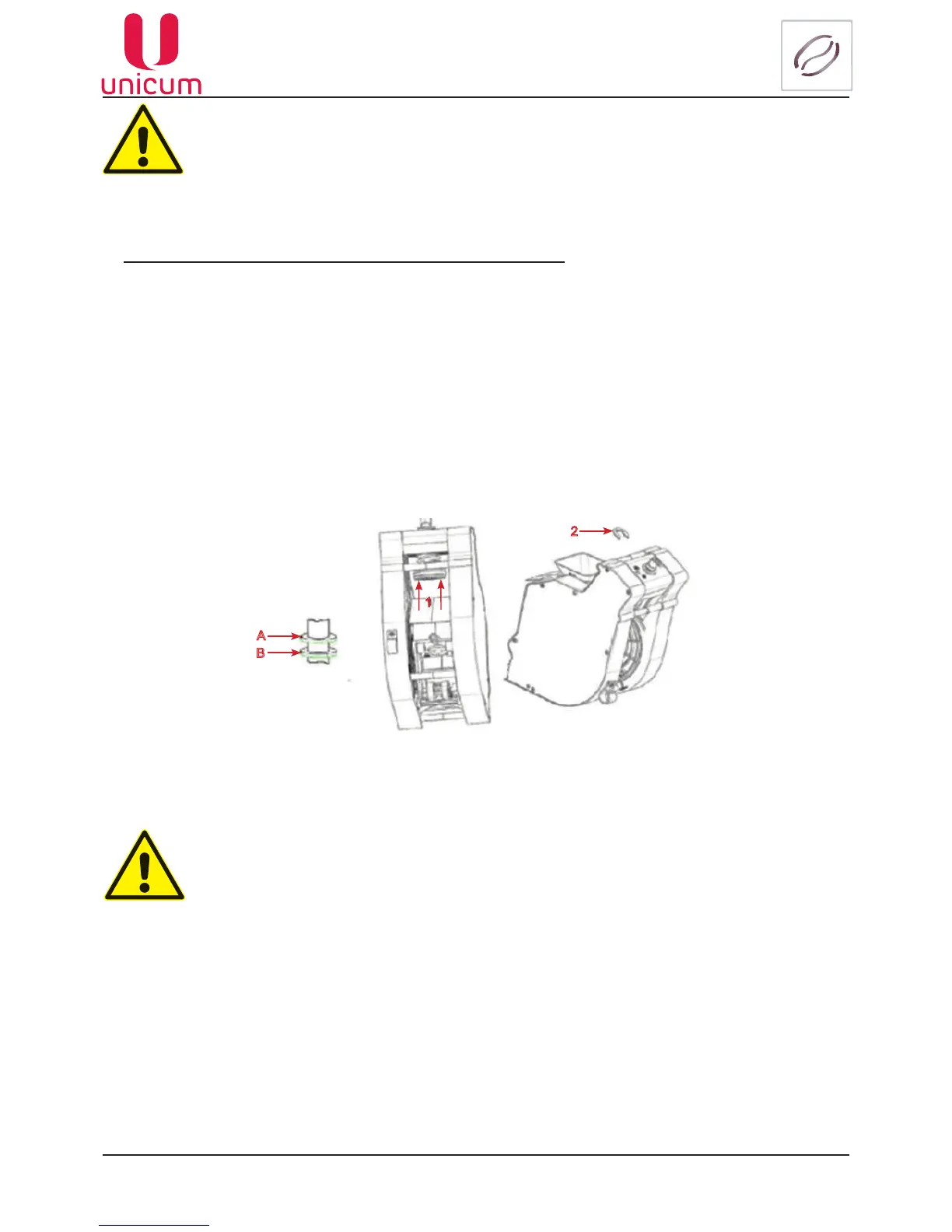
Increasing the capacity of the espresso group’s chamber:
1. Remove the espresso group
2. Make sure that there is only on restricting nut under the spring of the piston’s spring
3.Pushthepiston(forcer)inthedirectionofthearrows1(seeg.5.14)
4. Remove the restricting (stopper) nut 2 from the current position (factory setting A)
5.InstallthestoppernutinpositionBtoincreasethechambercapacity;
6. Release the piston
7. Reinstall the espresso group.
1
2
А
B
Fig.5.14
If the capacity of the chamber will not be increased for the cases described in this man-
ual, the espresso group can malfunction (displaying errors “Opening group”, “Closing
group” and blockage of coffee bean based drinks), as well as mechanical failures.
The espresso group allows you to regulate the space in the chamber for intake of
ground coffee from the dosing mechanism. In case of setting the dosing mechanism
into positions 5 or 6 it is necessary to increase the capacity of the chamber by setting
thestopperringinpositionB(seeg.5.14).



 To Next Page