Page 152 of 244
4.6.4. Center Ball Size Calibration
1. Acquire the PANO Ball Phantom image and open it.
2. Enter 5 in the Z box, and drag the mouse to see the Center Balls
3. Click the starting point of the Right Center Ball and read the X value by pixel.
4. Click the end point of the Right Center Ball and read the X value by pixel.
5. Subtract the starting point value from the end point value to measure the Right Center Ball
size.
6. Check the Right Center Ball size meets the standard(54 ~ 55 pixels).
7. Do steps 3 ~ 6 for the Left Center Ball.
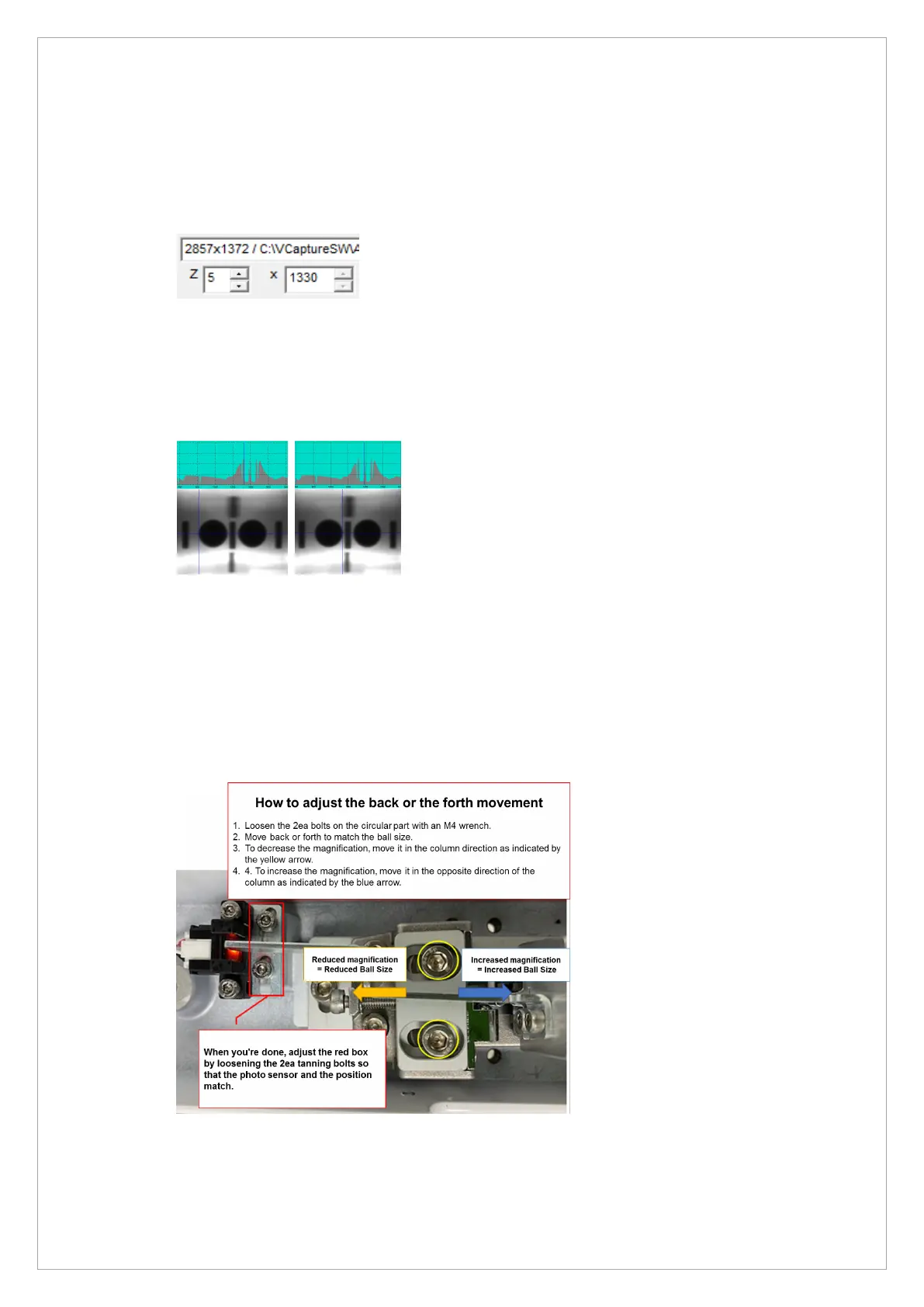
8. If it is out of the standard value, move the position of the PANO Mode Chinrest Fixed Block
and adjust the ball size.
9. When Ball Size is 56 Pixels or more: Move the Chinrest in the direction of Column.
10. If the ball size is less than 53 Pixel: Move the Chinrest in the opposite direction of Column.
When all of the above operations are completed, adjust by loosening 2 headless bolts on the red
square display so that there is no interference between the photo sensor and the blade



 To Next Page