Page 76 of 244
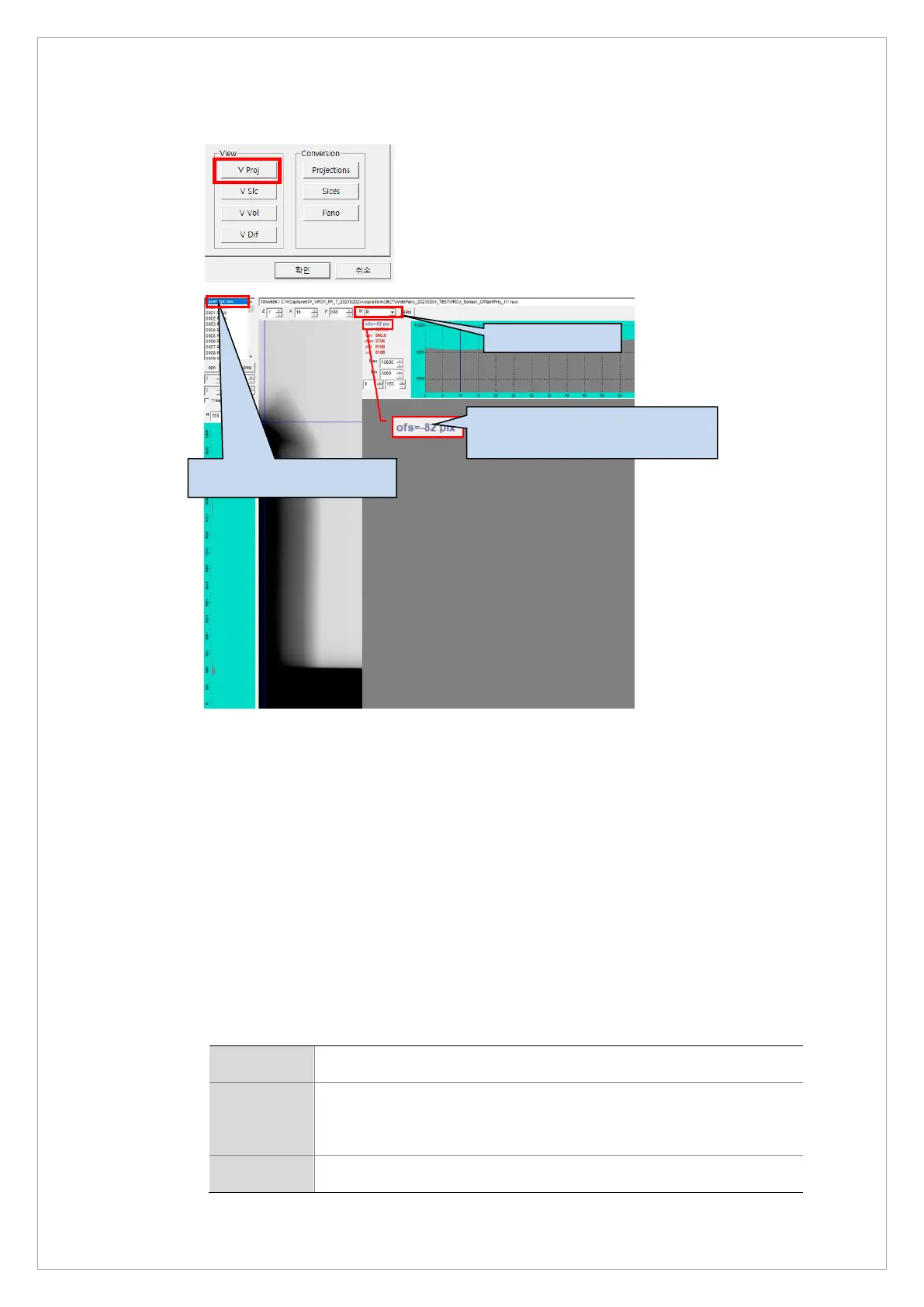
10. Click V Proj and follow the steps below to view the averaged PROJ file
11. If the acquired file does not meet the standard, sends out the following commands to adjust
the sensor:
When the ofs value increases, move the sensor to the ORG direction :
[SPM_CMCT_xxxx] value decreases
When the ofs value decreases, move the sensor in the opposite direction to the ORG :
[SPM_CMCT_xxxx] value increases
To modify ofs value by 1, modify CMCT value by 2.
12. If the acquired file passes the standard, enter the ofs value in the DETOFFSETYY
parameter from the following files: reconstruction.vxm, reconstruction_Bead.vxm and
reconstruction_GEO.vxm.
To enter the ofs value, see the table:
Path C:\VCaptureSW\VCaptureSW\Acquisition\CBCT\WidePANO\REC
File 1) reconstruction.vxm,
2) reconstruction_Bead.vxm
3) reconstruction_GEO.vxm
Parameter DETOFFSETYY = -xxx setting in (1) & (2) & (3) file
1.Click the average image.
3.Check the Offset
(Standard range: - 82±1 pixel)



 To Next Page