26
Step Terminal Display Action
4
Insert/Swipe
card
Tap card
Total Amount
AUD
6.50
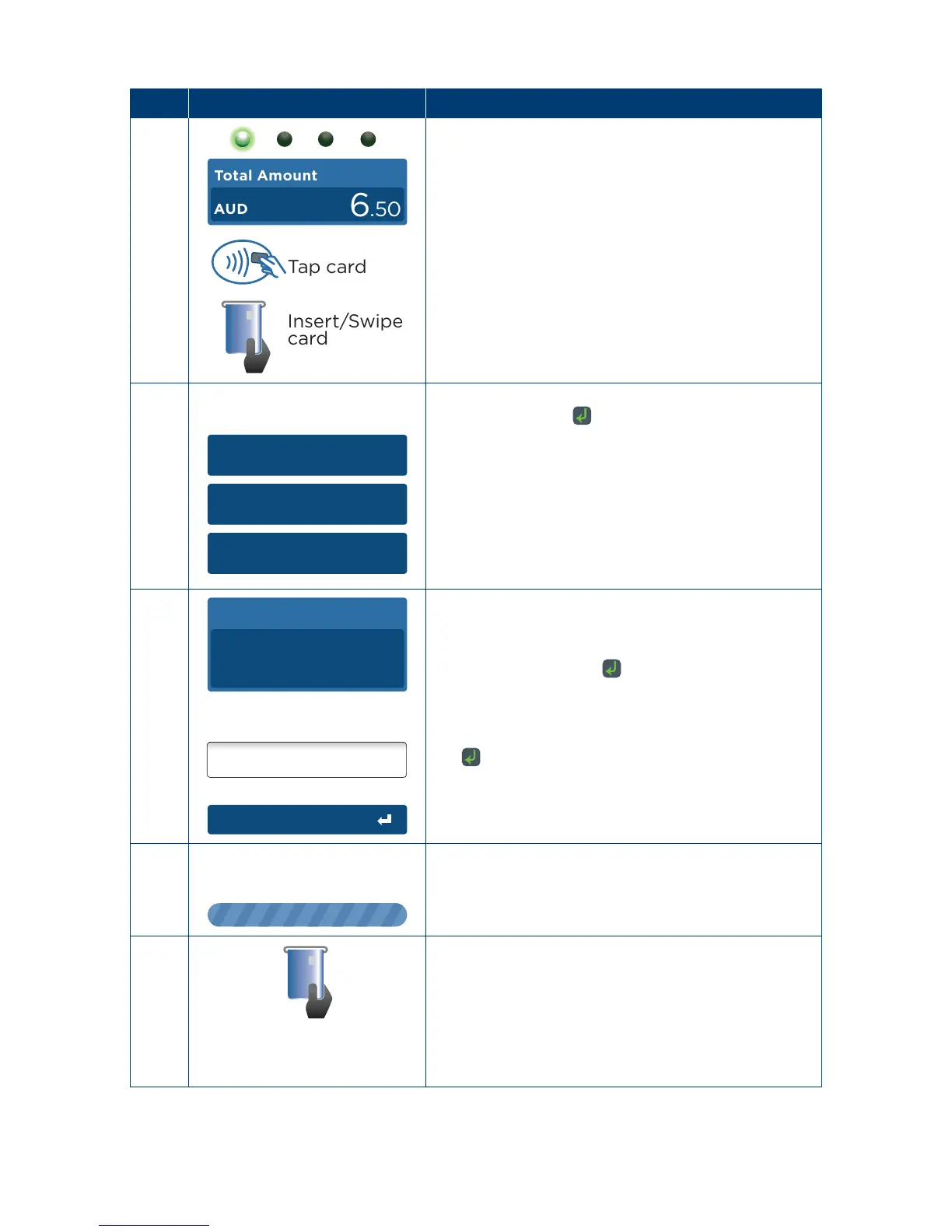
Insert, swipe or tap the customer’s card
(see Sections 3�3, 3�4 and 3�5)�
5
1. Cheque
2. Savings
3. Credit
Select the required account and press the touch
screen or press the key�
6
Signature
PIN or Enter
Total Amount
AUD
6.50
The cardholder can now enter their Personal
Identication Number (PIN).
Once entry is complete the cardholder can press
the touch screen or the
key�
Note: If the customer does not wish to enter a PIN
it can be bypassed for certain card types by leaving
the PIN blank and pressing the touch screen or
the
key�
7
The terminal will connect to the bank and begin
processing the purchase�
8
If a chip card was inserted and is yet to be removed,
this prompt will appear�
Remove the card at this prompt�
The terminal will beep as a reminder if the card is
not removed�



 To Next Page