VTK‐VS‐BA‐004e‐B|UserManualMDS3200A | Product Description
19
4.3 MenuStructure
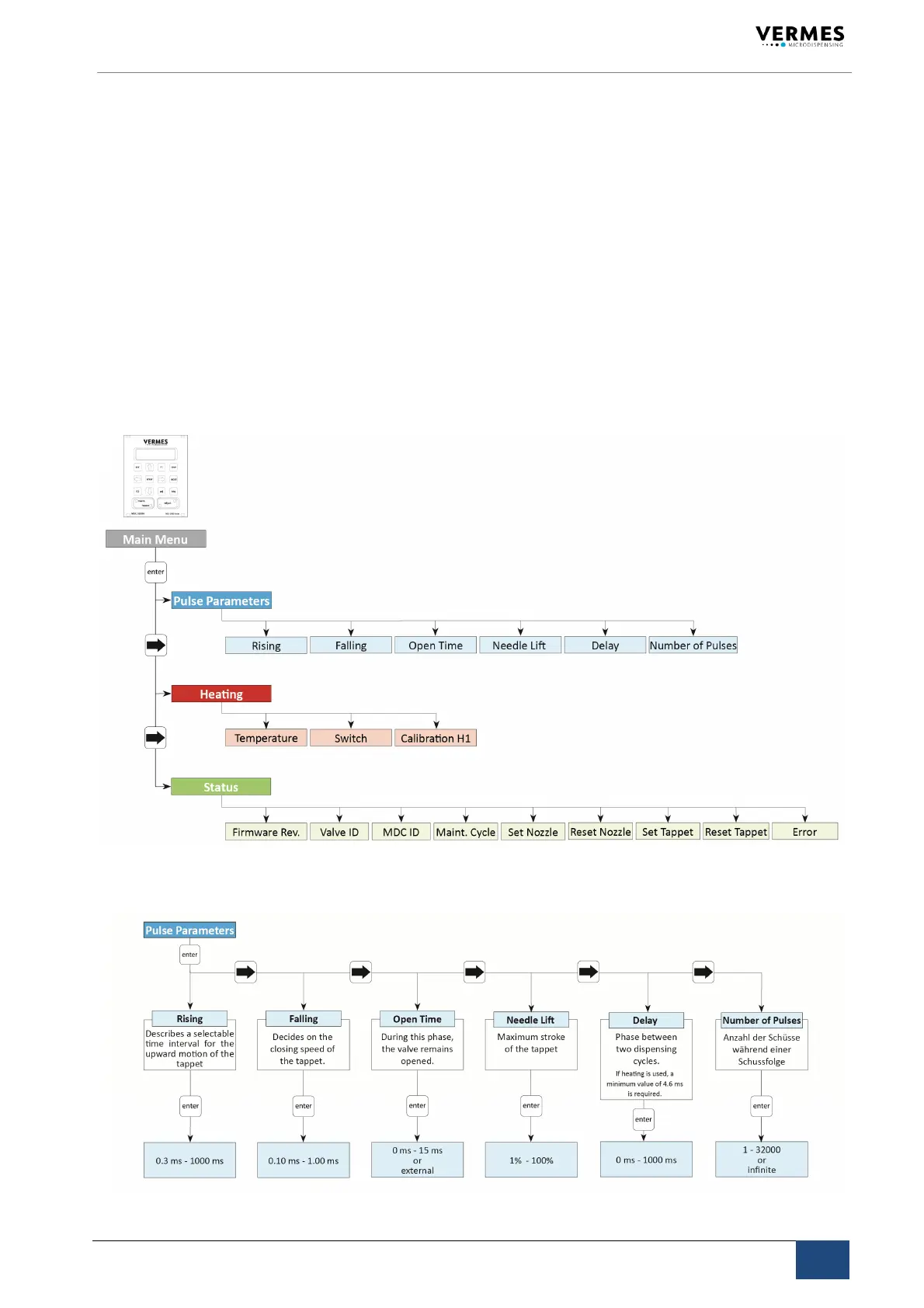
Threemenuscanbeaccessedfromthemainmenu:
“PulseParameter“,“Heating“and“Status“.
Youcanrecallandmodifydispensingparametersforaparticularprocessinthesubmenu
“PulseParameter“.
“Heating“–selectthesettingsfortheheating.
RelevantdataforourTechnicalSupportarecontainedin
submenu“Status“.Thisfunctioncan
alsobeusedbytheclienttodecideonindividualcyclesforthereplacementoftappetandnoz‐
zleinsert(seepage59).Thecurrentstateofthesystemwithrespecttothemaintenanceinter‐
valcanbeverifiedbyfunction“Maint.Cycle“(seepage59)
,messagesconcerningthecorrect
behaviorofthesystembyfunction“Error“.Troubleshootingisdetailedinchapter10.
4.3.1 MainMenu
4.3.2 Submenu“PulseParameter“



 To Next Page