Home
Vertical
IP Phone
SBX IP 320
Page 200
Vertical SBX IP 320 - Page 200
248 pages
Manual
Save Page as PDF
To Next Page
To Next Page
To Previous Page
To Previous Page
Loading...
Software Upgrade
190
SBX IP 320 Features & Operation Guide
5.
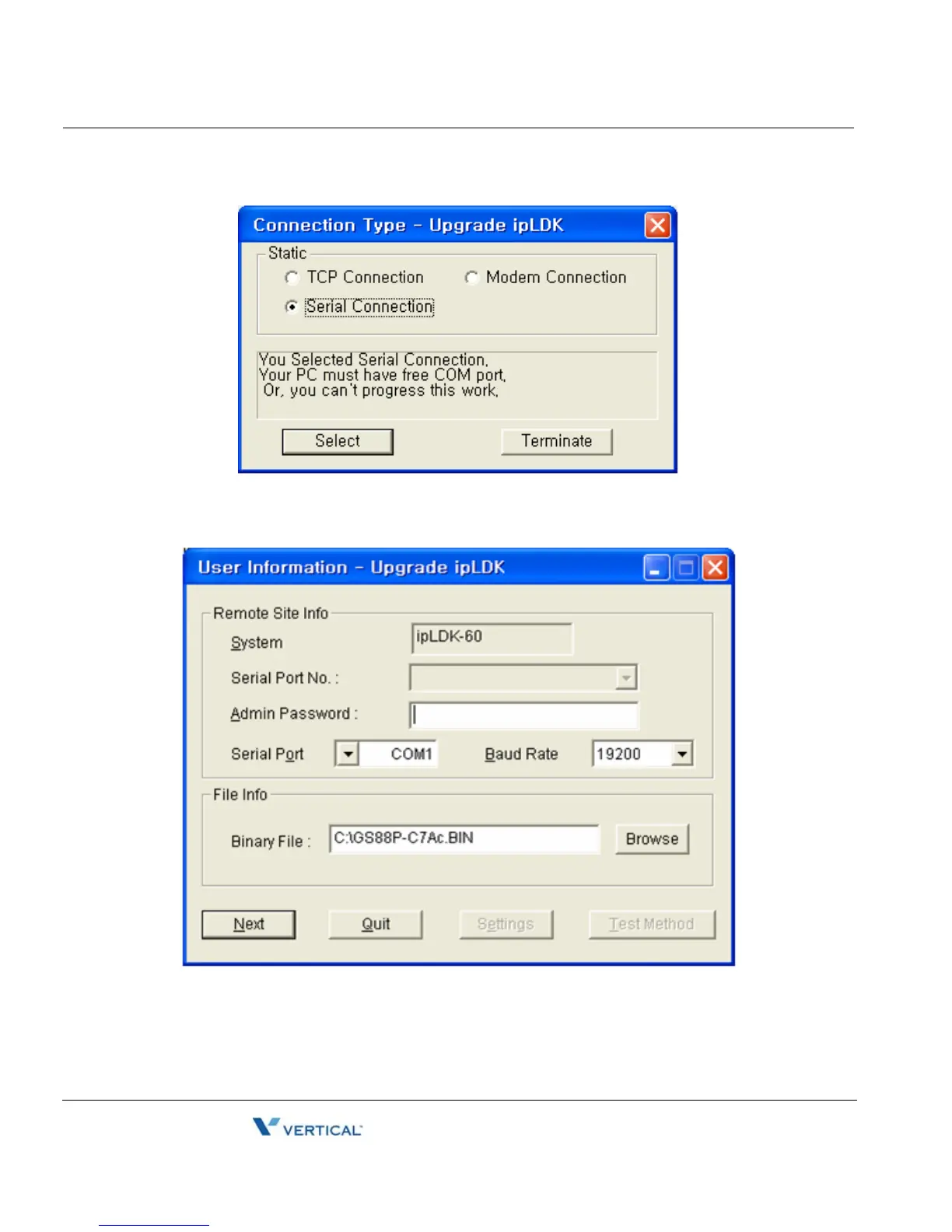
Select the port type Serial Connection.
6.
Click on the Select button.
7.
Enter the Serial Port Number
, Admin Pass
word, and select the serial port Baud Rate.
8.
Click on the Next button.
199
201
Table of Contents
Main Page
Table of Contents
5
System Features
11
Attendant Service
12
Assign Attendant
12
Attendant Call & Queuing
13
Attendant Forward
14
Attendant Intrusion
15
Attendant Override
16
Attendant Recall
17
Change LCD Date/Time Display
17
Day/Night Service
18
Disable Outgoing Access
20
DSS/BLF Consoles
20
ICM Box Music Selection
22
Station Feature Cancel
22
Call Control
23
Account Code
23
Authorization Code
24
Automatic Call Release
26
Class of Service (COS)
27
System Speed Zone
30
Walking Class of Service (Walking COS)
30
Call Handling
31
Absent Text Message
31
Alarm
34
Analog CLI Display
35
Automatic Fax Transfer
36
Automatic Privacy
37
Barge in
38
Background Music (BGM)
39
Call Log
40
Camp-On
42
Change Ring Type
43
Chime Bell
44
Data Line Security
45
Dialing Security
45
Do Not Disturb (DND)
46
Emergency Intrusion
48
Extend CO-To-CO Connection
49
Flash
50
Flexible Buttons
51
Forced Hands-Free Mode
56
Forced Trunk Disconnect
57
Headset
58
Hot Desk
59
In-Room Indication
61
Intercom Signal Mode
62
Intercom Tenancy Group
63
Message Wait / Call Back
64
Message Wait Indication (MWI) - SLT Feature
66
Mobile Extension
66
Music on Hold (MOH)
69
Mute
70
On-Hook Dialing
71
Station Call Coverage
72
Station Name
74
Station Port Blocking
76
Station Programming
77
Station Relocation
79
Station Serial Call
79
Time & Date Setup (Digital Network)
80
Voice over
80
Wakeup
82
Conference
84
Conference - SLT (Brokers Call)
85
Conference Room
86
Paging Conference
88
External Device Control
89
Door Open
89
Doorbox
90
Loud Bell
91
Hunt Groups
92
Common Hunt Group Features
92
Automatic Call Distribution Groups (ACD Groups)
94
Circular Group
102
Ring Group
102
Terminal Group
103
UCD Group (Unified Call Distribution)
103
Voice Mail Group
104
Incoming Call Pickup
104
CO Line Name
104
Customer Call Routing (CCR) with VMIB
105
Direct Inward Dialing (DID)
107
Direct Inward System Access (DISA)
108
Preferred Line Answer (PLA)
111
Ring Assignment
112
Universal Night Answer (UNA)
114
Internet Protocol (H.450)
115
Absent Text Message
116
Attendant Call Service (CAS)
116
Busy Lamp Field (BLF)
117
Call Completion
118
Call Offer
119
Centralized SMDR for Transit Call
120
Centralized VMS
121
CO Transit - in
122
CO Transit - out
123
Do-Not-Disturb (DND)
124
Identification Service
125
Message Waiting Indication (MWI)
125
Net Call
127
Net Call Forward
128
Net Conference
131
Net Follow-Me Forward
132
Net Transfer
133
VOIP Networking
134
ISDN Service
137
Calling Line Identification Presentation (CLI)
138
Linked Stations
144
Executive/Secretary Pairs
144
Linked-Pair Station
145
Outgoing Call Access
146
Basic Access
146
Call Time Restriction
149
CO Line Queuing
150
CO Step Call - Analog Only
151
Emergency Call Service
151
Hot Line & Warm Line
152
Least Cost Routing (LCR)
153
Memory Dialing
157
Private Line
166
Paging
166
Internal, External, All-Call, and Meet-Me Page
166
Pre-Recorded Message
169
SOS Paging
170
Push-To-Talk (PTT)
171
Rerouting
172
Call Forward
172
Call Transfer
184
Holding and Parking
188
Pick-Up
192
Software Upgrade
194
Lan
195
Modem
197
Serial (COM Port)
199
Station Message Detail Recording (SMDR)
202
Print-Out
205
Supplementary Service
207
Collect Call Blocking for E1-R2 and LCO in Brazil
207
Message Wait Notification to Mobile Extension
208
PSTN Short Message Service (SMS)
209
Traffic Analysis
213
Attendant Reports
215
Call Reports
217
CO Reports
218
Hardware Unit Reports
220
Voice Service
222
DID Call to each Station's Voice Mailbox (Future Feature)
222
Direct Transfer to VMIB
222
No Answer Call to VMIB
223
Recording System VMIB Announcement
224
Recording User VMIB Announcement
227
Remote Control
231
Two-Way Recording
233
VMIB Announcement for Auto Attendant
235
VMIB Message Transfer
236
VMIB Message with CLI
236
Voip Service
237
Call by IP Address
237
Call by Routing Table
238
Early H.245
239
Normal/Fast Mode for H.323
240
Other manuals for Vertical SBX IP 320
User Guide
124 pages
Installation Guide
148 pages
User Training Guide
74 pages
Quick Reference Guide
2 pages
Quick Start Guide
2 pages
Related product manuals
Vertical SUMMIT IP Phone
70 pages
Vertical MBX IP
70 pages
Vertical Edge 120
70 pages
Vertical Wave Phone
180 pages
Vertical LDP-9030D
2 pages
Vertical Edge 5000
168 pages





 To Next Page