Terminal servers
Any autosensing port can be used to connect a terminal server to the appliance. Terminal server serial ports can be
accessed from SSH with or without authentication and Telnet with authentication.
Once a terminal server is discovered, it must be assigned a default name in the form of <appliance mac address>_<terminal
server IPaddress>. For example, a terminal server with an IPaddress of 10.207.16.99 discovered on an appliance with a mac
address 00:e0:86:0b:dd:38 would be assigned a name of 0b-dd-38_10.207.16.99.
When virtual serial targets on the terminal server are discovered, they must be assigned a default name in the form of
<appliance mac address>_<terminal server IPaddress>_p_<port number>. For example, a virtual serial target discovered on
port 2004 of the terminal server in the previous example would be assigned a name of 0b-dd-38_10.207.16.99_p_4.
To add a terminal server:
1. From the sidebar of the Administration tab, click Targets-Serial Management-Terminal Servers.
2. Click Add.
3. Enter the Name, IPAddress, Range and login credentials for the terminal server.
4. Click Add.
To delete a terminal server:
Check the box next to the terminal server you want to delete and click Delete.
5.7.6 PDUmanagement
Connected power devices can be used for remote power management. The appliance enables users who are authorized for
power management to turn power on, turn power off and reset devices that are plugged into a connected PDU.
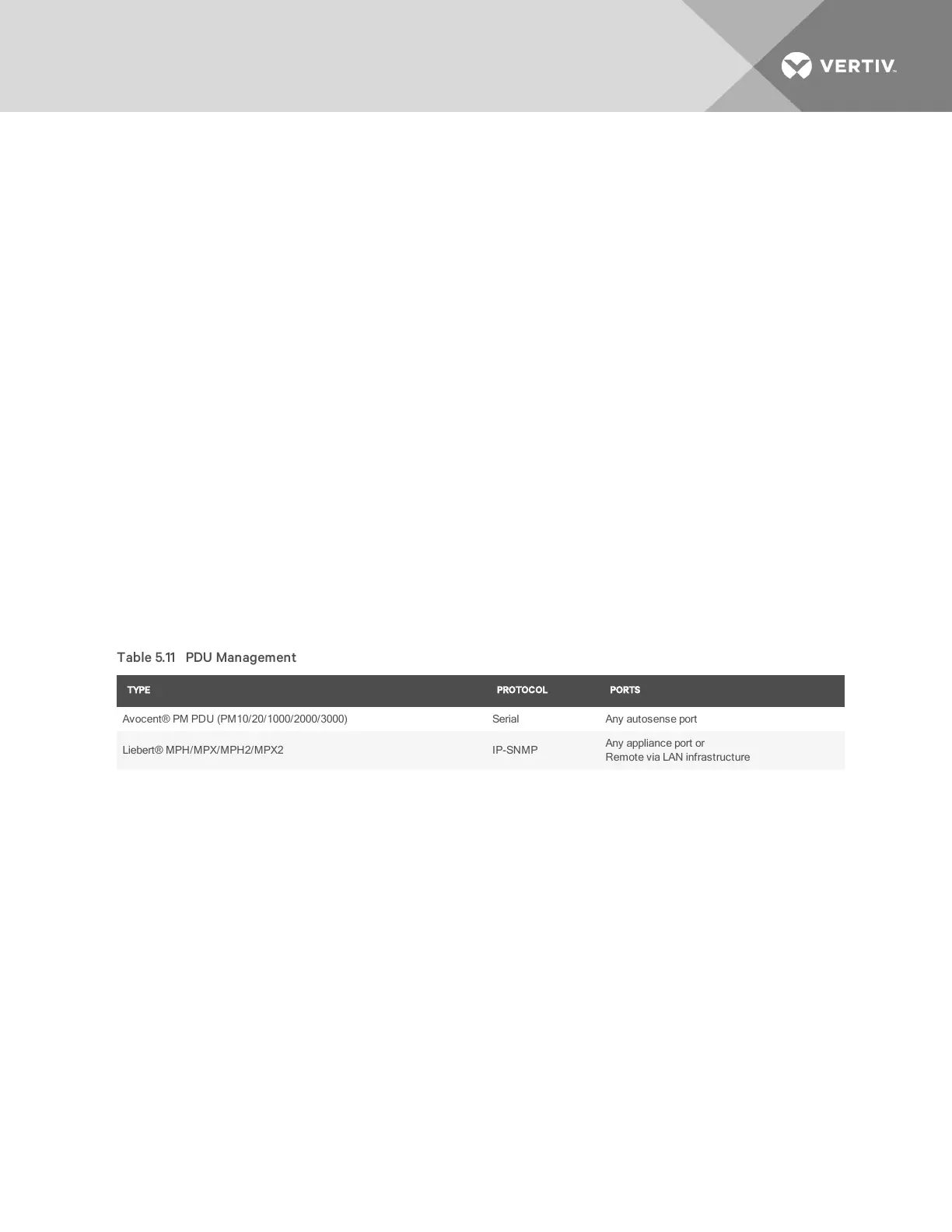
The following table displays the types of PDUs supported, the communication protocols used and the ports that can be
connected.
TYPE PROTOCOL PORTS
Avocent® PMPDU (PM10/20/1000/2000/3000) Serial Any autosense port
Liebert® MPH/MPX/MPH2/MPX2 IP-SNMP
Any appliance port or
Remote via LANinfrastructure
Table 5.11 PDU Management
Serial PDUs connected to an autosense port will be automatically discovered. Serial PDUs connected to a port with
autosense disabled must be manually given a port class of Serial PDU.
Network (IP)PDUs connected to appliance ports will be automatically discovered if the DHCP and SNMPsettings are in a
default state. Network PDUs can also be discovered from a remote LAN infrastructure using the SP management discovery
range feature.
Network PDU
Network PDUs can be added or discovered when physically connected to appliance ports or logically accessible via IP from
the rest of the LANnetwork.
To add a network PDU:
1. From the sidebar, click Targets-PDU Management then click the Network PDU tab.
2. Enter the IPaddress, community name string and use the drop-down menu to select either RO(Read Only)or
RW(Read/Write)as the ComType.
3. Click Apply.
NOTE: Acom type of RWis required to turn outlets on or off and to modify rack PDU settings. You may need to change
the SNMPcom type within the rack PDU's native interface and within the appliance before control actions will be
supported.
Vertiv | Avocent® Universal Management Gateway Appliance Installer/User Guide | 51



 To Next Page