For example, a host which has an IPaddress of 192.168.0.2 and a subnet mask of 255.255.255.0 would belong to the
192.168.0.0 network. Representing a subnet mask in prefix notation is an efficient way of designating which part of the
network address is the subnet IDand which part represents all possible hosts within the subnet. The best way to designate
an IPrange of 192.168.0.1-254 within a network definition on the appliance would be using the CIDRformatted address of
192.168.0.0/24.
This process effectively assigns a name to a range of IPs or an entire network. The NATand firewall rules rely on definition
names exclusively.
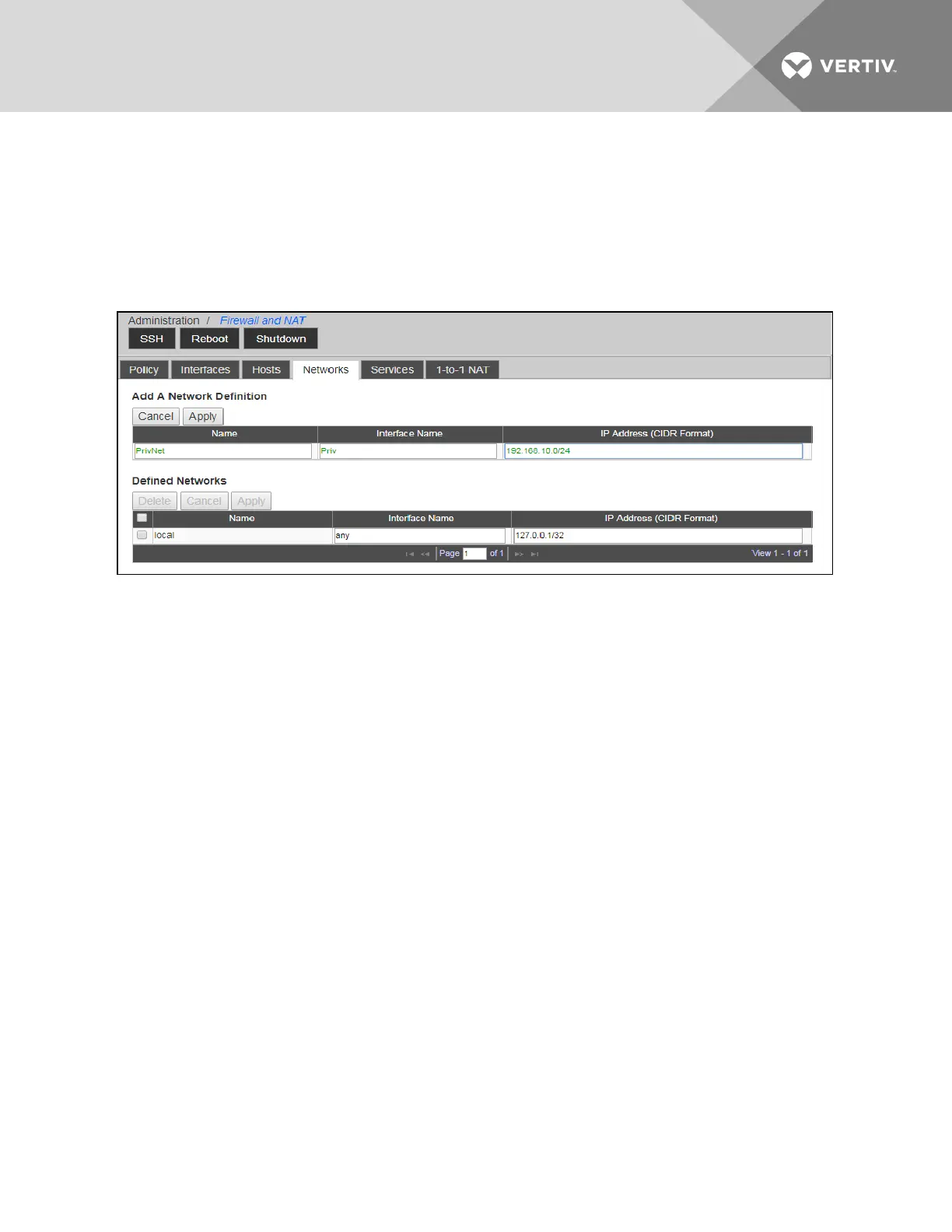
Figure 6.4 Networks Tab
To add a network definition:
1. From the sidebar, click Firewall and NAT, then click the Networks tab.
2. In the Name field, enter a name for the network definition.
3. In the Interface Name field, enter the name of the interface with an IPfrom, or that has access to, the network
being defined. The name must match one of the virtual or physical interfaces listed on the Interfaces tab.
NOTE: The network and interface names each must be unique names between 3 and 40 alphanumeric characters.
4. In the IPAddress field, enter a valid subnet IDfor the network in CIDRformat.
5. Click Apply.
To modify or delete a defined network:
1. From the sidebar, click Firewall and NAT, then click the Networks tab.
2. Under the Defined Networks heading, check the box next to the network you wish to modify or delete.
3. Make your changes and click Apply.
-or-
Click Delete to delete the defined network.
6.5.3 Hosts
Host definitions can be used in NATand firewall rules for situations when an individual IP/host needs to be referenced
separately than other hosts that would be affiliated with a network definition, or when multiple hosts need to be referenced
uniquely with their own NATor firewall rules.
This process is effectively assigning a name to an IPaddress, and then using that name within the NATand firewall rules.
By default, the lists of hosts will be populated by SPs or UMIQ modules that have been connected to or discovered by the
appliance. You can create new host entries to represent any IPregardless of the device.
NOTE: Creation of hosts is useful for individual IPdifferentiation but not required for all types of NATand firewall
rules.
Vertiv | Avocent® Universal Management Gateway Appliance Installer/User Guide | 75



 To Next Page