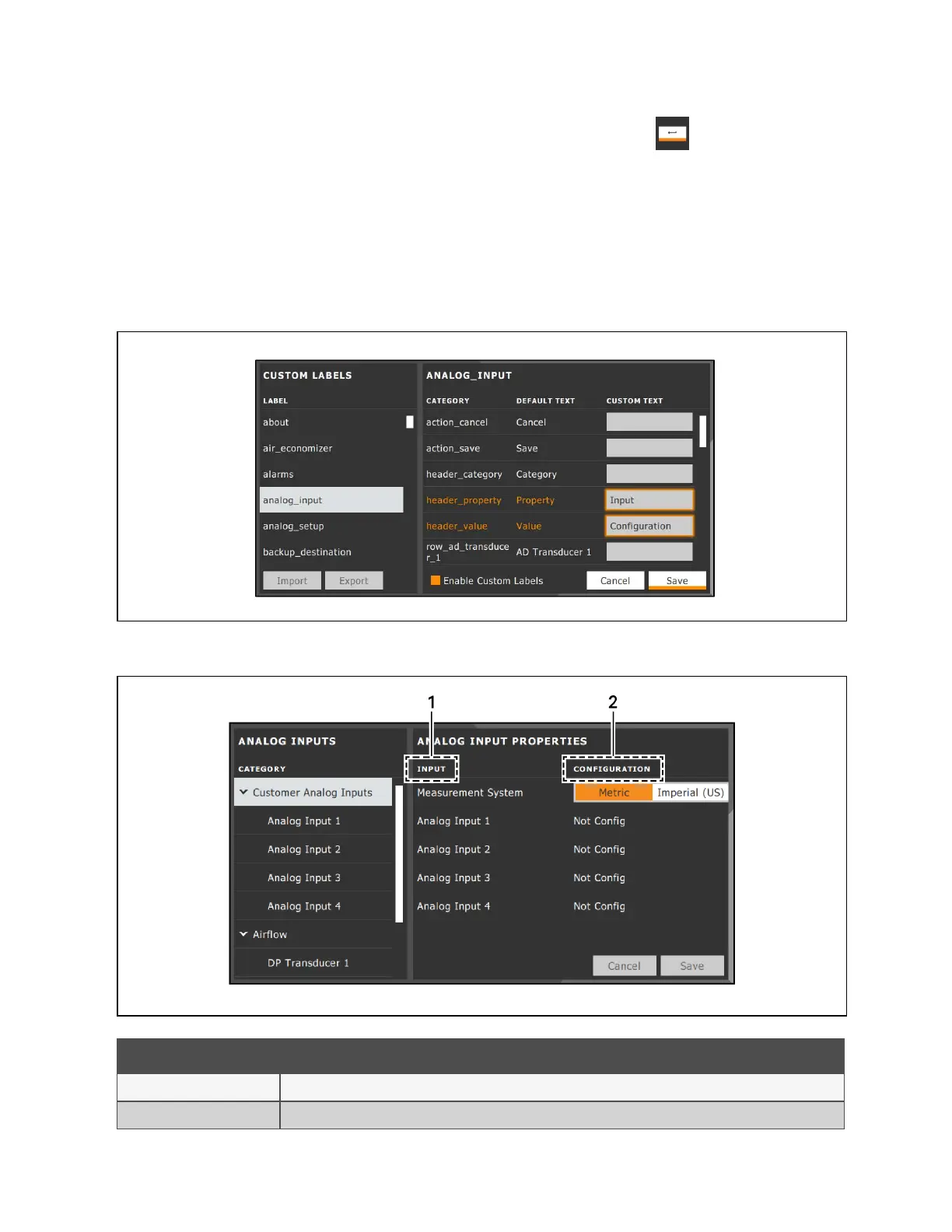
4. In the Custom Text column, touch the text box to edit, make changes and touch . See Figure 12.2 below ,
for an example of changing the column names for Property and Value (in the Analog Inputs panel) to Input and
Configuration.
• Touch Cancel to discard the change.
5. When finished editing labels, make sure the Enable Custom Labels is selected (or your updates will not display),
and touch Save. The label(s) are updated. Figure 12.3 below , shows the Analog Input Properties panel with the
custom labels that replaced Property and Value.
Figure 12.2 Custom Text for the Analog Input Properties Labels
Figure 12.3 Customized Label Text on Analog Input Properties Panel
Item Description
1 Former Parameter heading is now Input.
2 Former Valueheading is now Configuration.
12 Customizing the Vertiv™ Liebert® iCOM™ Display
179
Vertiv™ Liebert® iCOM™Installer/User Guide










 To Next Page