Operation
Driving with dynamic compaction system
94
BA RD24_RD27 en 04
3.19.01 Switching the compaction system on and off
The dynamic compaction system is deactivated every time the engine is started.
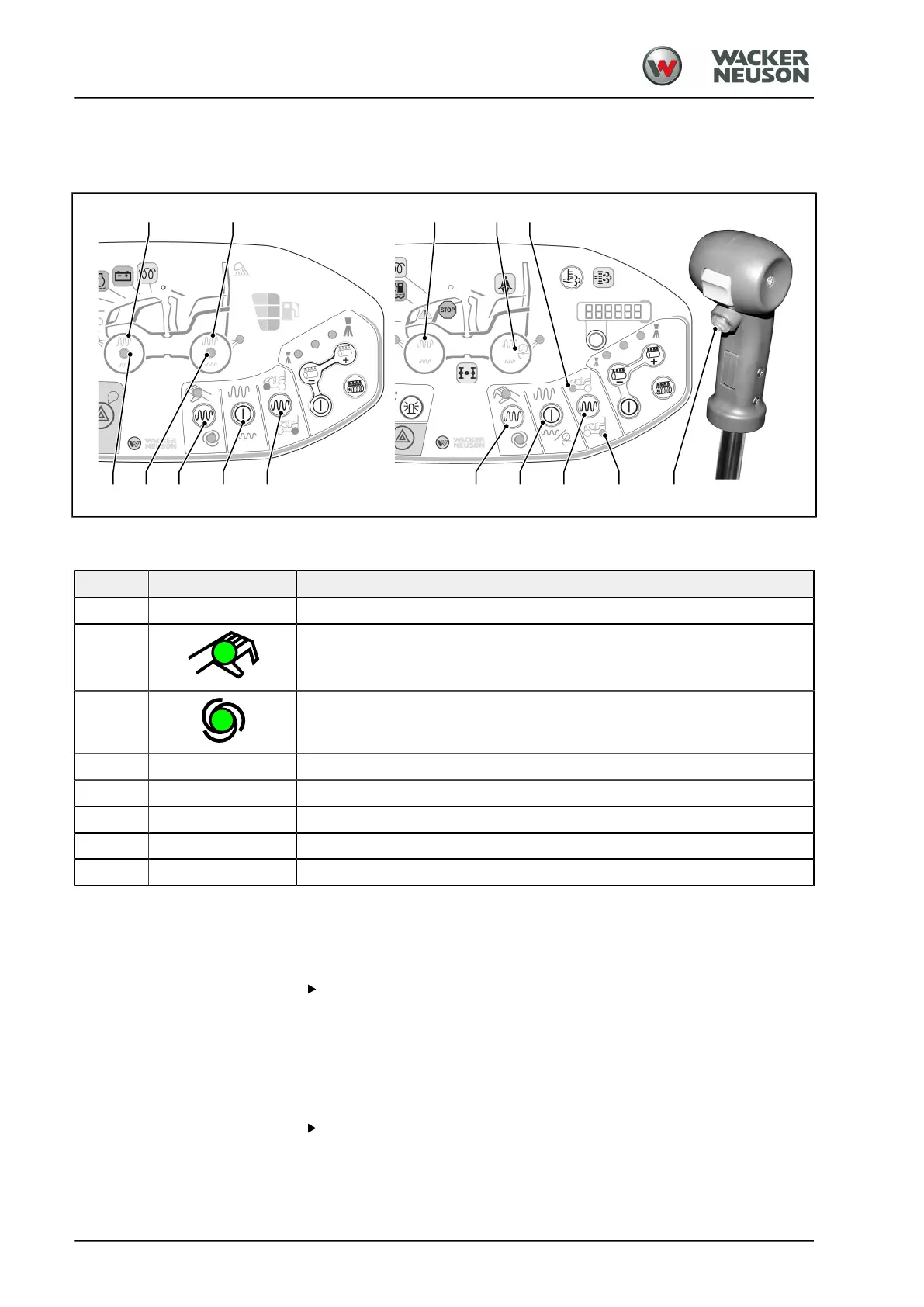
[I] Standard version [II] Version with auxiliary equipment
No. Switch/symbol Meaning
[1] Operating mode switch
Manual
Automatic
[2] Preselect the drum
[3] Indicator LED for the preselected drum
[4] Activate the drum
[5] Vibration/oscillation symbols
[6] Dynamic compaction system ON/OFF switch
Preparing for working with dynamic compaction system
Requirement: Electrical system ON
Selecting manual operating mode
Press switch [1].
a
LED Manual lights up green.
a
Use the switch [6] at the drive lever to set the dynamic compaction
system to ON or OFF.
Selecting automatic operating mode
Press switch [1].
a
LED Automatic lights up green.
a
The dynamic compaction system is switched on/off automatically
depending on the vehicle speed. The dynamic compaction system is



 To Next Page