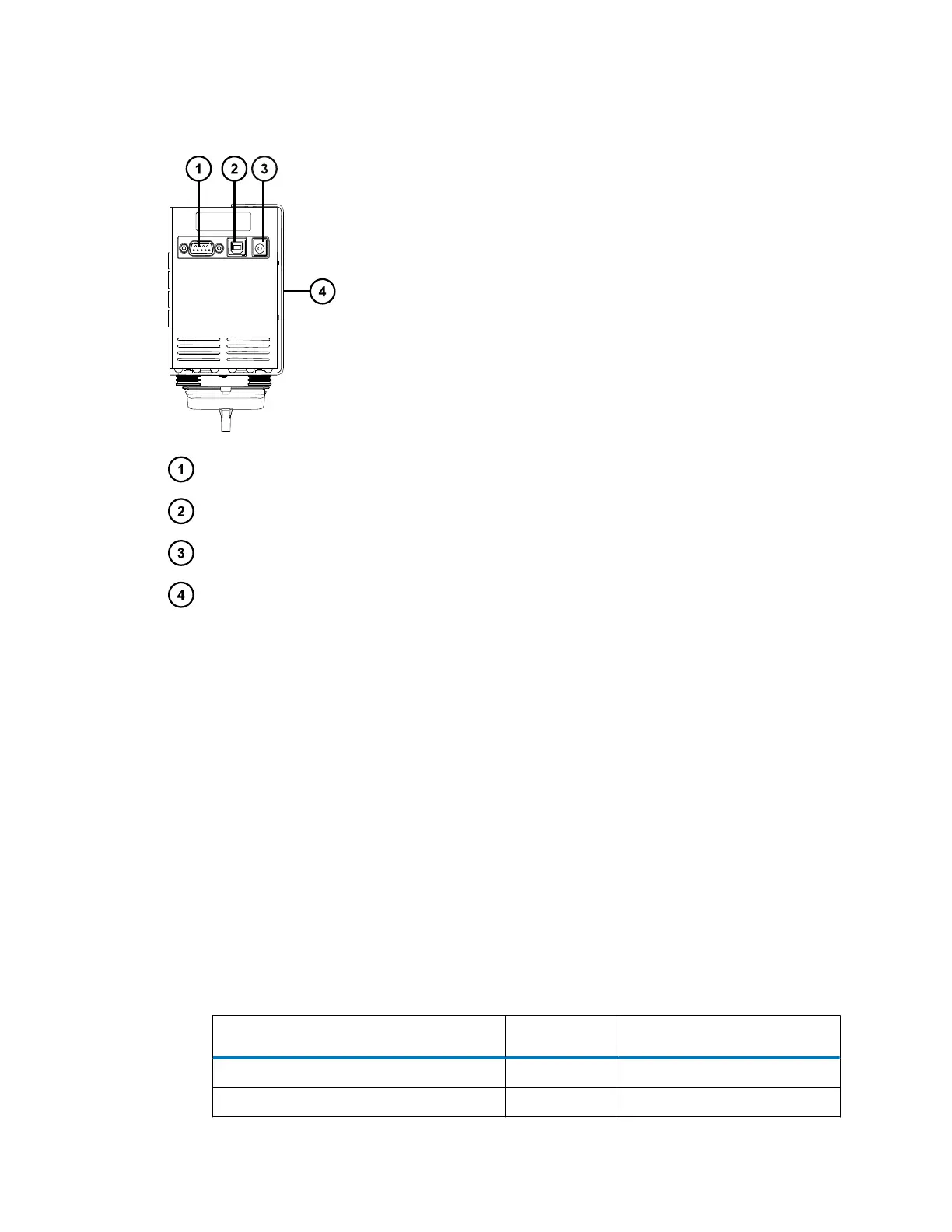
Figure E–6: Rear panel connections
9-pin D-Type socket for the contact closure cable
USB socket (not used)
Power cable socket
Diverter valve mount
For details of supported system configurations, contact Waters Technical Service.
E.2.2.1
Connecting the diverter valve to the QDa
Required materials
• Contact closure cable
• Flat-blade screwdriver
To connect the diverter valve to the QDa:
1. Attach the contact closure cable to the 9-pin D-type socket at the rear of the valve.
2. At the other end of the cable, connect the signal connectors to the corresponding ports on
the signal connection box at the rear of the QDa.
Note: Some of these connectors share their port slot with other instruments and devices
in the system that connect to the QDa.
Signal connector Color Port number
Stop Flow + Red 1
Stop Flow - Black 2
June 15, 2017, 715003956 Rev. F
Page 121











 To Next Page