67
Select Disk : Select the media to copy using Enter buttonr on Select Disk.
Start : Start Copy. Press Start button with Enter or click the left button of the
mouse.
Please, refer to the supported media list below.
DVD-R manufacturer CD-R Manufacturer
Mitsubishi(×16 recomended) Mitsubishi(×52 recomended)
TDK(×16 recomended) TDK(×52 recomended)
Imation(×16 recomended) Imation(×52 recomended)
Sony(×16 recomended) Sony(×48 recomended)
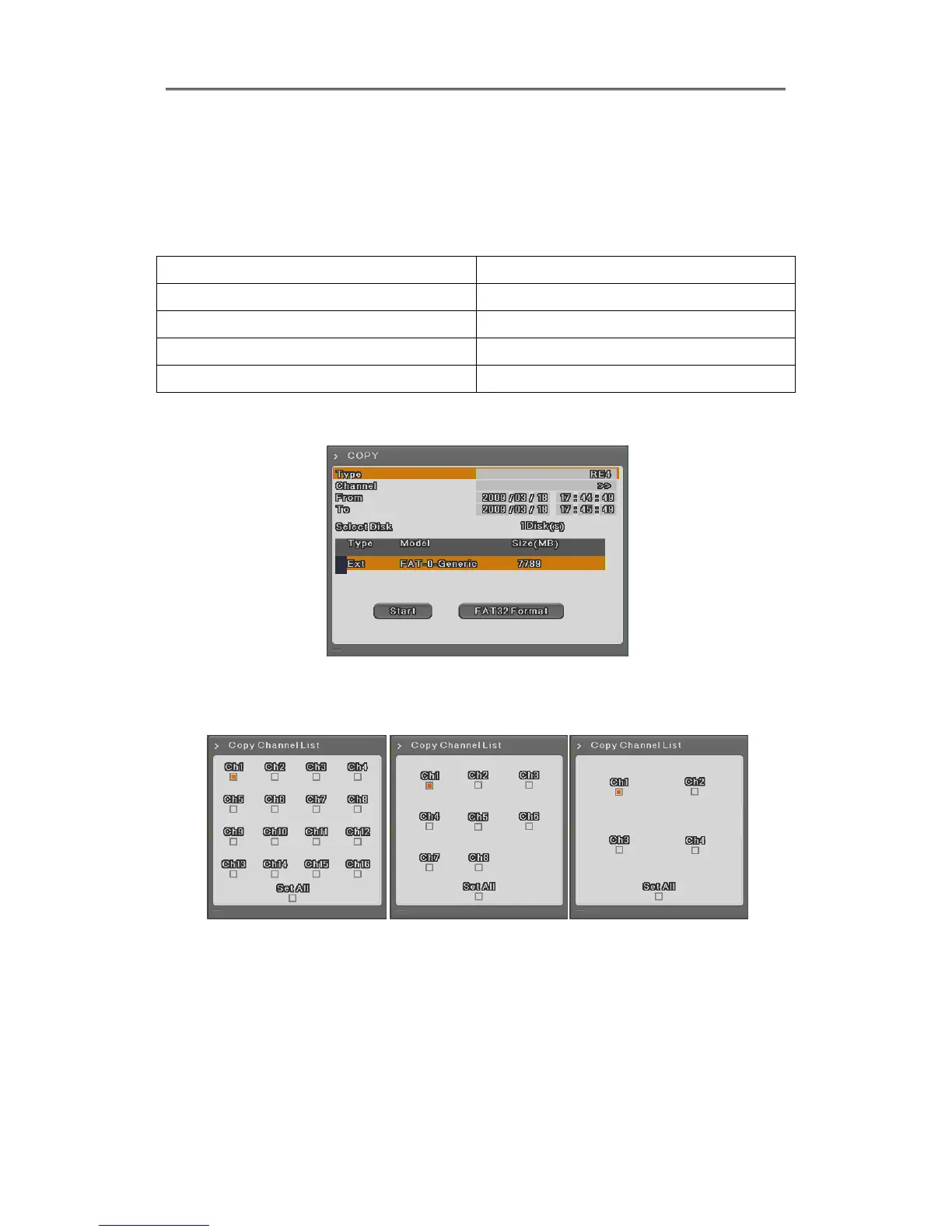
5.3.2 RE4
User can back up by HDD, USB memory and play back suing mini-player or Control Center.
Select channel position and press Enter or use mouse wheel to open the channel list like below.
[EH1600L, LH1600C] [EH800M, LH800L] [EH400H]
Type : Select RE4 using up-down button or mouse wheel.
Channel : To pop up the channel selection window, press Enter or use mouse
wheel.
Select Channel : use can select some or all channels and after selecting channel,
press Enter or click mouse left button.
Start time : Set start date or time to copy. After selecting part for change and set



 To Next Page