73
If mounted Disk is full, alarm warning to user.
6.2.2.1 Disk
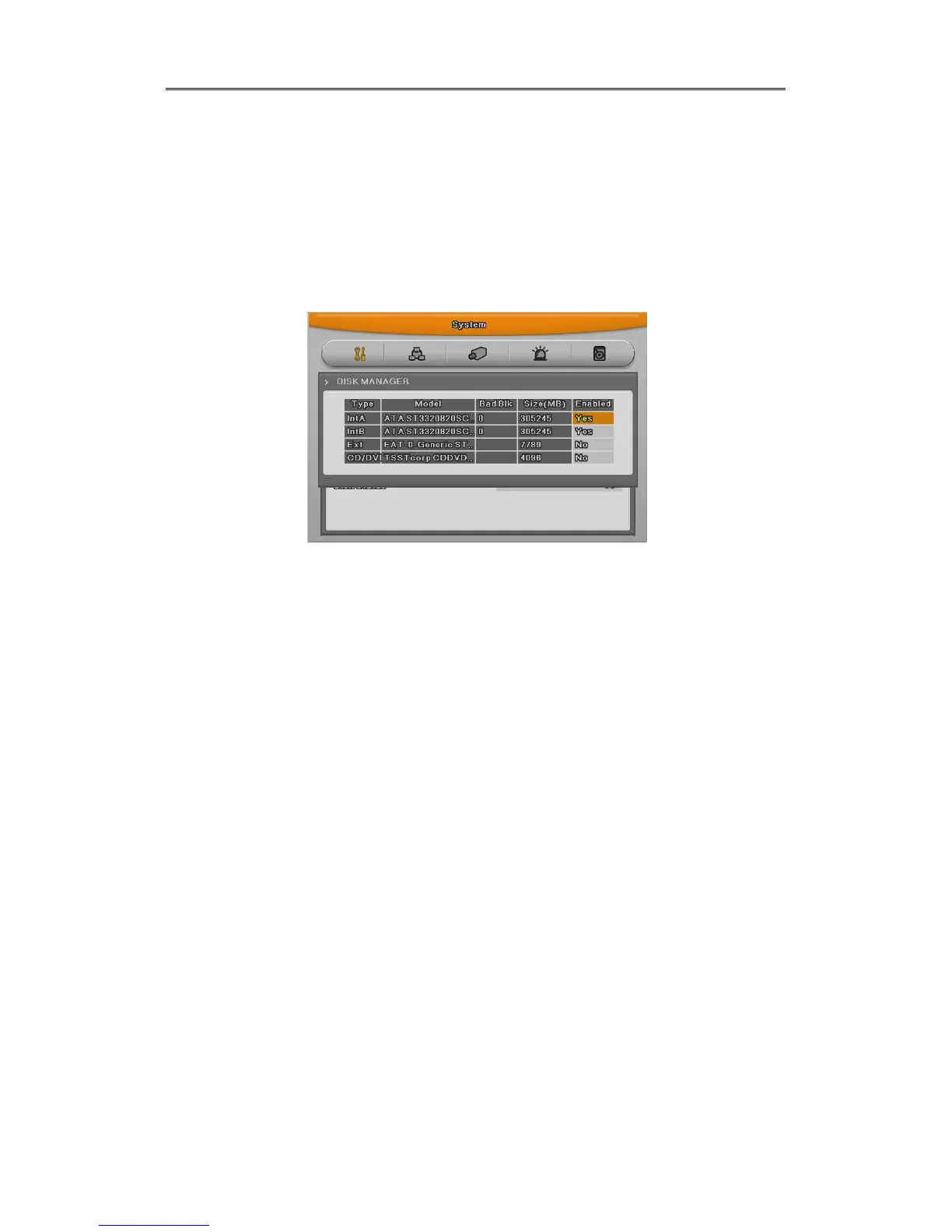
This is menu for the management of internal or external HDD.
Manage status, bad block, size, Yes or No etc.
Type : display location or type of disk.
Int A (Internal A HDD), Int B (Internal B HDD), Ext (External HDD)
Model : HDD model name.
Bad Blk : display bad block. In HDD. If no proble, “0” will be displayed. Others are
Not shown anything at all.
Size : Display HDD size by MB unit
Enabled : Make HDD enable mode or disable mode.
Yes: enable / No: Disable
In case HDD YES
- Enabled : Press [Enter] in No mode or scroll mouse wheel. Notice window pops up and show
user the message like below.
- Caution : This Disk is not available without format. Will you format Disk?
- If selecting No, keep previous data and HDD will be Enable to use.
- If selecting Yes, delete previous data and HDD will be Enable to use.
In case HDD No
- Enabled : In Yes mode, press [Enter] or scroll mouse wheel and notice window pops up and
show user the message like below.
-Caution, will you remove Disk?
- If Yes, user will find the message “Disk is removed” on the bottom and Enable status
will be No.



 To Next Page