English
HMI
pressed,atextaboutthisparameterwillbedisplayed;ifitispressedonamainscreen,thecodingoftheparameters
presentinthisscreenwillbedisplayed.
Thefiguresbelowshowsomeexamplesoftheuseofthehelpkey.
Ready
LOC
0rpm
00:00
Inverter Output
S2.3.1 Corrente
0.0 A
Ready
LOC
0rpm
00:00
Help
It indicates the inverter
output current in Amperes
(A)
Ready
LOC
0rpm
00:00
0.0
0.0
0
rpm
A
Hz
Ready
LOC
0rpm
00:00
Motor Speed
Reference
S2.3.3
Inverter Output
Current
S2.3.1
Inverter Output
Frequency
S2.3.2
Figure4.9:Exampleoftheuseofthehelpkey
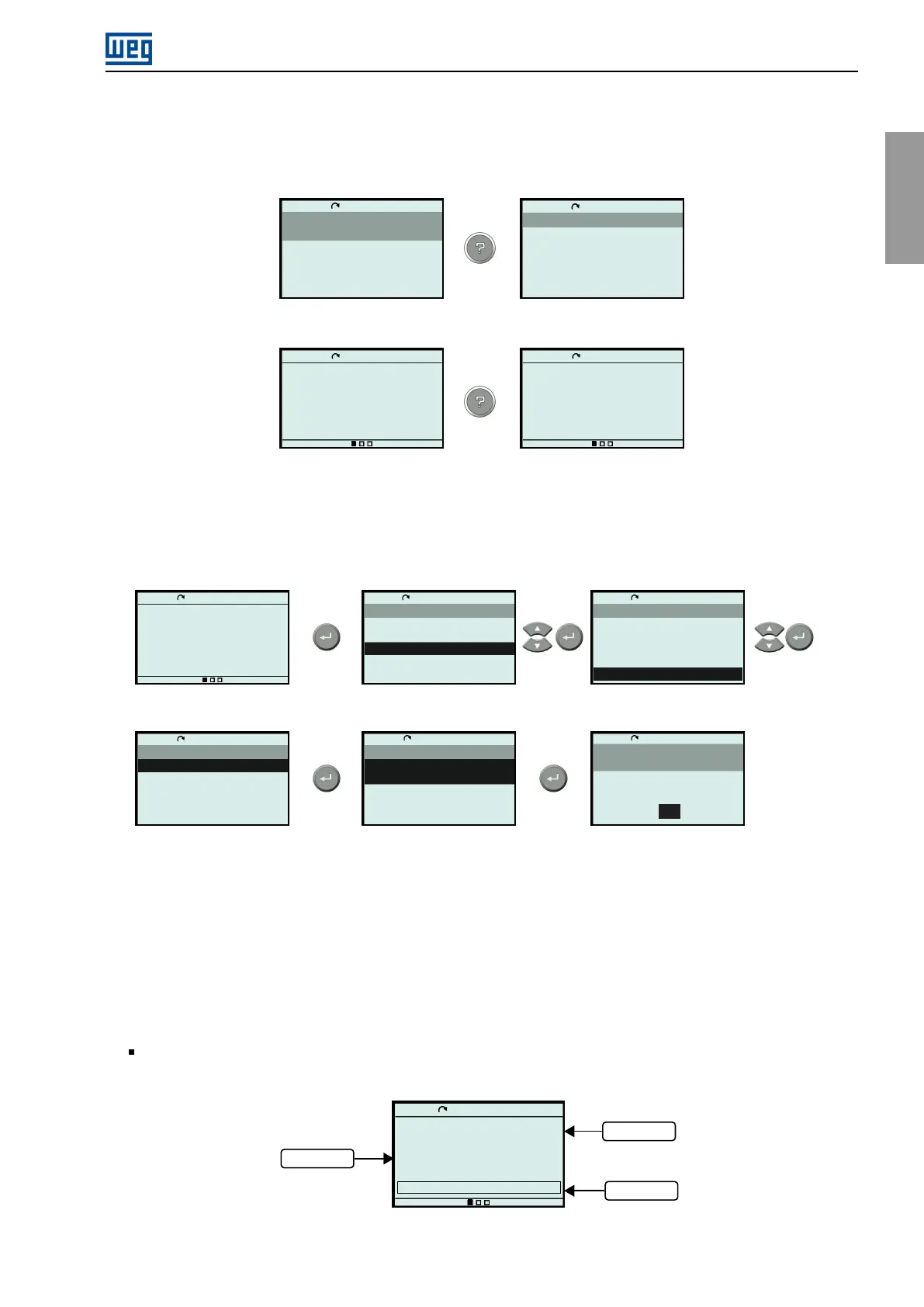
4.4DATEANDTIMESETTING
Setthedateandtimeintheconfigurationsmenu,asillustratedbelow.
Ready
LOC
0rpm
00:00
0.0
0.0
0
rpm
A
Hz
Ready
LOC
0rpm
00:00
Main Menu
Status
Diagnostics
Configurations
Assistants
Ready
LOC
0rpm
00:00
Configurations
7. Protections
8. Functional Safety
9. Communications
10. SoftPLC
11. HMI
Ready
LOC
0rpm
00:00
C11 HMI
1. Configuration
2. Main Screen
Ready
LOC
0rpm
00:00
C11.1 Configuration
1. Date/Hour
2. Language
3. Screen Brightness
1970-01-01 00:00:00
English
Ready
LOC
0rpm
00:00
Configuration
C11.1.1 Date/Hour
1970-01-01
00:00:00
00
Figure4.10:Dateandtimesetting
4.5MAINSCREENSETTING
CustomizingthemainscreensallowsyoutodefinewhatwillalwaysbedisplayedwhenpoweringuptheCFW900.
Threeeasy-to-accessmainscreensareavailable.Eachscreencanbeconfiguredamong3viewmodes.
4.5.1ViewModes
Line:Inoneline,itispossibletodisplayareadingvariableintheformattext,valueorbar. Figure4.11
showsanexamplewiththethreeformats.
Ready
LOC
0rpm
00:00
Frequency Inverter Output
S2.3.3
0.0Hz
0v
Voltage Inverter Output
0%
Text
Bar
Value
Figure4.11:InlineView
CFW900|51



 To Next Page