English
HMI
Ready
LOC
0rpm
00:00
Main Menu
Add visualization
Edit visualization
Remove visualization
Back to start
Ready
LOC
0rpm
00:00
Choose the parameter
1. Inverter
2. Measurements
3. I/Os
4. Functional Safety
5. Communications
Ready
LOC
0rpm
00:00
Choose the parameter
1. Motor Speed
2. Motor Torque
3. Inverter Output
4. Motor temperatures
5. Inverter temperatures
Ready
LOC
0rpm
00:00
Choose the parameter
1. Current
2. Voltage
3. Frequency
4. cos phi
5. Power
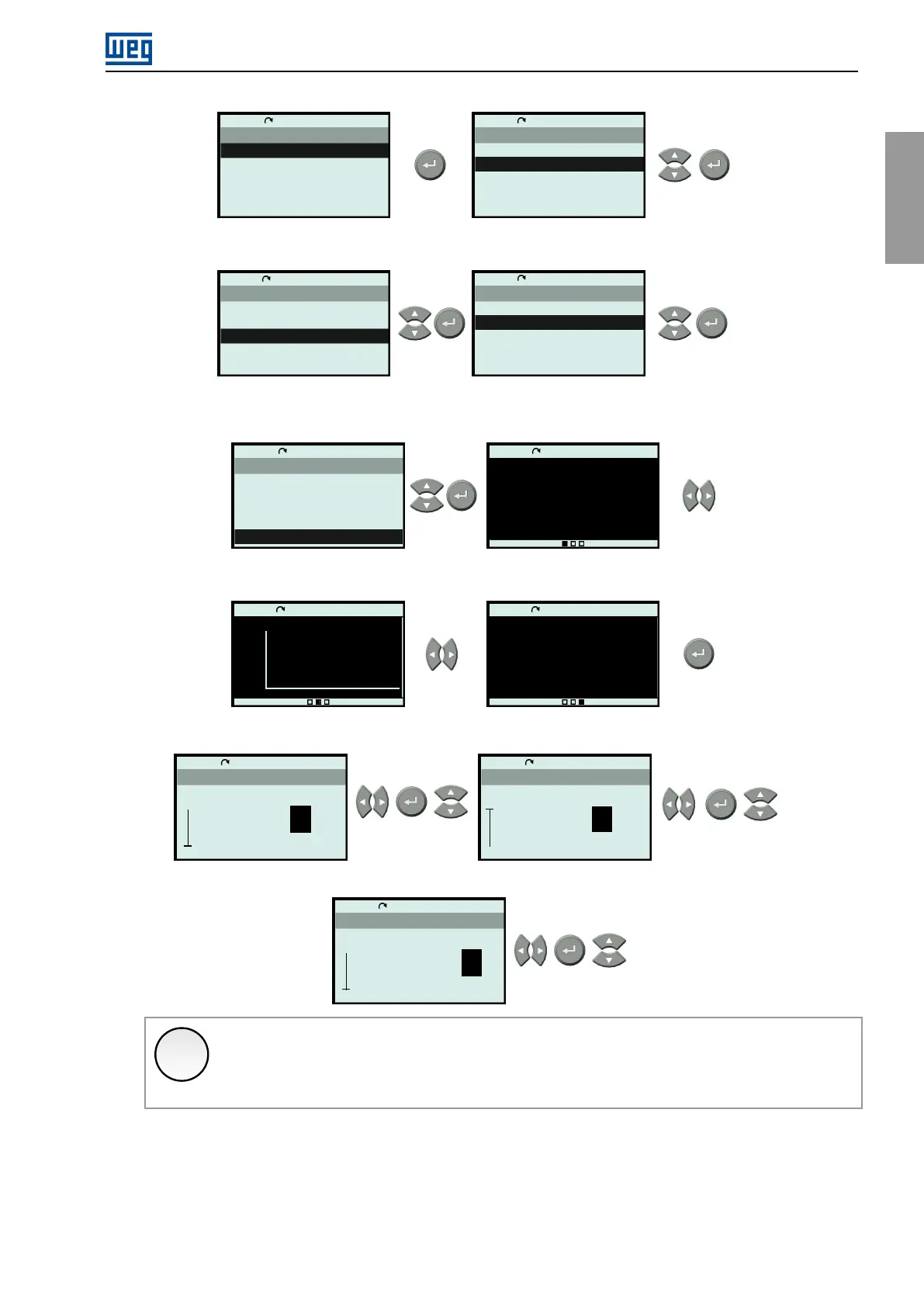
3.Thenselecttheviewformatforthereadingvariableanditslocationonthemainscreens.Inthisexample,the
fullscreenmodeingraphicformatwillbechosen.Usethenavigationkeystoswitchbetweenscreens.
Ready
LOC
0rpm
00:00
Choose Exhibition
Value (line)
Value (slot)
Bar (line)
Bar (full screen)
Graph (full screen)
Ready
LOC
0rpm
00:00
0.0
0.0
0
rpm
A
Hz
Ready
LOC
0rpm
00:00
2000
0.0
64.0s
Motor Speed Estimated Value
Ready
LOC
0rpm
00:00
kW
kVA
0.0
0.0
0
4.Configuretheviewformat.Forthisexample,choosethegraphrangeandsamplingrate.
Ready
LOC
0rpm
00:00
Min ref.
0000 v0
2000
0
Ready
LOC
0rpm
00:00
Max ref.
2000 v0
2000
0
Ready
LOC
0rpm
00:00
Sample time
0000.5s
1
3600.0
0.1
✓
NOTE!
TheoptionEditViewisappliedtothebarandgraphmode,whereyoucansettheminimumand
maximumvaluesforexistingviews.
5.Confirmthenewview.
CFW900|53



 To Next Page