DTV 720 USER’S MANUAL
800043-01 Rev. C 16 www.wegener.com
The Inputs section (on the left side) allows setting of the two ASI inputs and RF inputs if
available. If the ASI inputs are used, select the Enable check box and click the Set button
for each one that is used. Similarly, select the Enable checkbox for each RF input that is
used, set the channel number, click the radio button to select either Broadcast or CATV,
then click the Tune button. If the optional, dual ASI Input Module is used rather than the
RF Input Modules, then set them up in the same manner as the included ASI Inputs.
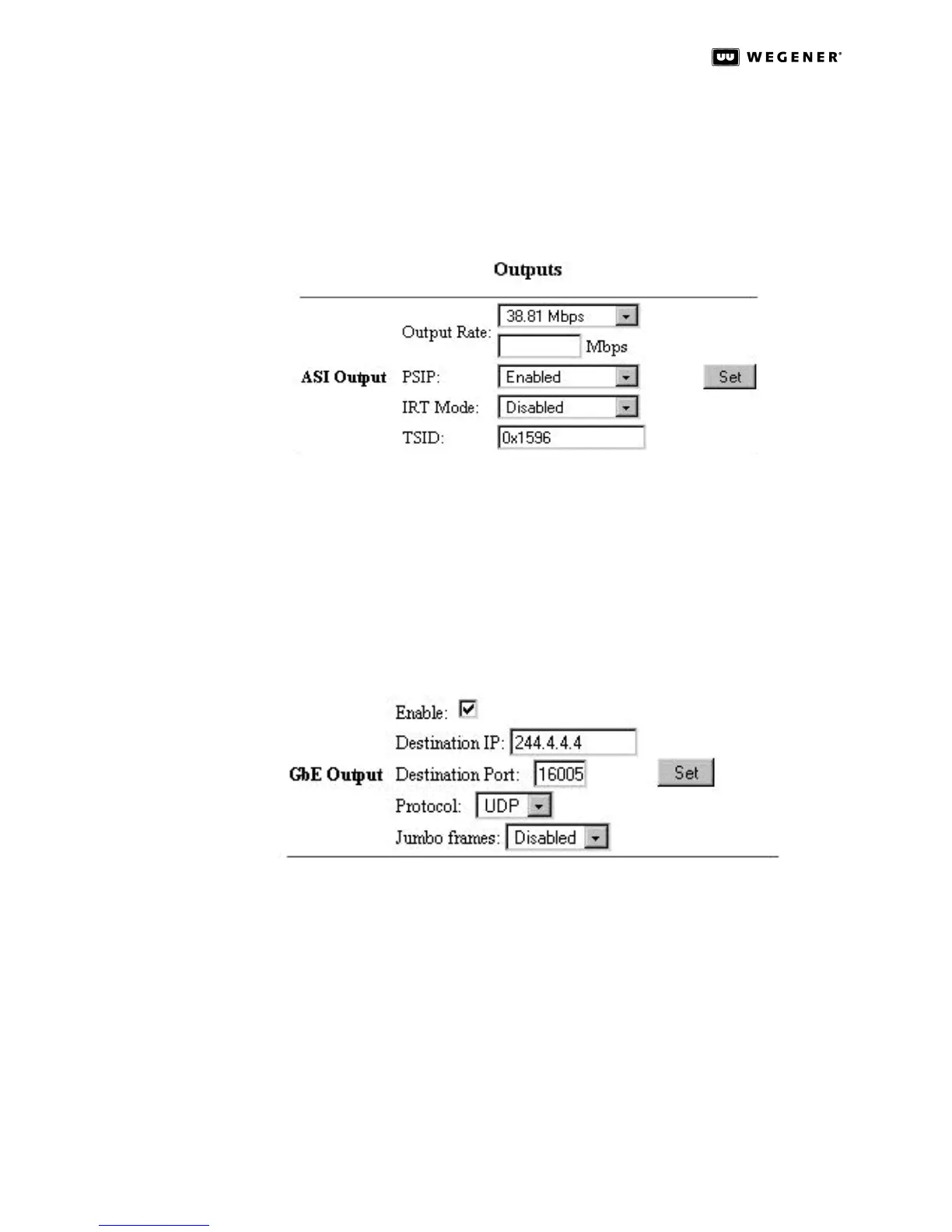
Figure 3.3: DTV 720 Control & Status Page ASI Output Section
The ASI Output section allows the user to set the Output Rate; Enable/Disable output PSIP
data, Enable/Disable the IRT Mode; and set the output TSID number. The output data rate
may be set to 19.39 Mbps, 26.97 Mbps (64 QAM), 38.81 Mbps (256 QAM), or to a custom
rate between 2.5 Mbps and 70 Mbps. The PSIP Enabled/Disabled box allows PSIP data to be
included in the output stream. The IRT Mode box allows the user to Enable/Disable the
functions needed for use in systems with the Motorola IRT product. This is normally set to
OFF. (Refer to IRT Mode on page36 for more details.) The output TSID number may be set
to a four-digit hexadecimal number. You will normally use the TSID of the major program
included in the multiplex, which may be found on the Status (right) side of the page.
Figure 3.4: DTV 720 Control & Status Page GbE Output Section
The GbE Output section (if the GbE module is installed) allows the user to Enable GbE
output; assign a Destination IP address and Destination Port number to the output
stream; set the Protocol; and enable Jumbo packet frames. The output date rate and
content of the GbE output is identical to the ASI output stream as configured under
the Pidset Config page. The content of the GbE output is assigned to one IP address
and one port number; this makes the GbE output stream a Multi-Program Transport
Stream (MPTS) service. The output Protocol can be configured as either UDP or RTP.
The standard payload packet frame size is 1.5Kbps, when Jumbo frames is enabled
the payload packet size is set to 9Kbps.
In the Control section, the PID Display Mode and Time Source may be selected. The PID
Display Mode is used to select whether the PID numbers on all the screens are displayed
in decimal or hexadecimal format. (Note that program numbers are always displayed in



 To Next Page