DTV 720 USER’S MANUAL
www.wegener.com 39 800043-01 Rev. C
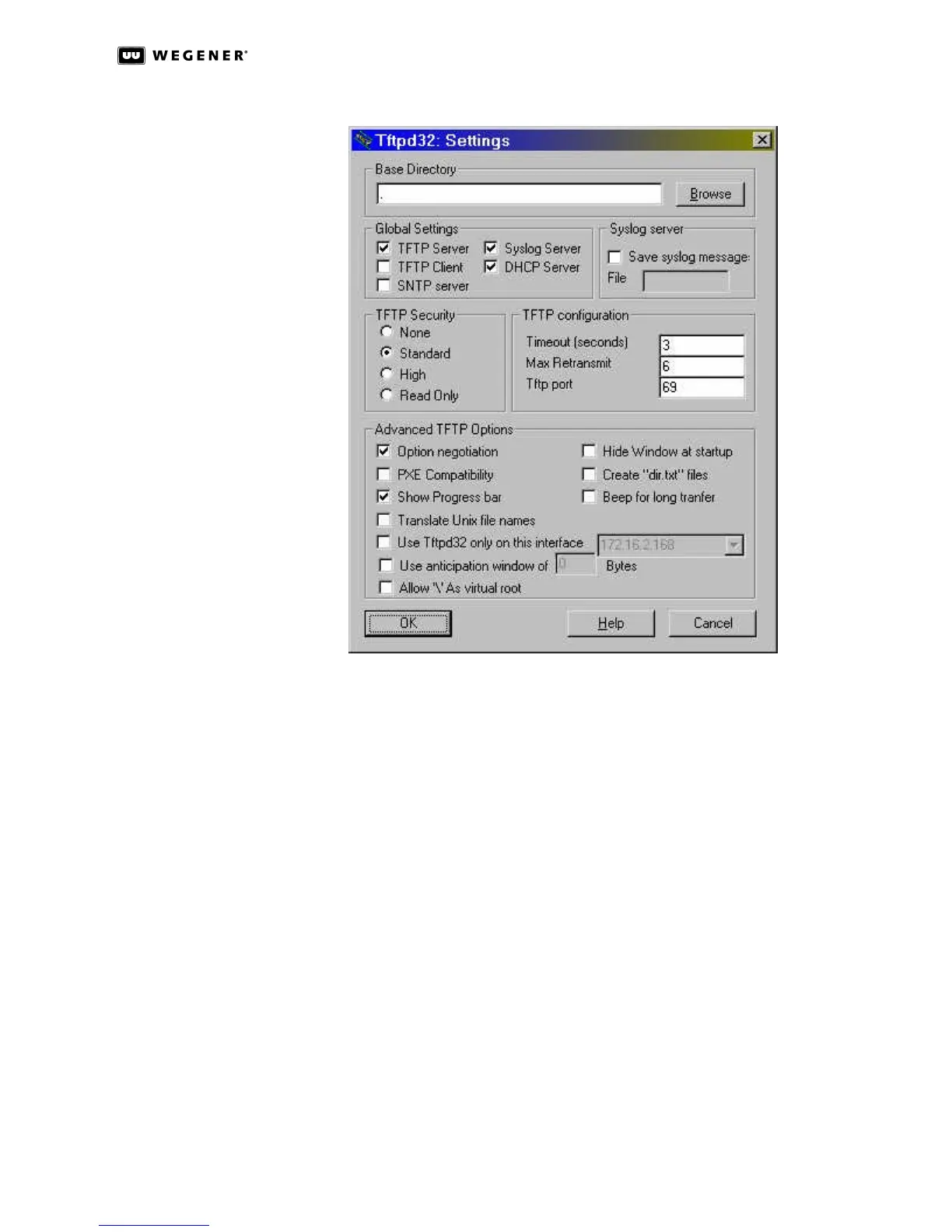
Figure 3.24: TFTPD32 Settings
h. Under Advanced TFTP Options: click the checkboxes to set Option negotiation and
Show Progress bar to be checked for ON, and all others unchecked or OFF.
i. Click the OK button, close the program, then re-open it.
10. Verify that the Current Directory on the TFTPD32 main window (Figure3.23) is correct.
11. Now click the Settings button and set the following items on the DHCP server tab:
NOTE: Press the Save button after every change or selection.
a. Set the IP pool starting address: to the IP address of the DTV unit being upgraded.
b. Set the Size of pool: field to 100.
c. Make sure that the Boot File: field displays the name of the downloaded DTV
upgrade software version: dtv720-xxx.cf where xxx must match the upgrade
revision.
d. The WINS/DNS Server: field should display 0.0.0.0.
e. The Default router: field should display 0.0.0.0.
f. Set the Mask: field to show the first two segments of the DTV unit’s IP address
followed by .0.0. (For example, if the DTV unit’s IP address is 172.16.90.150, then
the Mask: should be set to 172.16.0.0.)
g. Click the Save button.



 To Next Page