WEILER E1650 REMIXING TRANSFER VEHICLE
2-29
Machine Controls
2
Machine Controls
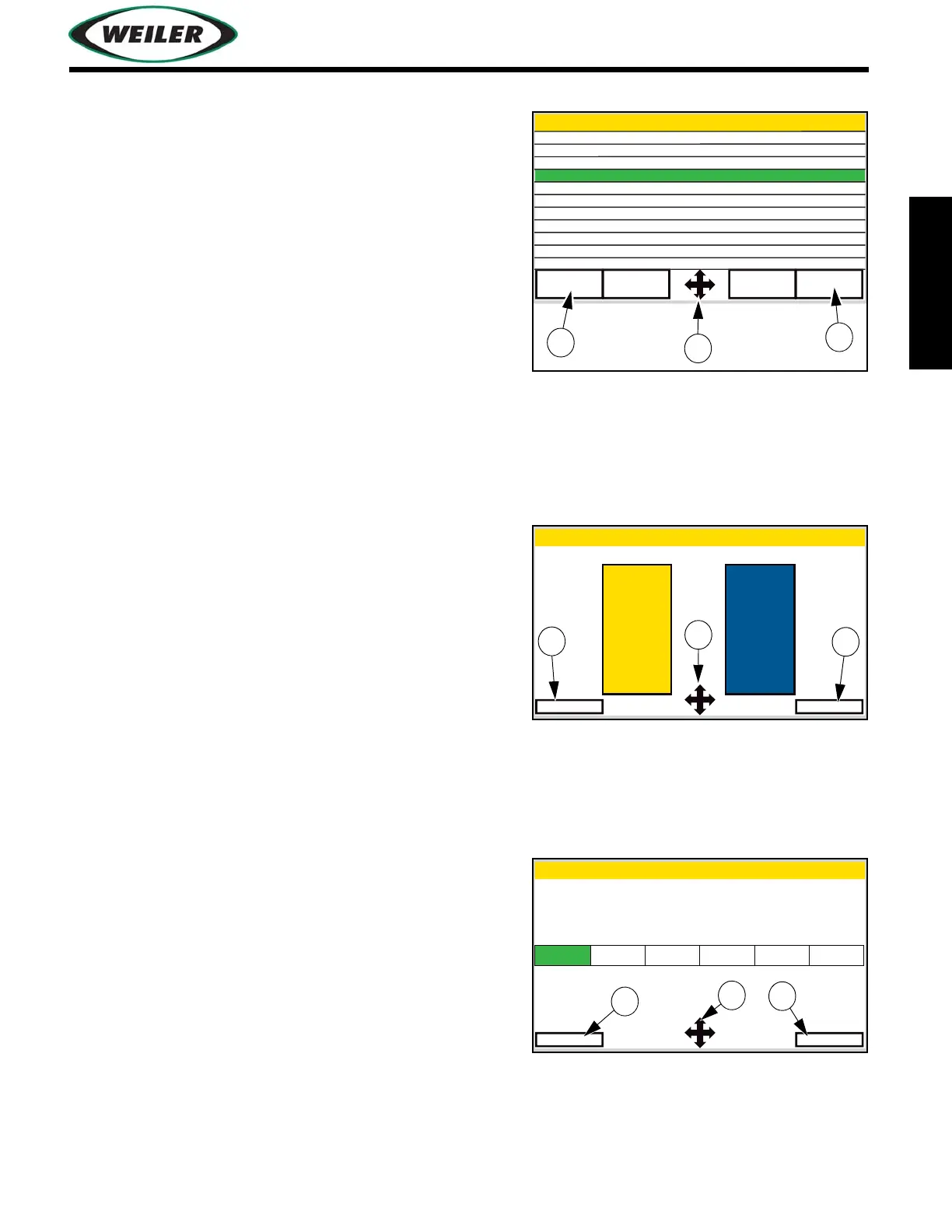
System Parameter Settings Screen
To select a parameter, use Navigation Control Button (1)
to highlight desired parameter. Select (2) parameter and
use Navigation Control Button to change value. Exit (3)
to return to Menu Screen.
Backlight Setup Screen
Use Navigation Control Button (1) to highlight day or
night mode. Select (2) mode and use Navigation Control
Button to change screen brightness. Exit (3) to return to
Menu Screen.
Clock Setup Screen
Use Navigation Control Button (1) to highlight field.
Select (2) field and use Navigation Control Button to
change value. Exit (3) to return to Menu Screen.
System Parameter Settings
Exit
REMIX STALL PRESSURE
ELEVATOR DELAY
RESET ALL
TIRE WASH OVERRIDE
DISTANCE CONTROL ENABLE
TIRE SPRAY ENABLE
Parameter Name
0
0
0
0
0
0
0
0
Value
CHAIN SPRAY ENABLE
CHAIN SPRAY TIME
CHAIN TENSION OVERRIDE
0
SPRAY PUMP TIME 0
Page
Up
Page
Down
Select
Back Light Setup
Exit
NightDay
Select
Clock Setup
Exit
Hour
Select
Minute AM/PM Day Month Year
12 30 AM 9 9 2016



 To Next Page