4-5
Electrical Shock Hazard
Disconnect power before servicing.
Replace all parts and panels before
operating.
Failure to do so can result in death or
electrical shock.
1. Unplug washer or disconnect power.
2. Turn off the water supply to the washer.
3. Remove the control panel (See page 4-4).
4. Disconnect all of the wire connectors from
the UIC.
NOTE: Due to continuous improvement
efforts the manufacturer of this washer can
change the software loaded on the UIC for
use on new models. The controls do not
change physical look or dimension, but the
label may or may not indicate the correct
software version on the control. Installing
a control with incompatible software may
cause the washer to not operate at all, to
operate differently, or to develop failure
codes during subsequent operation.
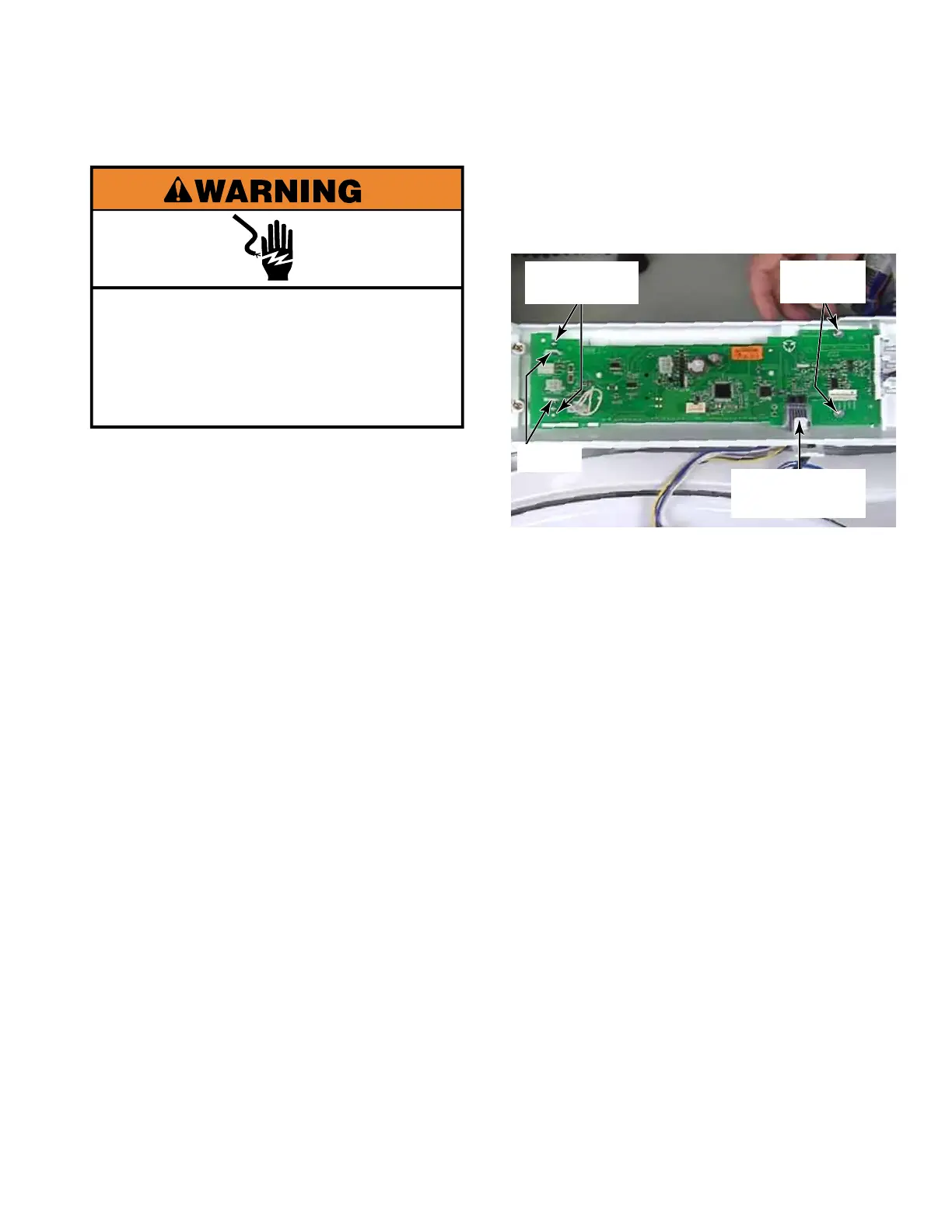
5. To remove the keypad assembly ribbon
connector, gently pull it out of the connector
on the board.
6. Remove two #1 Phillips screws from the left
end and two 5/16” nuts from the right end of
the UIC.
USER INTERFACE CONTROL (UIC)
7. Squeeze the 2 tabs at the left end of the
board together and lift the board up off the
squeeze tabs. To remove the board, slide it
out of the Rast connector mounting bracket .
Keypad Ribbon
Connector
2 Phillips
Screws
2 tabs
2 - 5/16”
Nuts




 To Next Page