6-9
MANUAL OVERVIEW TEST
Before replacing any system components, perform this Manual Overview Test.
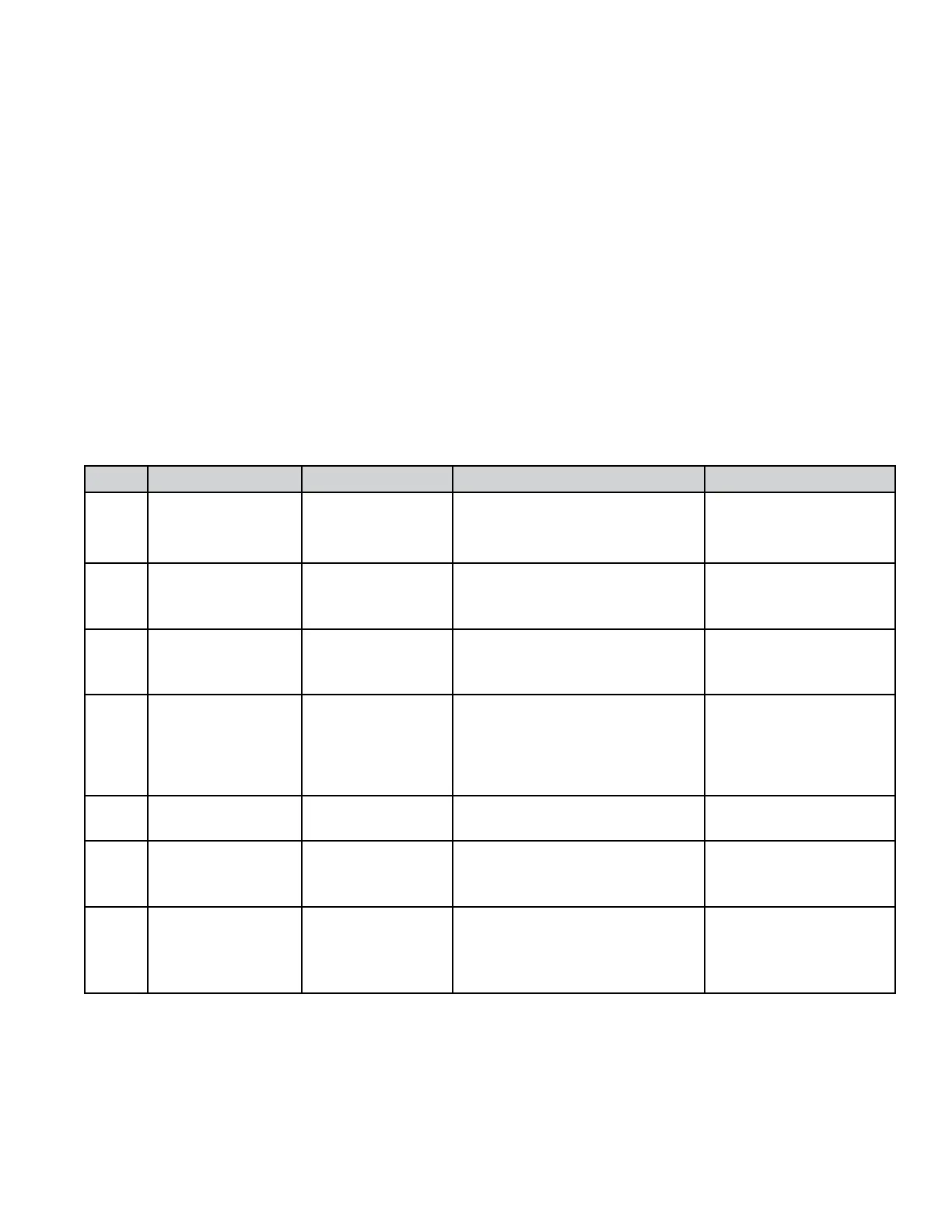
n This cycle consists of 7 steps. In each step, the washer will perform a Control Action as
described in the table below. Once the action is completed, the washer will move to the next
step. Check Exit Condition column.
n Each step can be differentiated from the others by looking at the display indication. Each step
has a different message displayed.
n To move to the next step before a control action is complete, press any button except
COLD (only when the option is available).
n To exit the Manual Overview Test at any time, press the COLD button.
Step Display Exit Condition Control Action To Be Checked
1 Delicates On completion
only
Door locks, basket turns 1/2
revolution, then door unlocks
and relocks.
n Door lock system
n Child safety routine
2 & Knits On button press
or if overll level
is detected
Filling with both cold valves. n Both Cold Water
Inlet Valves
n Overfill level
3 Colors On button press
or completion
Basket executes reversing
movement at wash speed
(10 minutes).
n Motor
n Motor Control (MCU)
4 Permanent Press On button press
or completion
Drain pump is on (4 minutes). n Drain Pump
5 Delicates On completion
only
Drain pump is on
(reach Level_sud plus 10 sec.).
n Drain Pump
6 & Knits On button press
or completion
Basket rotates
counterclockwise and ramps up
to maximum speed.
n Motor
n Motor Control (MCU)
7 Woolens On button
press only after
rpm=0 & door is
unlocked
Stop motor to 0 rpm.
Door unlocks.
n Motor
n Motor Control (MCU)
n Door lock system
The drain pump may be running in any of the last 3 steps, depending on the water level in the washer and
position of the pressure switch.




 To Next Page