4-44
Electrical Shock Hazard
Disconnect power before servicing.
Replace all parts and panels before
operating.
Failure to do so can result in death or
electrical shock.
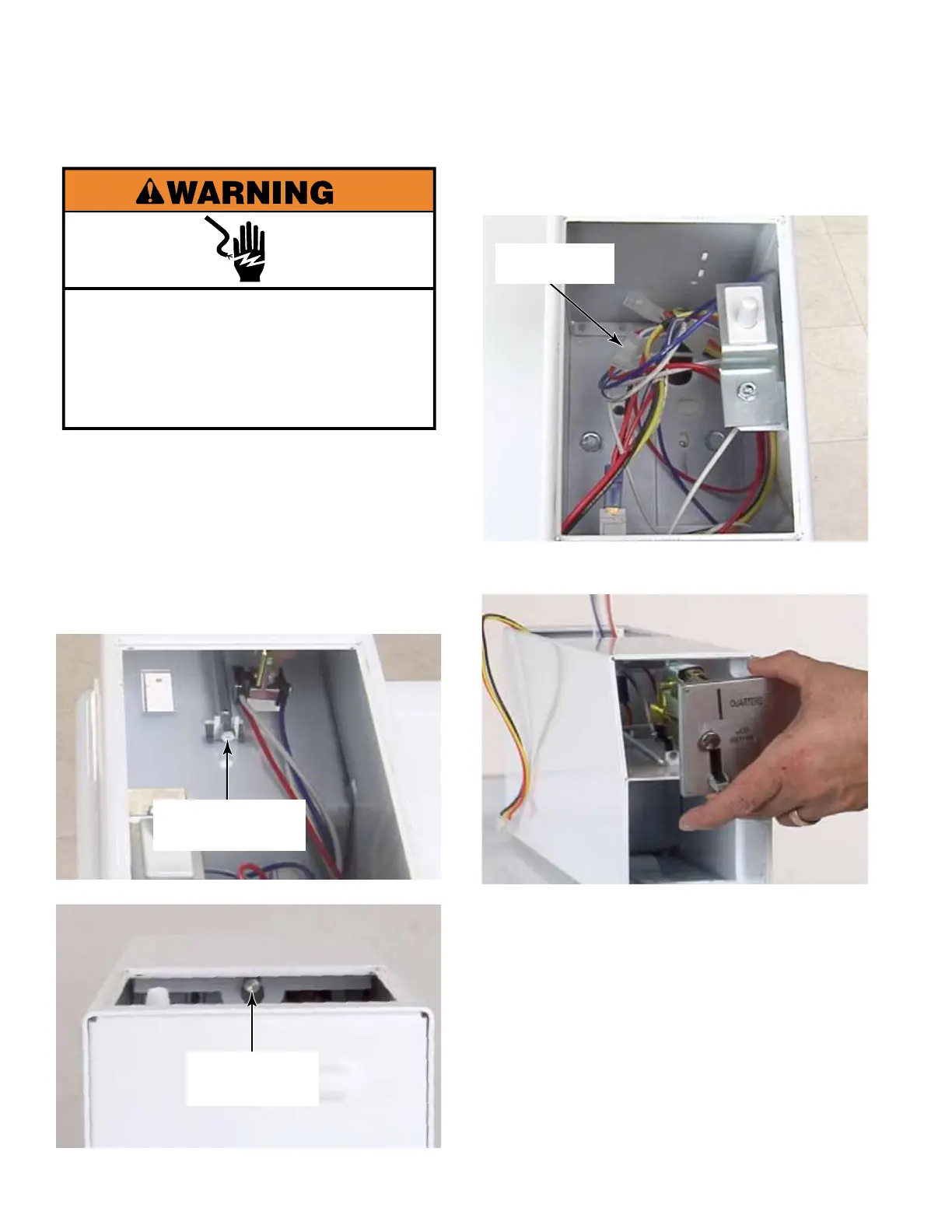
1. Unplug washer or disconnect power.
2. Remove the service access door from the
metercase.
3. Remove 2 security bolts that secure the
coin drop with a 1/4” ratchet from inside the
service access area.
COIN DROP (IF USED)
4. Disconnect the wire harness connectors to
the coin drop.
5. Pull the coin drop out from the front of the
metercase.
NOTE: When reinstalling the coin drop
make sure the wires connected to the
coin sensor go straight back from the coin
sensor. If the wire goes forward it could
break the beam of the coin sensor and show
an error on the UIC.
NOTE: There are two 4 pin connectors on
the washer wire harness in the metercase.
The connector with the colored mark on
it is for coin 2. If the wire harness is color
coded, white is for coin 1 and black Is for
coin 2
Top Coin Drop
Security Bolt
Bottom Coin Drop
Security Bolt
Wire Harness
Connectors




 To Next Page