EasyManua.ls Logo

Wolf Wall Ovens - Delayed Start Feature

Wolf Wall Ovens
83 pages
Print Icon
To Next Page IconTo Next Page
To Previous Page IconTo Previous Page
Loading...
WWaallll OOvveennss
Electronic Control System
3-6
Delayed Start Feature
This feature controls the automatic timing of the oven(s) ON and OFF function by setting the cooking mode to start later
in the day and turn off when the cooking is complete. It can also be set to turn off at a preset time. To accomplish
delayed start and/or stop, the time of day clock is used and therefore the correct time must be displayed prior to pro-
gramming.
NOTE: This mode will work for all cooking modes except Broil, Convection Broil and Bake Stone Mode.
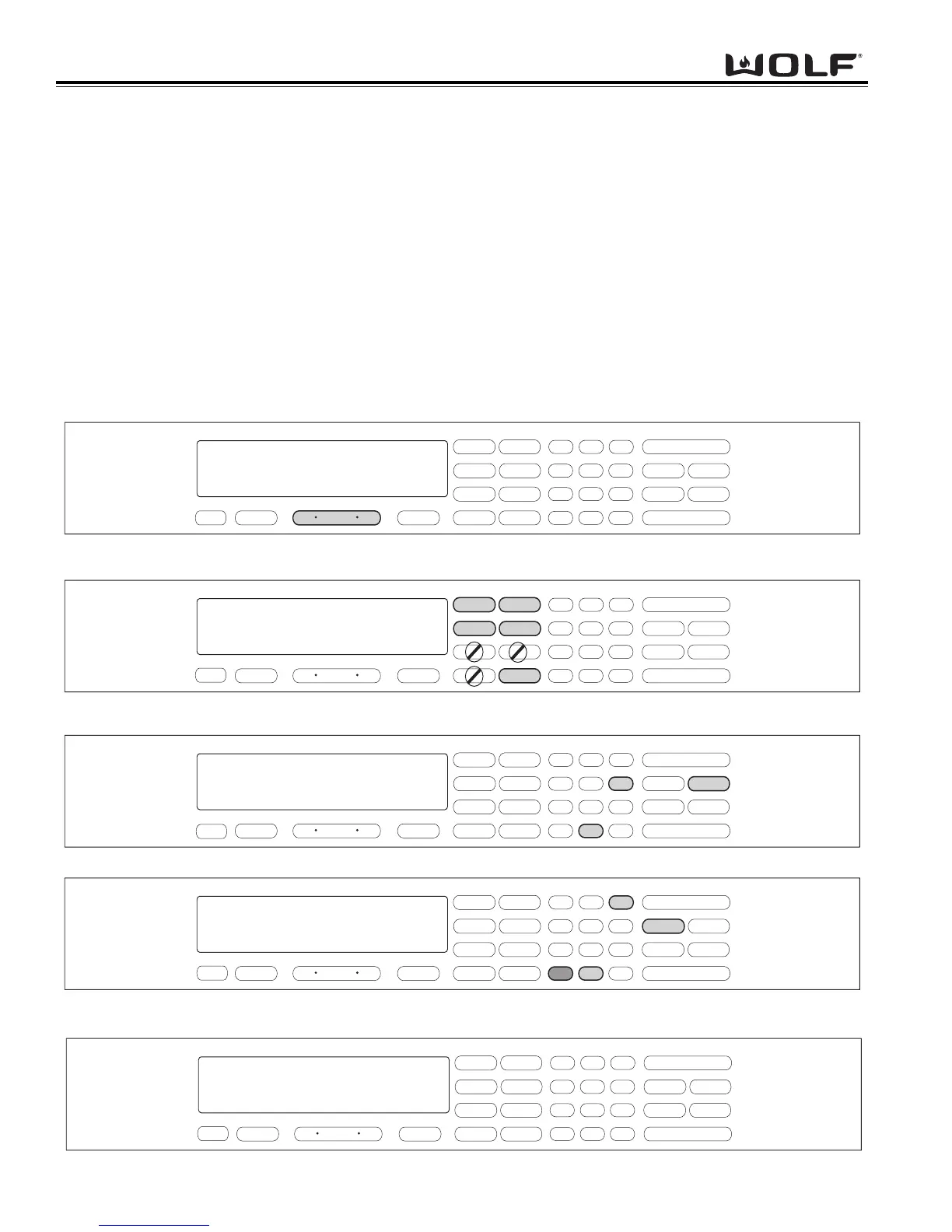
To initiate Delayed Start Mode, the oven must be OFF. Press the Upper or Lower Oven ON key or the Oven ON key,
depending on the model. (See Figure 3-11). Press the desired cooking mode key. (See Figure 3-12). To change pre-
set temperature, immediately enter another temperature using the number keys, then press Enter. Next, press Stop
Time. Then, using the number keys, enter the time for which the oven needs to turns off. Example: Set 6:00 for the
time of day the oven turns off. (See Figure 3-13). Then, enter the Cook Time using the number keys to set the
hours/minutes the oven will stay on. Example: Set 3:30 for the oven to remain on for 3-1/2 hours. Now, press the
ENTER key. (See Figure 3-14). The display appears as if the oven is on. To exit Delayed Start Mode, press Upper or
Lower Oven OFF or Oven OFF key. (See Figure 3-15).
NOTE: With the example used above, heating will not start for 3-1/2 hours prior to 6 o’clock which will be 2:30 on the time
of day clock.
OFF
ON
TIMER
CLOCK
TEMPERATURE
BAKE
OVEN
ROAST
BROIL
BAKE STONE
CONV. BAKE
CONV. ROAST
CONV. BROIL
CONVECTION
1
2
3
4
56
7
89
ENTER
0
CLEAR
LIGHT
PROBE
COOK TIME
SELF CLEAN
STOP TIME
PANEL LOCK
ON/OFF
ON/OFF
f
.
.
select mode
f
8 00
f
f
Figure 3-11. To initiate Delayed Start Mode, Press Oven ON key.
For Double Ovens select either Upper Oven ON key or Lower Oven ON key.
OFF
ON
TIMER
CLOCK
TEMPERATURE
BAKE
OVEN
ROAST
BROIL
BAKE STONE
CONV. BAKE
CONV. ROAST
CONV. BROIL
CONVECTION
1
2
3
4
56
7
89
ENTER
0
CLEAR
LIGHT
PROBE
COOK TIME
SELF CLEAN
STOP TIME
PANEL LOCK
ON/OFF
ON/OFF
f
.
.
TEMPERATURE
350
°
f
bake
setpoint
8 00
f
f
Figure 3-12. Press desired Cooking Mode. Bake, Roast, Convection Bake, Convection Roast or Convection.
NOTE: Broil, Convection Broil and Bake Stone will not work in this mode.
OFF
ON
TIMER
CLOCK
TEMPERATURE
BAKE
OVEN
ROAST
BROIL
BAKE STONE
CONV. BAKE
CONV. ROAST
CONV. BROIL
CONVECTION
1
2
3
4
5 6
7
89
ENTER
0
CLEAR
LIGHT
PROBE
COOK TIME
SELF CLEAN
STOP TIME
PANEL LOCK
ON/OFF
ON/OFF
set stop time
8 00
.
.
STOP TIME
MINUTES
HOURS
TEMPERATURE
350
°
f
setpoint
f
f
:
6 00
f
Figure 3-13. Press Stop Time. Then, using number keys, enter time of day to turn oven off. Example 6:00
OFF
ON
TIMER
CLOCK
TEMPERATURE
BAKE
OVEN
ROAST
BROIL
BAKE STONE
CONV. BAKE
CONV. ROAST
CONV. BROIL
CONVECTION
1
2
3
4
56
7
89
ENTER
0
CLEAR
LIGHT
PROBE
COOK TIME
SELF CLEAN
STOP TIME
PANEL LOCK
ON/OFF
ON/OFF
f
f
8 00
.
.
COOK TIME
STOP TIME
HOURS
MINUTES
MINUTES
HOURS
TEMPERATURE
350
°
f
set cook time
setpoint
:
6 00
:
3 30
f
Figure 3-14. Press Cook Time. Then, using number keys, enter hours/minutes the oven will stay on.
Example 3:30. Now, press ENTER.
f
f
f
OFF
ON
TIMER
CLOCK
TEMPERATURE
BAKE
OVEN
ROAST
BROIL
BAKE STONE
CONV. BAKE
CONV. ROAST
CONV. BROIL
CONVECTION
1
2
3
4
56
7
89
ENTER
0
CLEAR
LIGHT
PROBE
COOK TIME
SELF CLEAN
STOP TIME
PANEL LOCK
ON/OFF
ON/OFF
8 00
.
.
COOK TIME
STOP TIME
HOURS
MINUTES
MINUTES
HOURS
TEMPERATURE
350
°
f
bake
setpoint
:
6 00
:
3 30
Figure 3-15. Display appears as if oven is on.

Table of Contents

Related product manuals