WWaallll OOvveennss
Electronic Control System
3-16
Bake Stone Mode
In the Bake Stone Mode a specially designed oven rack and heating element are used along with a ceramic stone.
Mounted directly underneath the ceramic bake stone is a heating element. This bake stone element along with the
convection fans and the broil element help produce a hot enough environment necessary to cook on the ceramic
stone. In this mode the bake stone element is on 58 percent of the time and the broil element is on 42 percent of
the time. The convection fans are on 42 percent of the time, sequential in this mode. To use the Bake Stone,
remove all oven racks from the oven. Remove the bake stone element plug, located on the back wall of the oven
cavity and just below the convection fan baffle plate. Insert the bake stone element into the receptacle. Slide the
bake stone rack onto the rack guide number one position. Place the bake stone on the rack with its lip hanging over
the front edge of the rack.
NOTE: The oven should always be preheated in this mode. The oven will chime after the oven reaches preheat
temperature.
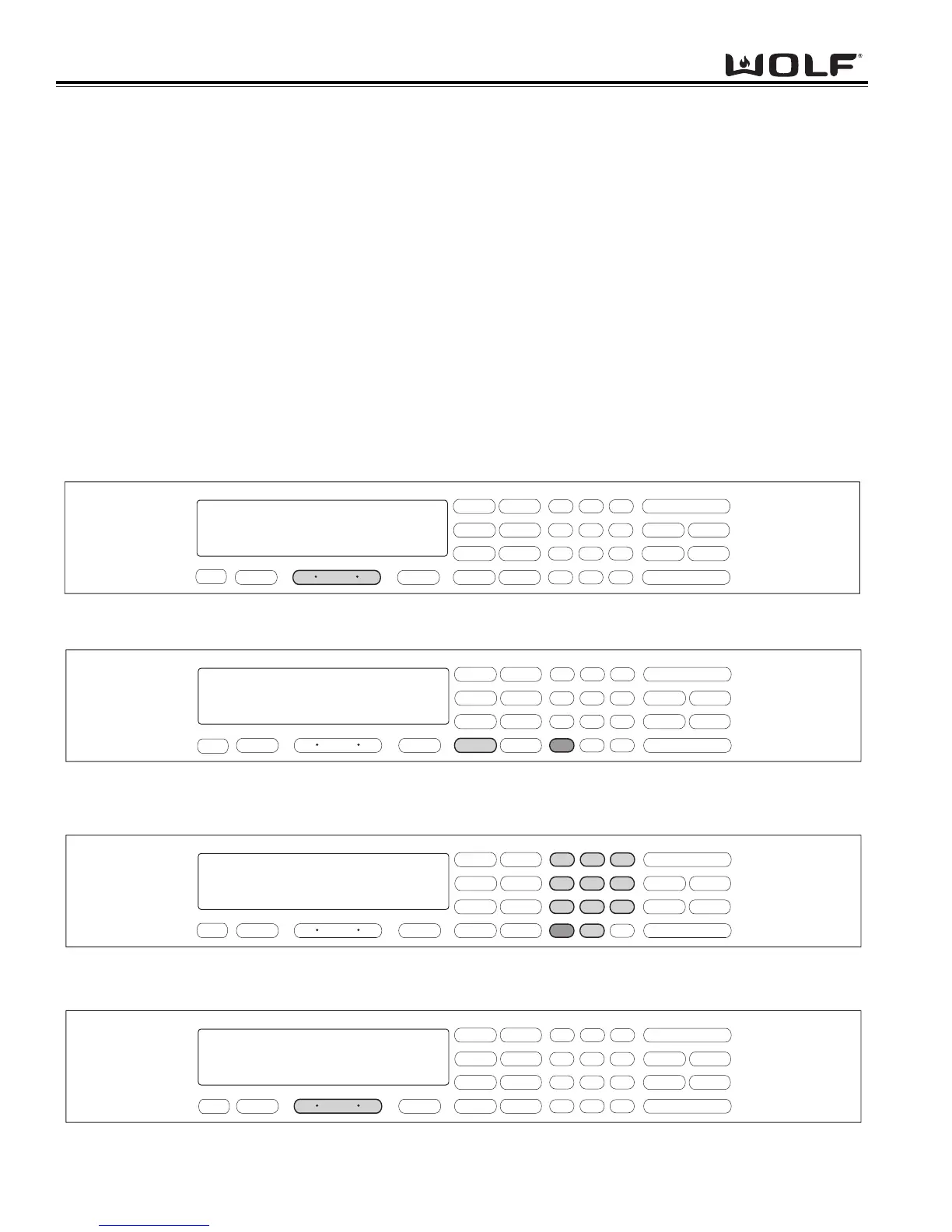
To initiate Bake Stone Mode, the oven must be OFF. First press the Oven ON key. (See Figure 3-51). For Double
Ovens press the Upper Oven ON key or the Lower Oven ON key. Now, press the BAKE STONE key. A preset tem-
perature of 400°F is shown in the display. The oven begins to heat after 5 seconds or by pressing the ENTER key.
(See Figure 3-52). To change the temperature from 400°F, immediately enter another temperature using the number
keys. Then, press the ENTER key. (See Figure 3-53). To exit the Bake Stone Mode, press the Oven OFF key.
(See Figure 3-54). For the Double Oven, press the Upper Oven OFF key or the Lower Oven Off key.
.
.
.
.
.
.
Figure 3-51. To initiate Bake Stone Mode, Press the Oven ON key.
For Double Oven, press the Upper Oven ON key or the Lower Oven ON key.
Figure 3-52. Press the BAKE STONE key. A preset temperature of 400°F will be shown in the display.
The oven begins to heat after 5 seconds or by pressing the ENTER key.
Figure 3-53. To change the preset temperature, immediately press the number keys to enter a new temperature.
Then, press the ENTER key.
Figure 3-54. To exit the BAKE STONE Mode, press the Oven OFF key.
For Double oven, press the Upper Oven OFF key or the Lower Oven OFF key.
.
.



 To Next Page