XAG AUSTRALIA
30
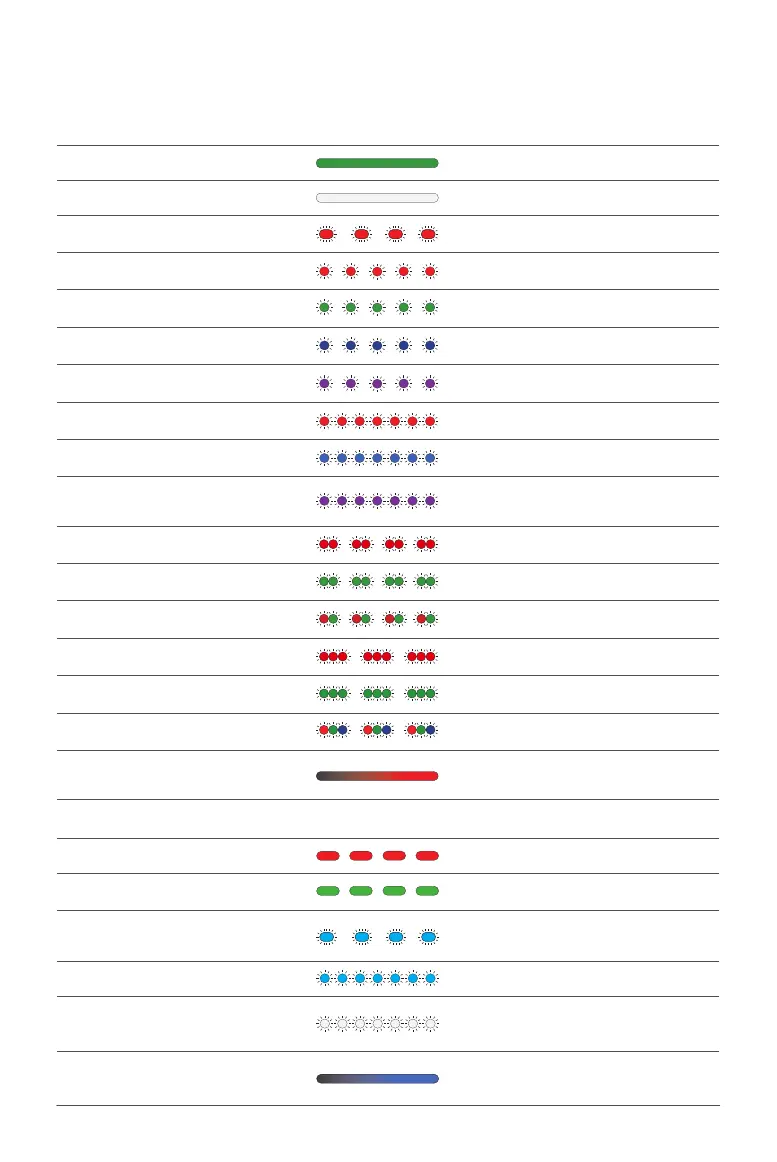
Status Indicator (Arm) – Operation Mode
Description
Solid Green In operation
Solid White File system mounting failed
Flashing Red (Slow)
Single Flashing Red GPS malfunctioning/dramatic satellite loss
Single Flashing Green Attitude mode
Single Flashing Blue Manual mode
Single Flashing Purple Initialization failed / Preheating
Flashing Red (Fast) Sensor error
Flashing Blue (Fast) Propulsion system error
Flashing Purple (Fast)
Underlying controller formatting/incorrect
parameters
Double Flashing Red Flight in safe mode
Double Flashing Green Manual GPS mode; good GPS signal
Flashing Red & Green Weak GPS signal
Triple Flashing Red Low voltage
Triple Flashing Green Auto GPS mode; good GPS signal
Red/Green/Blue Alter-nating Flashing Unlocking
Illumination Red
Entering; returning; avoiding/bypassing
obstacles
Status Indicator (Arm) – Firmware Update Mode
Description
Red Light ON for 2s Update failed
Green Light ON for 2s Updated
Flashing Cyan (Slow) ESC updating
Flashing Cyan (Fast) ESC requesting to be updated
Flashing White (Fast) Updating
Illuminating Blue
Updates detected by underlying controller;
waiting for the update
Status Indicator – Arm (Operation Mode)



 To Next Page