45
XAG AUSTRALIA
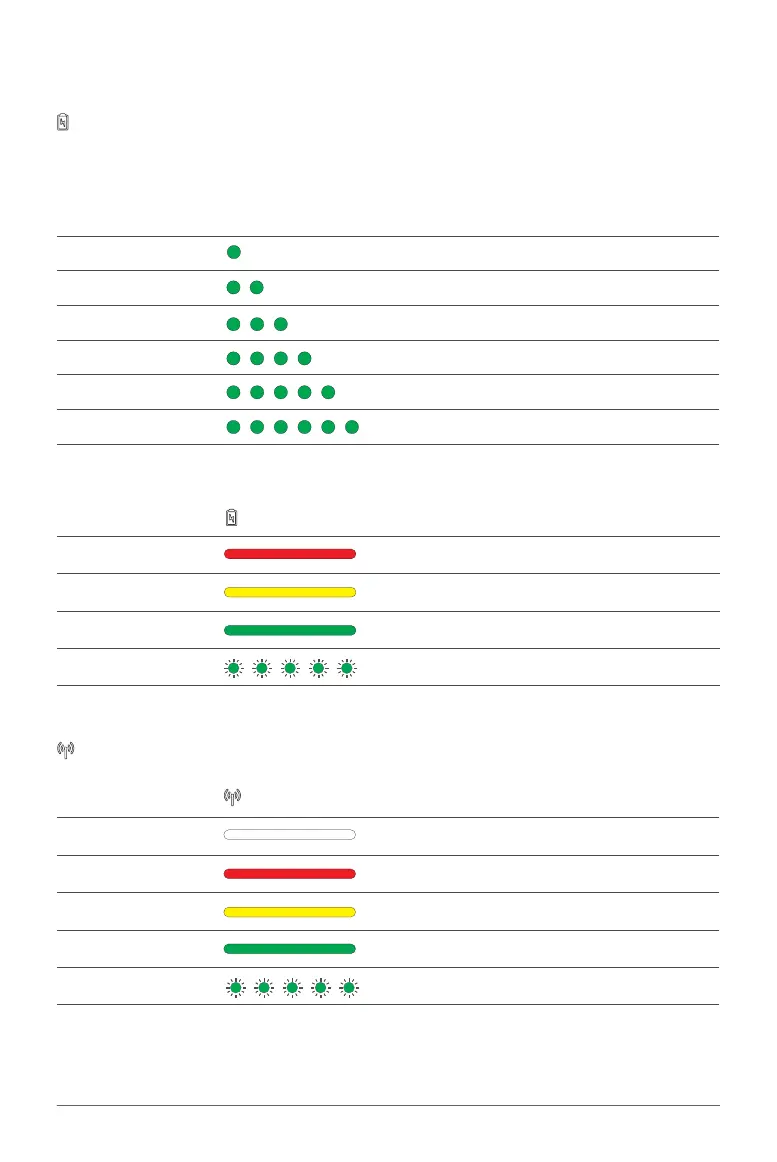
When the remote controller is OFF, press the power button once to display the battery level. The
battery level is indicated by the 6 Status Indicator.
Status Indicator Description
1 Solid Green Battery level: 01% - 20%
2 Solid Green Battery level: 21% - 35%
3 Solid Green Battery level: 36% - 50%
4 Solid Green Battery level: 51% - 65%
5 Solid Green Battery level: 66% - 80%
6 Solid Green Battery level: 81% - 100%
When the remote controller is ON, the battery indicator displays the current battery level.
Mobile Network Indicator
Battery Indicator
Status Indicator
Mobile Network Description
OFF SIM Card not detected
Solid Red Communication error
Solid Yellow Communication normal (LNT)
Solid Green Communication normal (LAN)
Flash Green LAN/WAN Communication
Battery Indicator Description
Solid Red Battery level: 01% - 20%
Solid Yellow Battery level: 21% - 50%
Solid Green Battery level: 51% - 100%
1 Light Flashing Quick Charging



 To Next Page