XAG AUSTRALIA
52
Operating the Aircraft
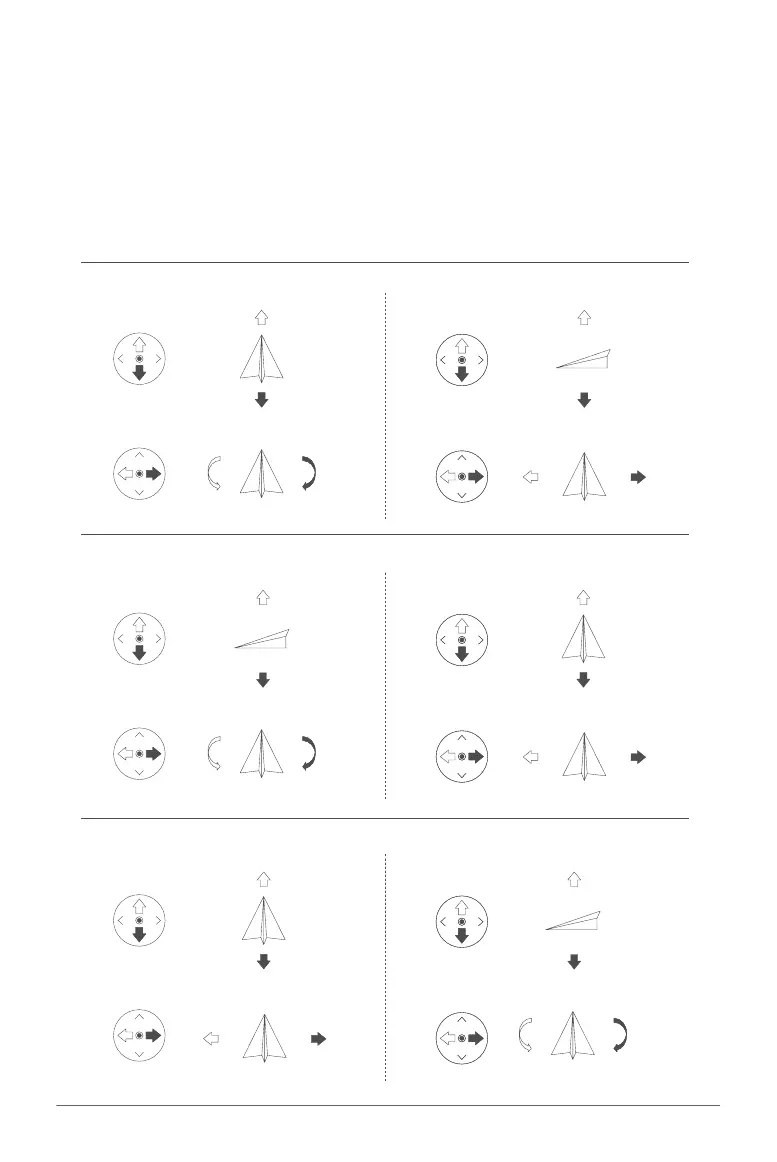
This section details how to manipulate the aircraft's orientation using the remote controller. The
controller can be configured into one of three modes: Mode 1, Mode 2, or Mode 3.
To adjust the Joystick Mode, first launch the "XAG One" application. Then, navigate to the "Remote
Controller Details" section and select the "Joystick Settings" option. By doing this, you will be able to
customize the joystick controls to better suit your preferences and improve the overall operation of
your aircraft.
Right Stick Ascend
Descend
Left Right
Mode 1
Left Stick Forward
Turn Left Turn Right
Backward
Right Stick
Left Right
Mode 2
Left Stick
Turn Left Turn Right
Backward
ForwardAscend
Descend
Right Stick
Mode 3
Left Stick
Left Right
Backward
Forward
Turn Left Turn Right
Ascend
Descend



 To Next Page