XAG AUSTRALIA
54
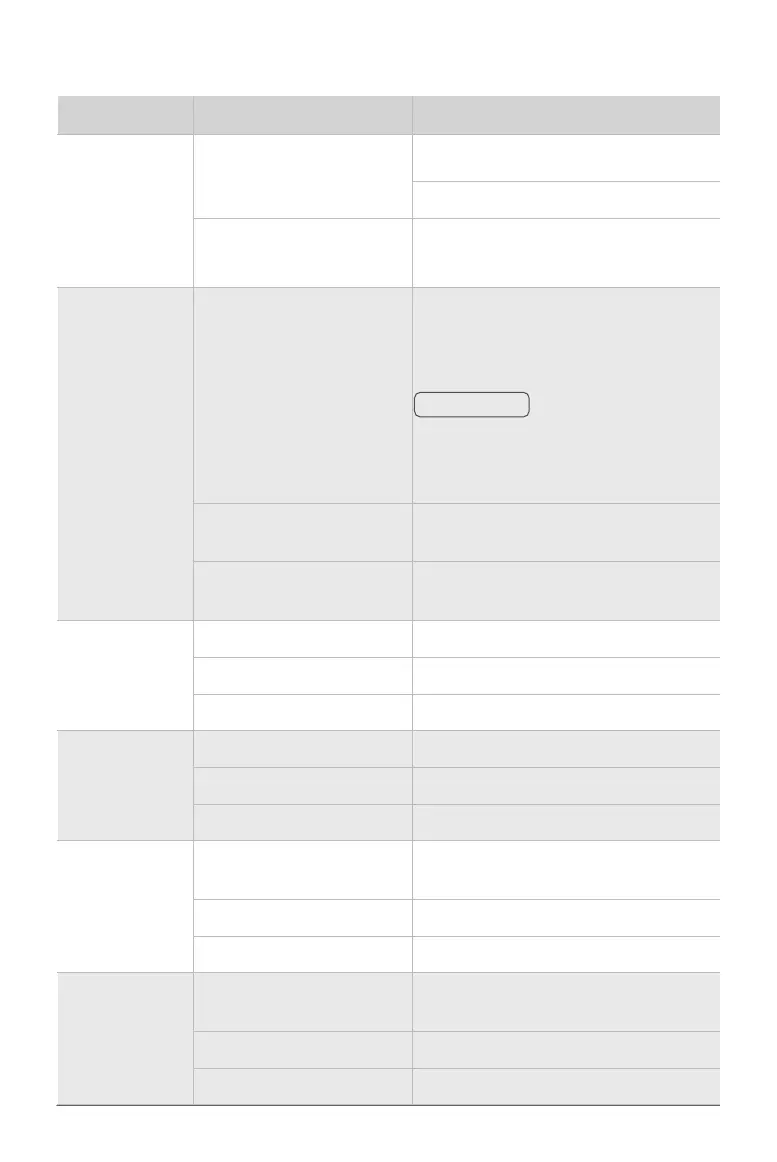
Button Operation Description
Pause/Resume
Short Press
(Calibration Mode) Next
Hover the Aircraft
Long Press Resume Task
Fn
Long Press
Enter/Exit Mapping Mode:
Short Press L1: Mark current position
Short Press L2: Undo previous Mark
In Mapping Mode, remote controller can only
be used for mapping rather than piloting the
aircraft.
Long Press
(Fn + Pause/Resume)
Return-to-Land (RTL)
Long Press
(Fn + Both stick to Bottom Left)
Enable – Calibration Mode
F1 Knob
Twiddle (Auxiliary Mode) Adjust Route spacing
Short Press Enable – Obstacle Avoidance
Long Press Disable – Obstacle Avoidance
F2 Knob
Twiddle (Auxiliary Mode) Adjust Route direction
Short Press Disable – Terrain Following
Long Press Enable – Terrain Following
F3 Knob
Twiddle
Spraying: Adjust Droplet Size
Spreading: Adjust Feed Rate
Short Press Toggle One-Nozzle/Two-Nozzle Spraying
Long Press Toggle Constant/Variable Rate Spraying
F4 Knob
Twiddle
Spraying: Adjust Flow Rate
Spreading: Adjust Dosage Rate
Short Press Disable – Spraying / Spreading
Long Press Enable – Spraying / Spreading
ℹ
IMPORTANT
Button Functions


 To Next Page