91
XAG AUSTRALIA
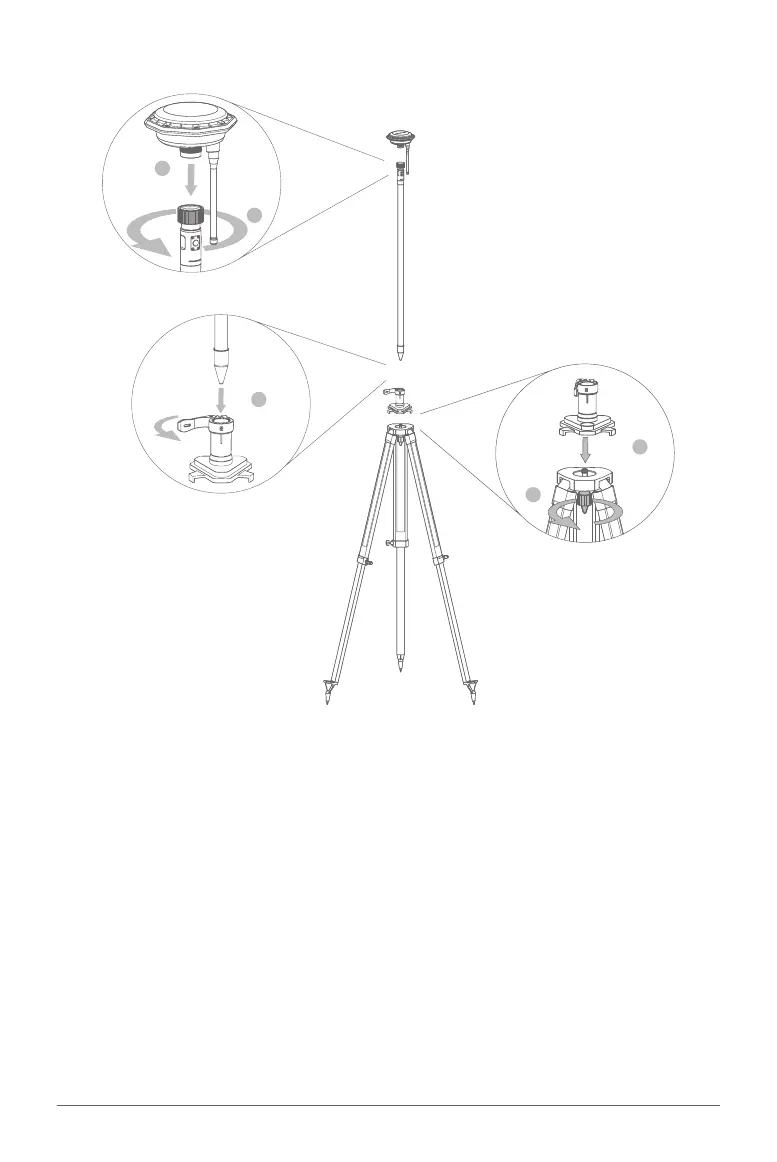
Follow the steps below to assemble your mobile station:
01. Attach the GNSS RTK Module: Connect the GNSS RTK Module to the top end of the extension
rod. Make sure the connection is secure to prevent any movement during operations.
02. Secure the extension rod: Rotate the tightening ring until the extension rod and the Module are
securely connected. This finalizes the assembly of the Rover.
03. Prepare the tripod: Position the Balance Plate on top of the Tripod as indicated in the manual
diagrams. The plate should sit flush against the tripod for stability.
04. Fasten the Balance Plate: Securely tighten the fixing bolts on the Tripod to firmly fasten the
Balance Plate. Check the security of the bolts to ensure the assembly will not shift or loosen
during use.
05. Insert the Rover: Carefully place the assembled Rover from Step 2 into the spacing hole on top
of the Balance Plate. Ensure the Rover is seated correctly within the hole.
06. Secure the Rover: Close the buckle to lock the Rover into place, finalizing the assembly of
the Mobile Station. Double-check the entire assembly to ensure all components are securely
connected and ready for operation.
2
1
5
4
3
Assembling the Mobile Station



 To Next Page