Viewing Aux Send Settings 115
DM2000 Version 2—Owner’s Manual
Pre/Post Parameters
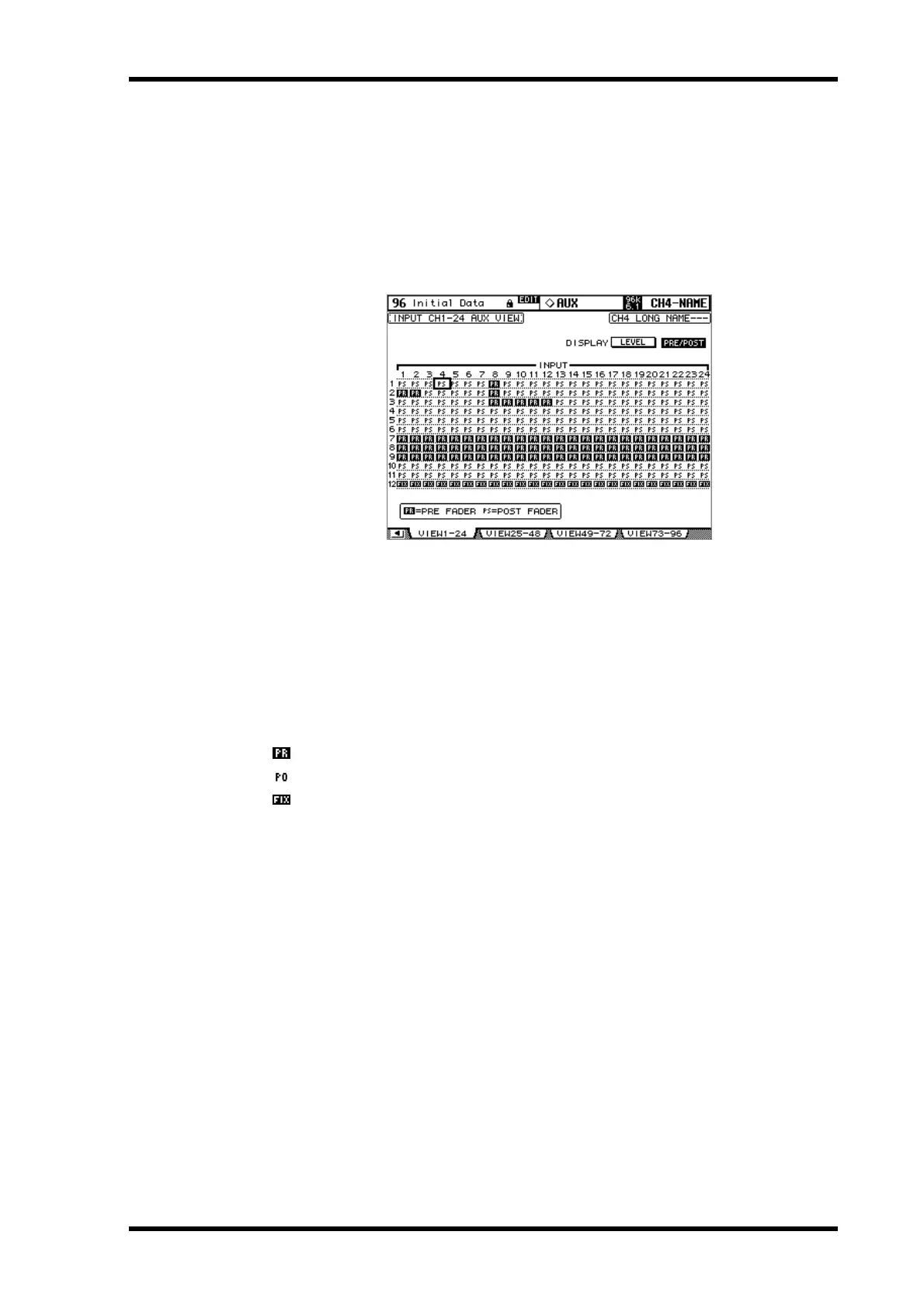
In Pre/Post mode, the Aux View pages display Aux Send Pre/Post parameters. Fixed mode
Aux Sends can be turned on and off only.
1 Use the AUX SELECT [DISPLAY] button to select the Aux View pages.
2 Select the DISPLAY PRE/POST button, and press [ENTER].
The Input Channel 1–24 Aux View page is shown below in Pre/Post mode. The layout of the
other three Aux View pages in Pre/Post mode is the same.
3 Use the cursor buttons or Parameter wheel to select the Input Channel Aux
Sends.
Input Channels can also be selected by using the Input Channel Layer buttons and [SEL]
buttons. Aux Sends can also be selected by using the AUX SELECT [AUX 1]–[AUX 12] but-
tons.
4 Use the [ENTER] button or INC/DEC buttons to set the selected Aux Send to
either pre-fader or post-fader.
The various Aux View page indicators are as follows:
Aux Send configured pre-fader.
Aux Send configured post-fader.
Fixed mode Aux Send.



 To Next Page