Assigning Surround Channels to Buses 99
DM2000 Version 2—Owner’s Manual
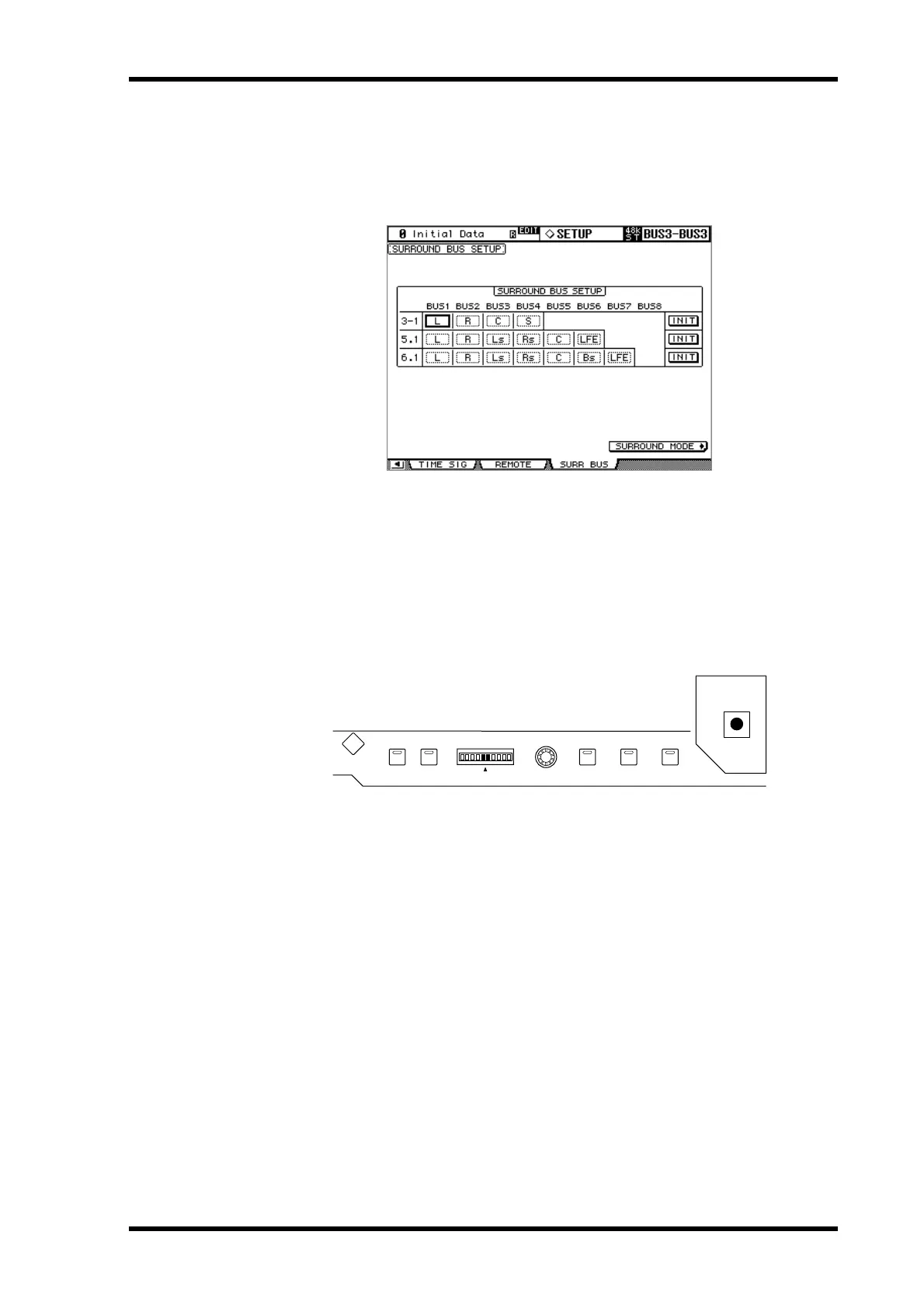
Assigning Surround Channels to Buses
You can modify the Surround Channel to Bus assignment.
1 Use the DISPLAY ACCESS [SETUP] button to locate the Surround Bus Setup
page.
2 Use the cursor buttons to select the bus for which you want to change the
surround channel assignment, then use the Parameter wheel or INC/DEC
buttons to select a surround channel.
INIT: These buttons reset the channel assignment to the default setting.
Using the Joystick
1 Use the LAYER buttons to select the Input Channel Layers, and use the [SEL]
buttons to select the Input Channels.
2 Press the [GRAB] button to grab the current Joystick position, and then use
the Joystick to set the surround pan.
This is used to turn on and off Joystick surround pan control for the currently selected Input
Channel. While Grab is on, the Joystick can be used to set the surround pan position of the
currently selected Input Channel. If the Joystick is set to control effects (i.e., the [EFFECT]
button indicator is lit), the [GRAB] button is disabled.
LINK GRAB EFFECT
L
EVEN
R
L
R
PAN/SURROUND
DISPLAY
ODD



 To Next Page