162 Chapter 13—Monitoring & Talkback
DM2000 Version 2—Owner’s Manual
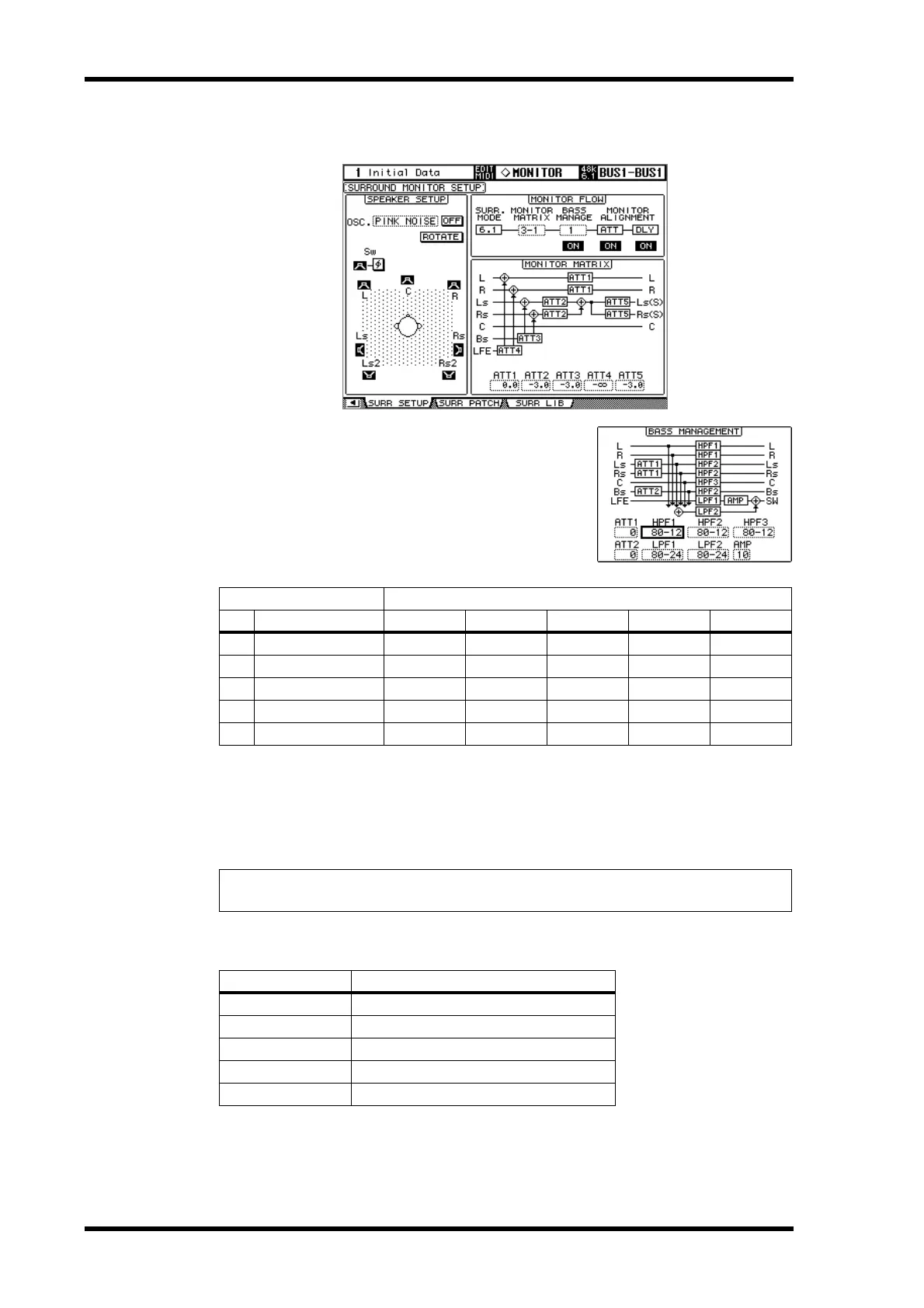
The following screen shows an example in 6.1 Surround mode and 3-1 Monitor Matrix
mode.
BASS MANAGEMENT: You can set the filter and
attenuator settings for each Surround Monitor Chan-
nel using five preset Bass Management modes.
The following presets are available:
ATT1: Adjusts the level difference between LR and LsRs.
ATT2: Adjusts the level difference between C and Bs.
AMP: Corrects the LFE channel level.
HPF1–3: Cut the low range so that the speakers’ supporting frequency ranges will not interfere with the
subwoofer signals.
HPF1–2: Cut the high range so that the subwoofer’s supporting frequency ranges will not interfere with
other speakers’ signals.
You can set the Bass Management parameters in the following ranges:
The HPF 1, 2, 3, and LPF 1 & 2 values indicate a cut-off frequency and a filter response. For example,
“80-12” means a cutoff frequency of 80 Hz and a filter response of –12 dB/octave.
“L” means Linkwitz filter. Other filters are Butterworth.
Presets Parameters
No. Title HPF 1, 2, 3 LPF1 LPF2 ATT 1 & 2 AMP
1
DVD Mix w/BS 80–12 80–24 80–24 0 10
2
DVD Author w/BS 80–12 120–42 80–24 0 10
3
Film Mix w/BS 80–12 80–24 80–24 –3 10
4
Film Author w/BS 80–12 120–42 80–24 –3 10
5
Bypass THRU THRU MUTE 0 0
Tip: If you select 3-1 Monitor Matrix mode, use Presets 1 or 2 to establish an appropriate mon-
itoring environment.
Parameters Range
HPF 1, 2, 3
THRU, 80-12, 80-12L, 80-24, 80-24L
LPF1
THRU, 80-24, 80-24L, 120-42
LPF2
THRU, 80-24, 80-24L, MUTE
ATT 1 & 2
0 to –12 dB (1 dB steps)
AMP
0 to +12 dB (1 dB steps)



 To Next Page