26 Chapter 2—Control Surface & Rear Panel
DM2000 Version 2—Owner’s Manual
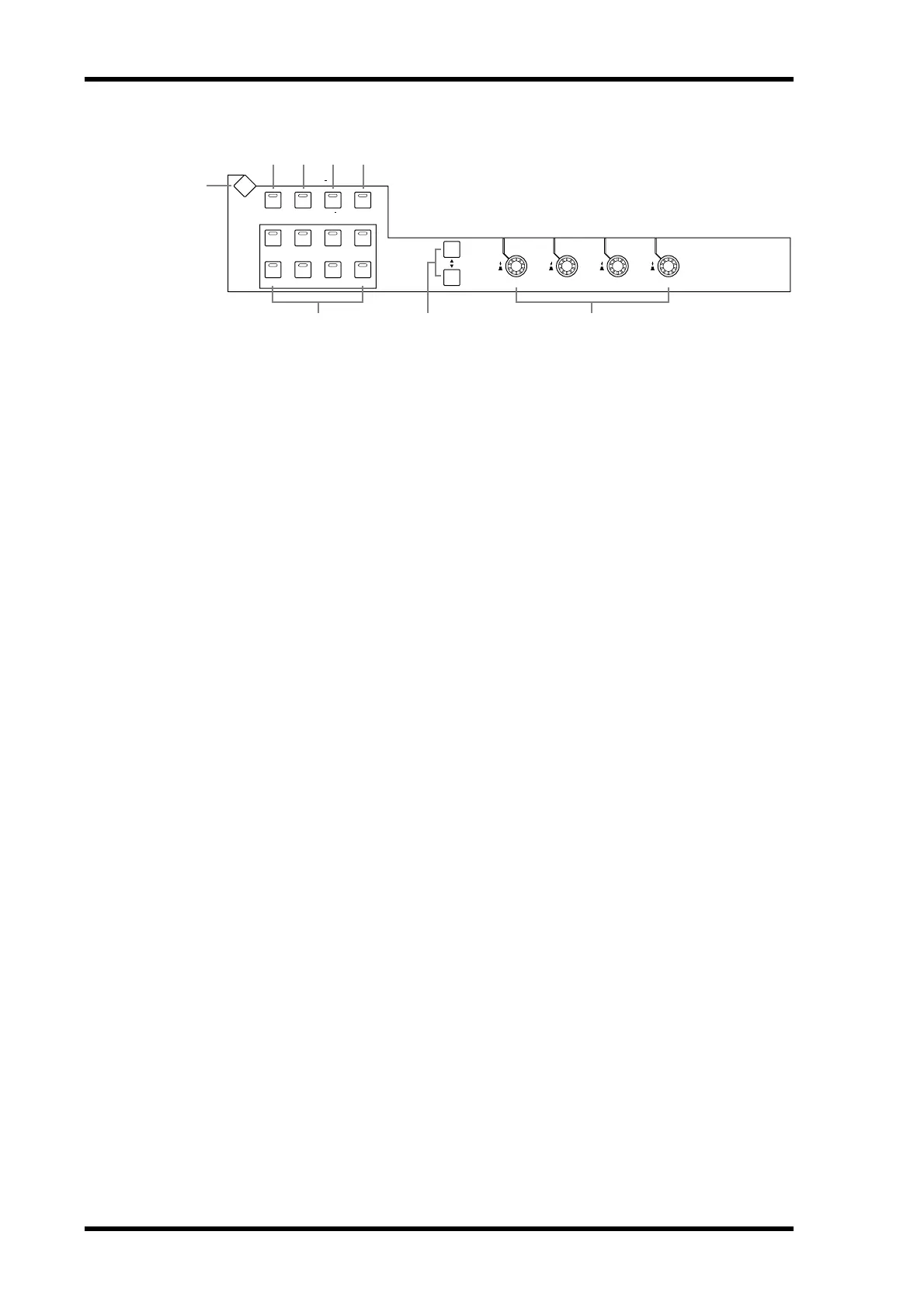
EFFECTS/PLUG-INS
A
EFFECTS/PLUG-INS DISPLAY button
This button is used to select the following pages: Effects Edit, Effects Library, Graphic
Equalizer Edit, Graphic Equalizer Library, Plug-In Setup, and Plug-In Edit. See “Internal
Effects, Plug-Ins & GEQs” on page 174 for more information.
B INTERNAL EFFECTS button
This button is used to select the internal effects processors in conjunction with the
EFFECTS/PLUG-INS [1–8] buttons. Its indicator lights up when it’s pressed. See “Editing
Effects” on page 177 for more information.
C GRAPHIC EQUALIZERS button
This button is used to select the GEQs in conjunction with the EFFECTS/PLUG-INS [1–6]
buttons. Its indicator lights up when it’s pressed. See “Editing GEQs” on page 183 for more
information.
D PLUG-INS button
This button is used to select the Plug-Ins in conjunction with the EFFECTS/PLUG-INS
[1–8] buttons. Its indicator lights up when it’s pressed. See “Editing Plug-Ins” on page 181
for more information.
E CHANNEL INSERTS button
If an internal effects processor or Y56K card effects chain is inserted in the currently selected
channel, the relevant Effects Edit or Plug-In Edit page appears when this button is pressed,
and its indicator lights up. In addition, the corresponding EFFECTS/PLUG-INS [1–8] but-
ton indicator flashes. If it’s a Y56K that is inserted, the [PLUG-INS] button indicator also
flashes. If it’s an internal effects processor, the [INTERNAL EFFECTS] button indicator
flashes. A warning message appears if there’s nothing inserted in the currently selected
channel. See “Editing Effects” on page 177 and “Editing Plug-Ins” on page 181 for more
information.
F EFFECTS/PLUG-INS 1–8 buttons
These buttons are used to select the internal effects processors, GEQs, and Plug-Ins in con-
junction with the EFFECTS/PLUG-INS [INTERNAL EFFECTS], [GRAPHIC EQUALIZ-
ERS], and [PLUG-INS] buttons. The button indicator of the currently selected internal
effects processor, GEQ, or Plug-In lights up. Since there are six GEQs, buttons [7] and [8]
are inactive when the [GRAPHIC EQUALIZERS] button’s indicator is lit. When the
EFFECTS/PLUG-INS [CHANNEL INSERTS] button indicator is lit, all of these buttons are
inactive.
G Parameter Up/Down buttons
These buttons are used to select the rows of internal effects processor and Plug-In parame-
ters for editing with Parameter controls 1–4. The parameters in the currently selected row
appear highlighted. Up to 16 parameters can be displayed at a time. If more are available,
an up or down arrow is displayed. See “Editing Effects” on page 177 and “Editing Plug-Ins”
on page 181 for more information.
INTERNAL
EFFECTS
1234
5678
CHANNEL
INSERTS
GRAPHIC
EQUALIZERS
DISPLAY
PLUG INS
2 3 4 5
1
EFFECTS / PLUG INS
6
1234
8
7



 To Next Page