6-148
Digital Operator Functions
This section explains the Digital Operator functions.
Setting Digital Operator Functions
You can set Digital Operator-related constants such as selecting the Digital Operator display, multi-function
selections, and copy functions.
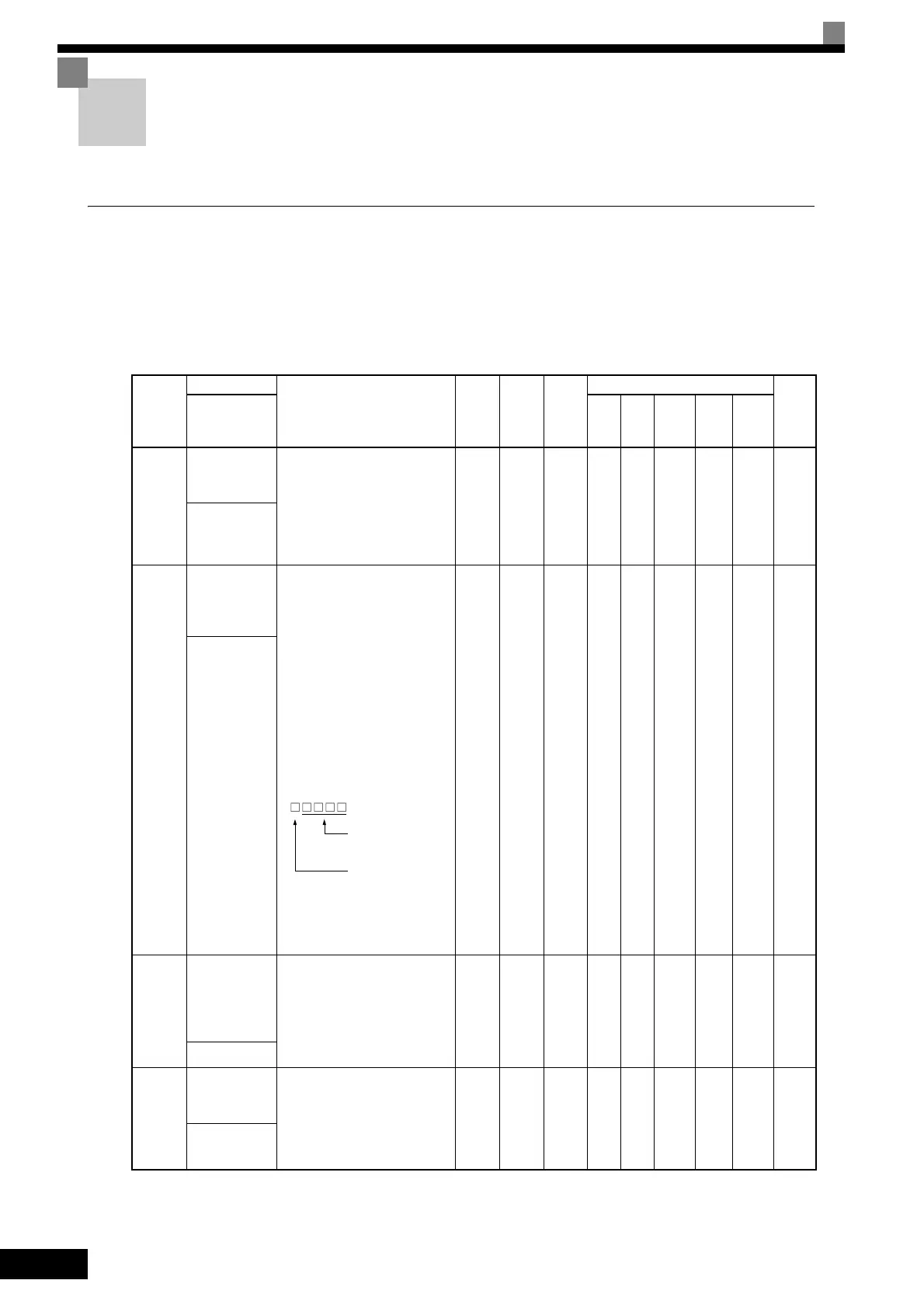
Related Constants
Con-
stant
Number
Name
Description
Setting
Range
Factory
Setting
Change
during
Opera-
tion
Control Methods
MEMO
BUS
Regis-
ter
Display
V/f
V/f
with
PG
Open
Loop
Vector
1
Flux
Vec-
tor
Open
Loop
Vector
2
o1-02
Monitor selec-
tion after power
up
Sets the monitor item to be dis-
played when the power is turned
on.
1: Frequency reference
2: Output frequency
3: Output current
4: The monitor item set for o1-01
1 to 4 1 Yes A A A A A 501H
通电监视项目
选择
o1-03
Frequency units
of reference set-
ting and moni-
tor
Sets the units that will be set and
displayed for the frequency refer-
ence and frequency monitor.
0: 0.01 Hz units
1: 0.01% units (Maximum
output frequency is 100%)
2 to 39:
min
−1
units (Sets the motor
poles.)
40 to 39999:
User desired display
Set the desired values for setting
and display for the max. output
frequency.
Example: When the max. output
frequency value is 200.0, set
12000
0 to
39999
0 No A A A A A 502H
频率指令单位
o1-04
Setting unit for
frequency con-
stants related to
V/f characteris-
tics
Set the setting unit for frequency
reference-related constants.
0: Hz
1: min
−1
0 or 1 0 No No No No A A 503H
参数设定单位
o2-01
LOCAL/
REMOTE key
enable/disable
Sets the Digital Operator Local/
Remote Key
0: Disabled
1: Enabled (Switches between
the Digital Operator and the
constant settings.)
0 or 1 1 No A A A A A 505H
L/R 键功能
Set 4-digit number
excluding the decimal
point.
Set the number of digits
below the decimal point
to display.



 To Next Page
 Loading...