Keypads
157
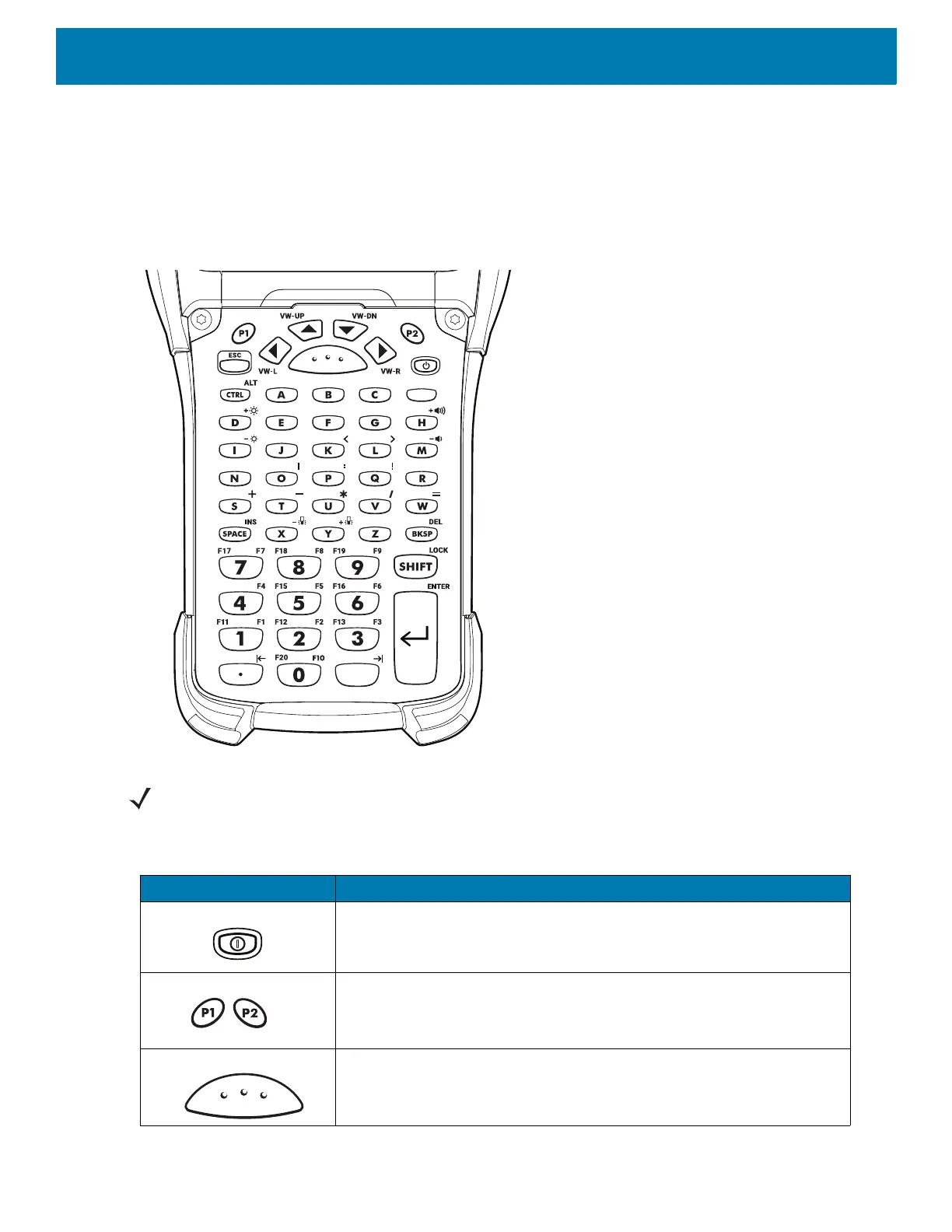
53-Keys VT Emulator Keypad
The VT emulator keypad contains a Power button, application keys, scroll keys and a function key. The keypad
is color-coded to indicate the alternate function key (blue) values. Note that keypad functions can be changed
by an application so the device’s keypad may not function exactly as described. See the Key Descriptions table
for key and button details, and the Keypad Special Functions table for the keypad’s various functions.
Figure 128 53-Keys VT Emulator Keypad
NOTE: The VT emulator configuration is only used when the device is running the VT emulation software.
Table 20 VT Emulator Descriptions
Key Description
Power (red) Turns the device on and off.
Performs a warm boot and a hard reset. See Resetting the Device for
more information.
P1/P2 User programmable keys:
• By default, P1 is the dedicated PTT key.
• By default, P2 acts like another Scan key.
Scan (yellow) Activates the scanner/imager in a scan enabled application.



 To Next Page