Detachment
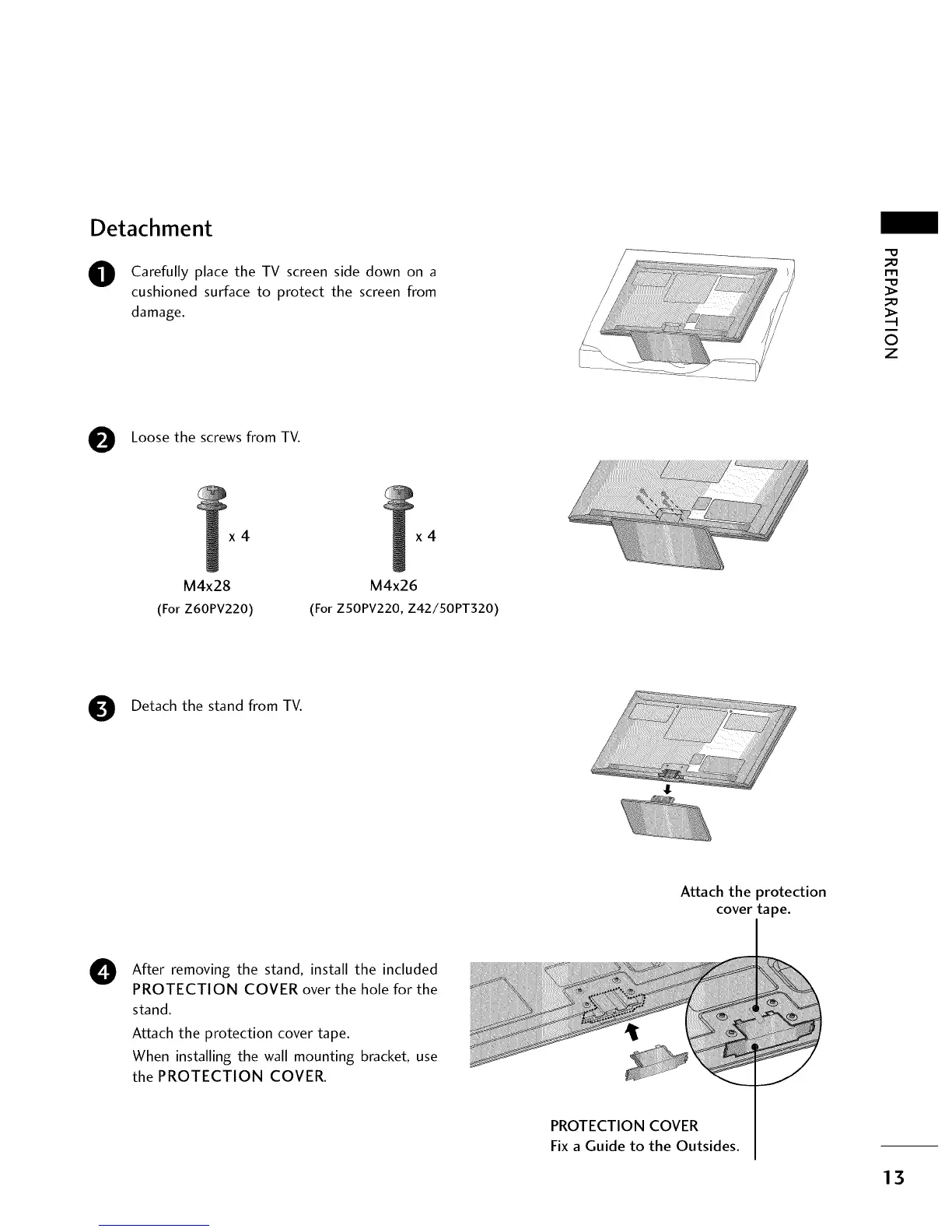
O Carefully place the TV screen side down on a
cushioned surface to protect the screen from
damage.
_!i_!_!_!_!_!_!_ii_ii_ii_ii_ii_iiii_i_ii_iiiiiiiiiiiiiiiiiiii!i_!i!!!!!i!i!i!_i_
....._:_-_
_D
m
_D
©
z
Loose the screws from TV.
x4
M4x28
(For Z60PV220)
x4
M4x26
(For ZSOPV220, Z42/50PT320)
Detach the stand from TV.
Attach the protection
cover tape.
0
After removing the stand, install the included
PROTECTION COVER over the hole for the
stand.
Attach the protection cover tape.
When installing the wall mounting bracket, use
the PROTECTION COVER.
PROTECTION COVER
Fix a Guide to the Outsides.
13



 To Next Page