INITIAL SETTING
This Function guides the user to easily set the essential items for viewing the TV for the first time when pur-
chasing the TV. It will be displayed on the screen when turning the TV on for the first time. It can also be acti-
vated from the user menus.
Default selection is "Home Use". We recommend setting the TV to "Home Use" mode for the best picture
in your home environment.
"Store Demo" Mode is only intended for use in retail environments. Customers can adjust the "Picture
menu - Picture mode" manually while inspecting the TV, but the TV will automatically return to preset in-
store mode after 5 minutes.
You can also adjust Initial Setting in the OPTION menu.
Factory defaults are set when you choose "Home Use".
If you do not complete the Initial setting, it will appear whenever the TV is switched on until the Initial
setting procedure is completed.
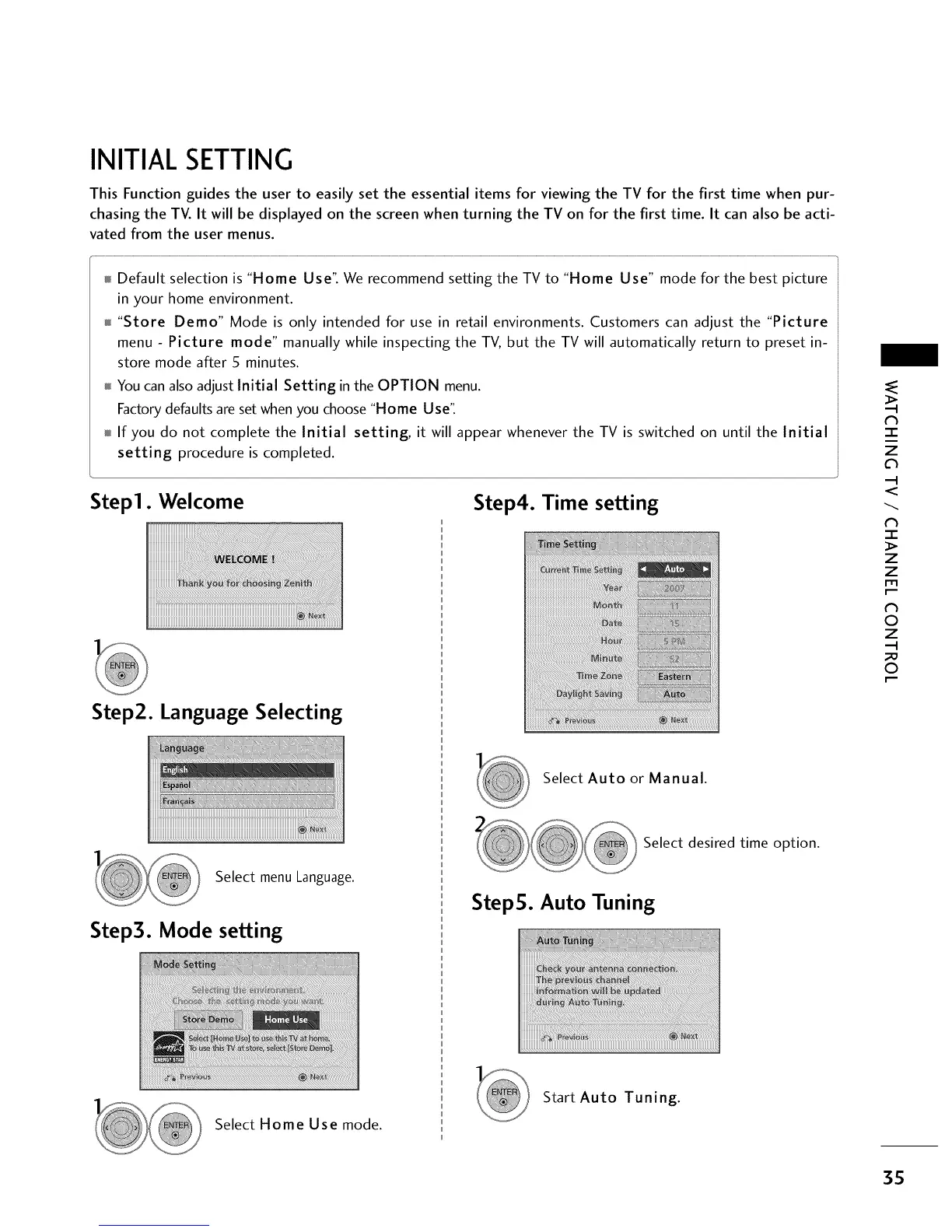
Step1. Welcome
Step4. Time setting
Step2. Language Selecting
-r"
z
<
N
-r"
>
Z
Z
fT1
N
0
Z
_m
0
Select Auto or Manual.
Select menu Language.
Step3. Mode setting
Select desired time option.
StepS. Auto Tuning
Select Home Use mode.
Start Auto Tuning.
3S



 To Next Page