EXTERNALEQUIPMENT SETUP
VCRSETUP
Antenna Connection
1. How to connect
x
r_l
_o
z
r_l
X:)
c
"O
r_l
z
r_l
c
"O
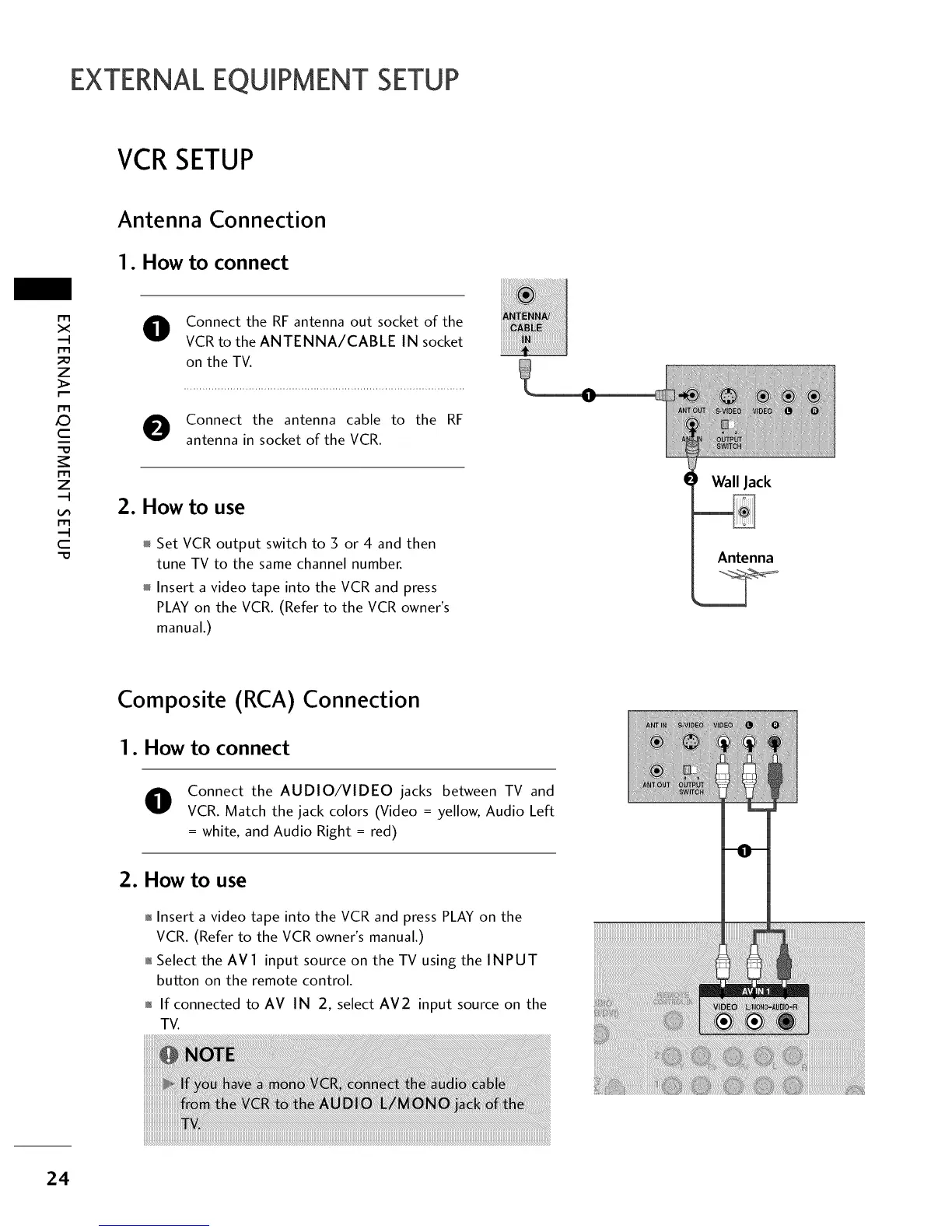
Connect the RF antenna out socket of the
VCR to the ANTENNA/CABLE IN socket
on the TV.
Connect the antenna cable to the RF
antenna in socket of the VCR.
2. How to use
Set VCR output switch to 3 or 4 and then
tune TV to the same channel number.
Insert a video tape into the VCR and press
PLAY on the VCR. (Refer to the VCR owner's
manual.)
Wall Jack
Antenna
Composite (RCA)
I. How to connect
Connection
Connect the AUDIO/VIDEO jacks between TV and
VCR. Match the jack colors (Video = yellow, Audio Left
= white, and Audio Right = red)
2. How to use
01_Insert a video tape into the VCR and press PLAY on the
VCR. (Refer to the VCR owner's manual.)
01_Select the AVl input source on the TV using the INPUT
button on the remote control.
01_If connected to AV IN 2, select AM2 input source on the
TV.
24



 To Next Page