PC SETUP
VGA (D-Sub 15 pin) Connection
1. How to connect
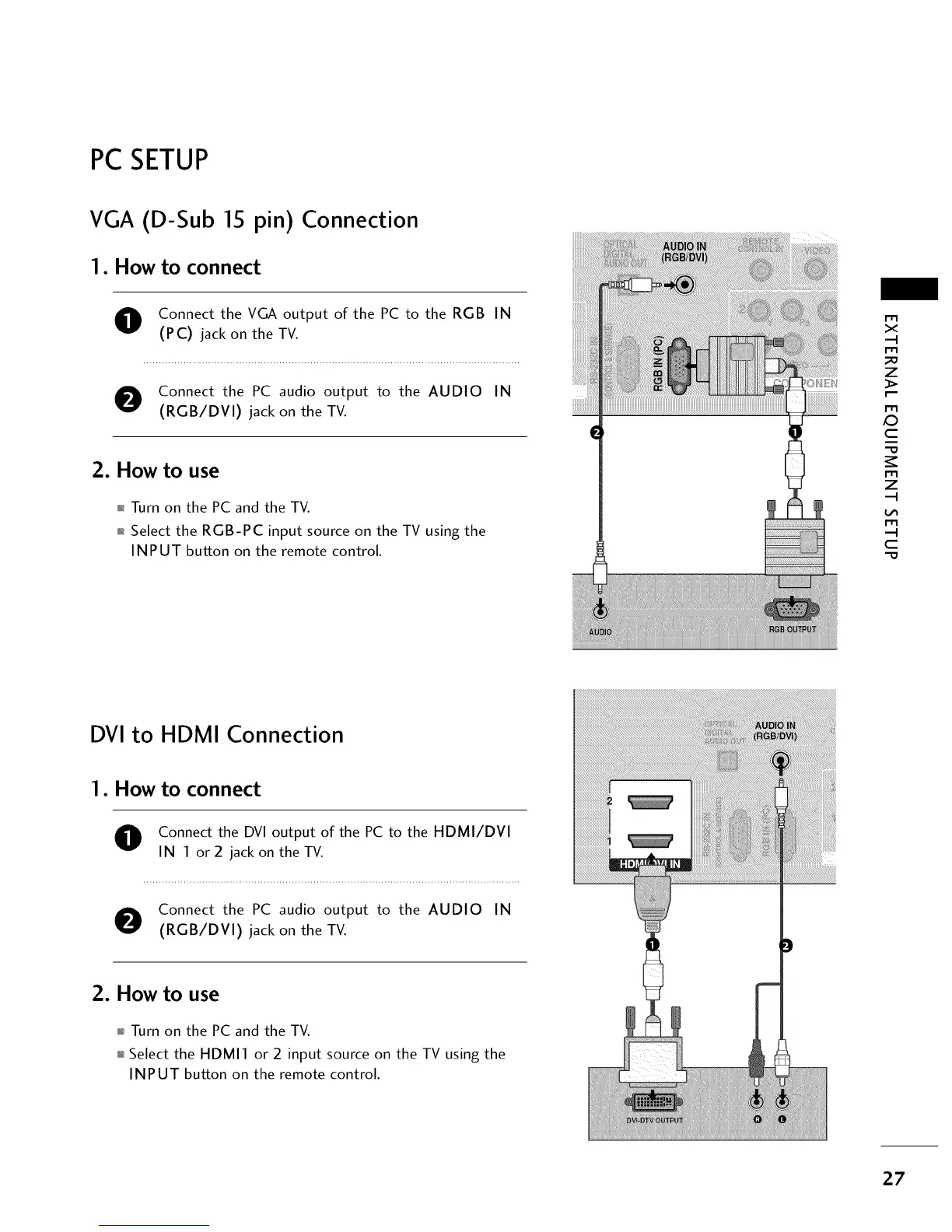
O onnect the VGA output of the PC to the RGB IN
(PC) jack on the TV.
O Connect the PC audio output to the AUDIO IN
(RGB/DVI) jack on the TV.
2. How to use
01_Turn on the PC and the TV.
01_Select the RGB-PC input source on the TV using the
INPUT button on the remote control.
m
x
m
_o
z
m
X:)
c
i
"O
m
z
m
c
"O
DVI to HDMI Connection
1. How to connect
O onnect the DVI output of the PC to the HDMI/DVI
IN 1 or 2 jack on the TV.
O Connect the PC audio output to the AUDIO IN
(RGB/DVI) jack on the TV.
2. How to use
01_Turn on the PC and the TV.
01_Select the HDMI1 or 2 input source on the TV using the
INPUT button on the remote control.
i!i!_!ii!i!i!_!ii]i!i!_!ii]i!i!_!ii]i!i!_!ii]i!i!_!ii]i!i!_!ii]i
27



 To Next Page