PRESETPICTURESETTINGS (PICTURE MODE)
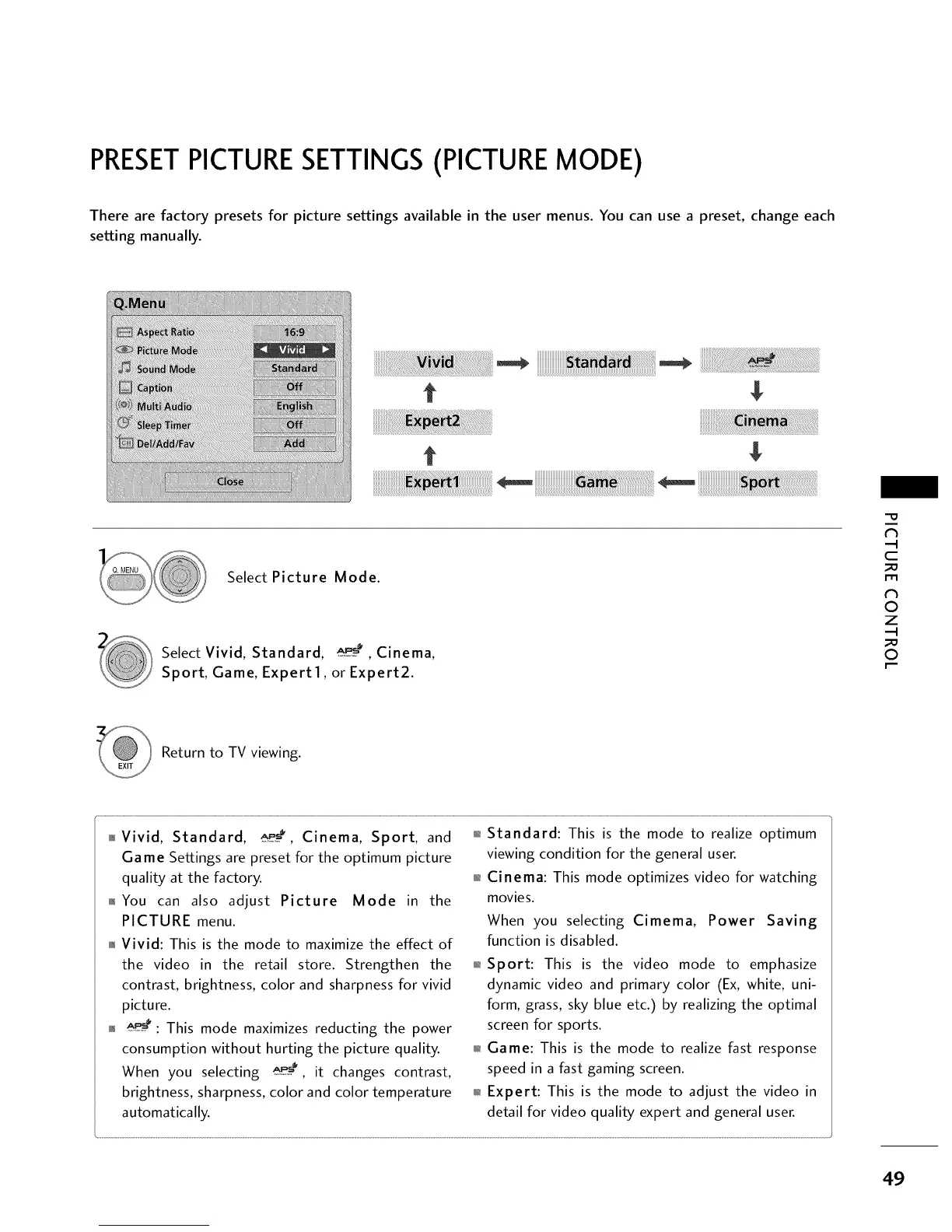
There are factory presets for picture settings available in the user menus. You can use a preset, change each
setting manually.
t
t
Select Picture Mode.
Select Vivid, Standard, _,_, Cinema,
Sport, Game, Expert 1, or Expert2.
c
0
z
0
Return to TV viewing.
0_Vivid, Standard, _, Cinema, Sport, and
Game Settings are preset for the optimum picture
quality at the factory.
01_You can also adjust Picture Mode in the
PICTURE menu.
01_Vivid: This is the mode to maximize the effect of
the video in the retail store. Strengthen the
contrast, brightness, color and sharpness for vivid
picture.
01__*: This mode maximizes reducting the power
consumption without hurting the picture quality.
When you selecting _e__, it changes contrast,
brightness, sharpness, color and color temperature
automatically.
0_Standard: This is the mode to realize optimum
viewing condition for the general user.
01_Cinema: This mode optimizes video for watching
movies.
When you selecting Cimema, Power Saving
function is disabled.
01_Sport: This is the video mode to emphasize
dynamic video and primary color (Ex, white, uni-
form, grass, sky blue etc.) by realizing the optimal
screen for sports.
01_Game: This is the mode to realize fast response
speed in a fast gaming screen.
01_Expert: This is the mode to adjust the video in
detail for video quality expert and general user.
49



 To Next Page