TIMESETTING
AUTO ON/OFF TIME SETTING
This function operates only if the current time has been set.
The Off Time function overrides the On Time function if they are both set to the same time.
The TV must be in standby mode for the On Time to work.
If you do not press any button within 2 hours after the TV turns on with the On Time function, the TV will
automatically revert to standby mode.
rT1
rT1
z
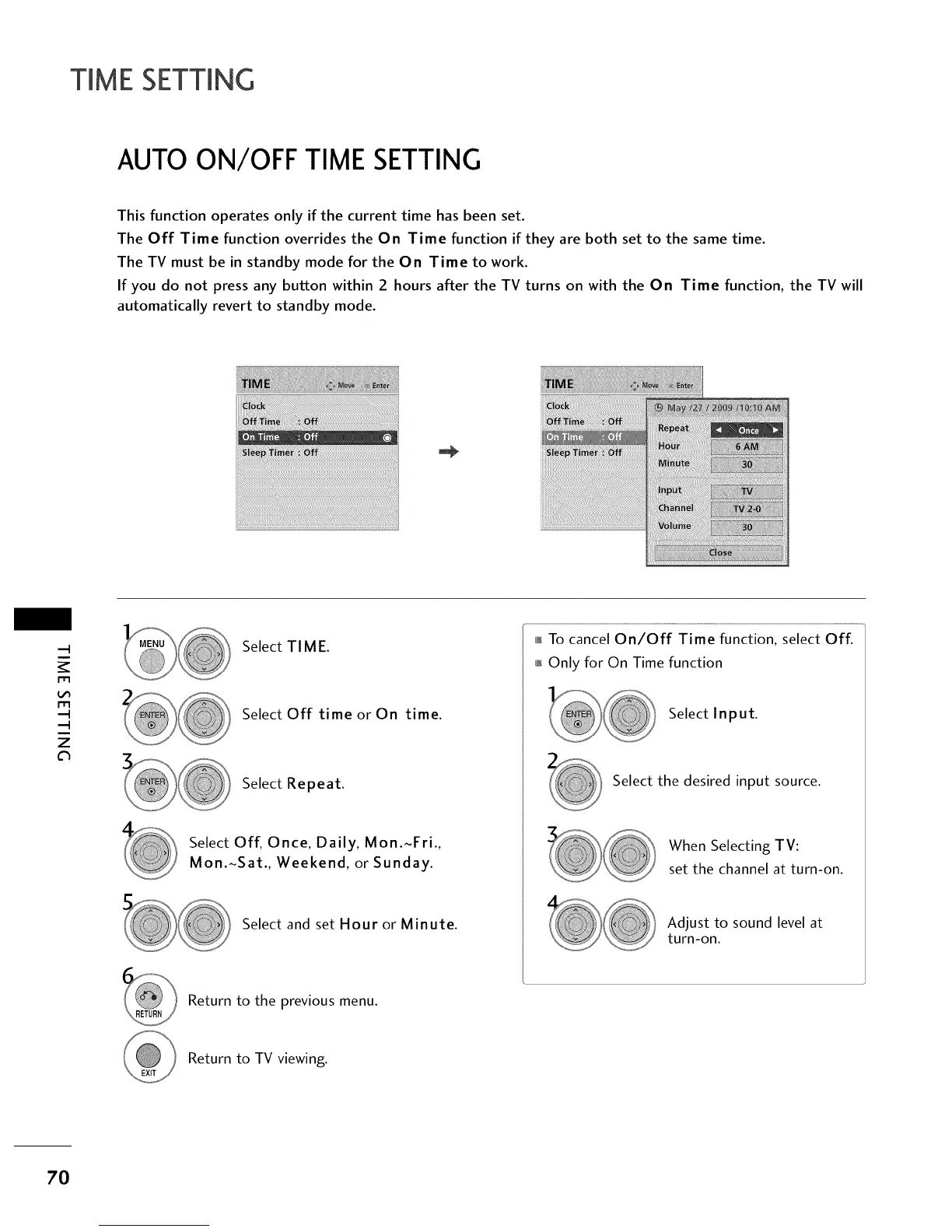
Select TIME.
Select Off time or On time.
Select Repeat.
Select Off, Once, Daily, Mon.~Fri.,
Mon.~Sat., Weekend, or Sunday.
Select and set Hour or Minute.
01_To cancel On/Off Time function, select Off.
01_Only for On Time function
Select Input.
Select the desired input source.
When Selecting TV:
set the channel at turn-on.
Adjust to sound level at
turn-on.
Return to the previous menu.
Return to TV viewing.
7O



 To Next Page