WATCHING TV / CHANNEL CONTROL
INPUT LIST
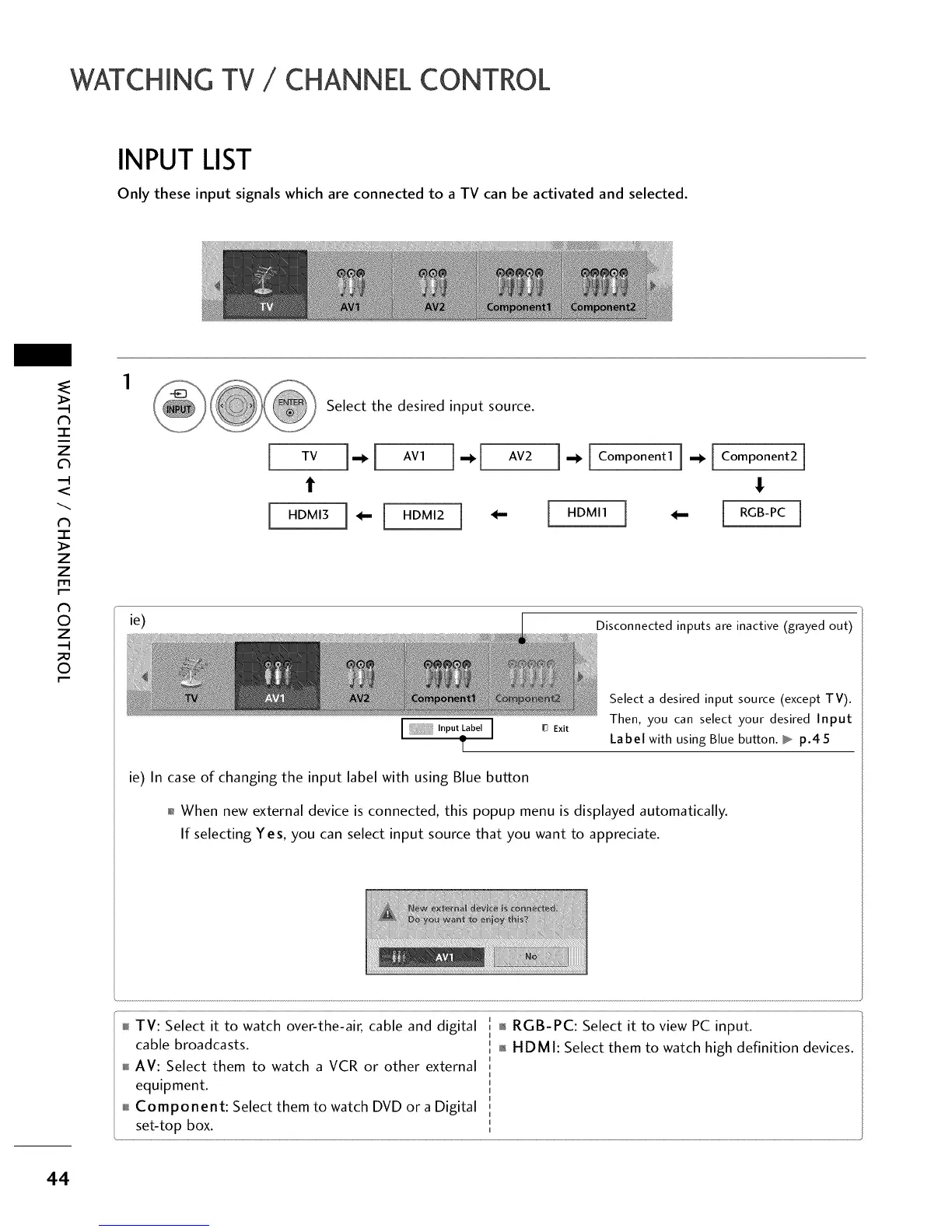
Only these input signals which are connected to a TV can be activated and selected.
N
-r"
z
<
N
-r
>
z
z
fT1
N
©
Z
©
Select the desired input source.
TV ],,,_ [ AVI
t
[ HDMI3 [ _--[ HDMI2
I. [Com onentli. [Component2j
HDMI1 ] _ RGB-PC
ie)
Disconnected inputs are inactive (grayed out)
Exit
Select a desired input source (except TV).
Then, you can select your desired Input
Label with using Blue button, b p.45
ie) In case of changing the input label with using Blue button
01_When new external device is connected, this popup menu is displayed automatically.
If selecting Yes, you can select input source that you want to appreciate.
TV: Select it to watch over-the-air, cable and digital
cable broadcasts.
AV: Select them to watch a VCR or other external
equipment.
Component: Select them to watch DVD or a Digital
set-top box.
01_RGB-PC: Select it to view PC input.
01_H DM I: Select them to watch high definition devices.
44



 To Next Page