WATCHING TV / CHANNEL CONTROL
Channel Editing
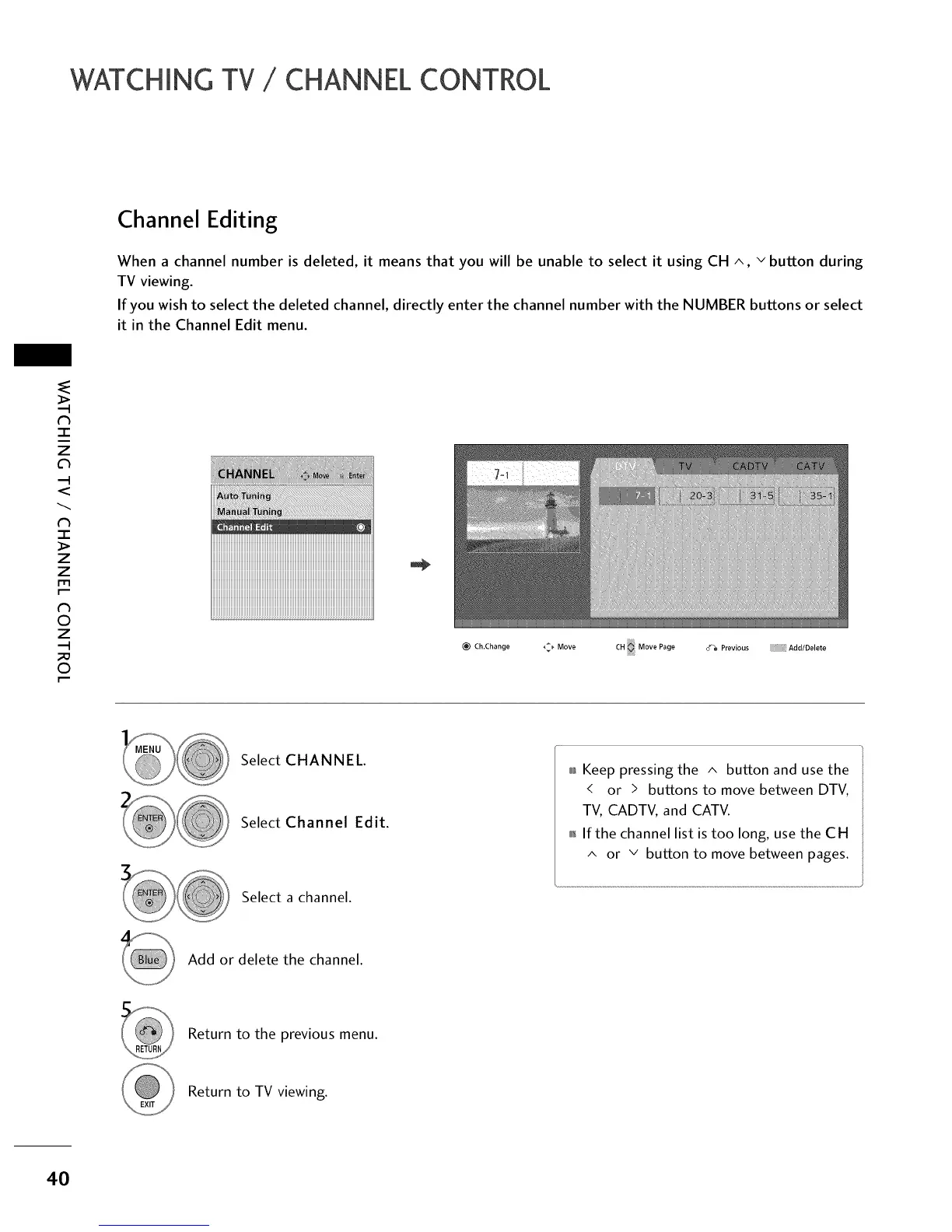
When a channel number is deleted, it means that you will be unable to select it using CH ^, v button during
TV viewing.
If you wish to select the deleted channel, directly enter the channel number with the NUMBER buttons or select
it in the Channel Edit menu.
"l-
z
<
N
-1-
>
z
z
fT1
N
0
Z
_m
0
_iiiiiiiiiiiiiiiiiiiiiiiiiiiiiiiiiiiiiiiiiiiiiiiiiiiiiiiiiiiiiiiiiiiiiiiiiiii_Ji
_) Ch.Change
_ Move CH Move Page _ Previous Add/Delete
Select CHANNEL.
Select Channel Edit.
Select a channel.
_ Keep pressing the ^ button and use the
< or > buttons to move between DTV,
TV, CADTV, and CATV.
_ If the channel list is too long, use the CH
^ or v button to move between pages.
Add or delete the channel.
Return to the previous menu.
Return to TV viewing.
40



 To Next Page