WATCHING TV / CHANNEL CONTROL
CHANNELSETUP
('h
"-r"
z
<
N
-1-
>
z
z
fT1
N
©
Z
©
Auto Scan (Auto Tuning)
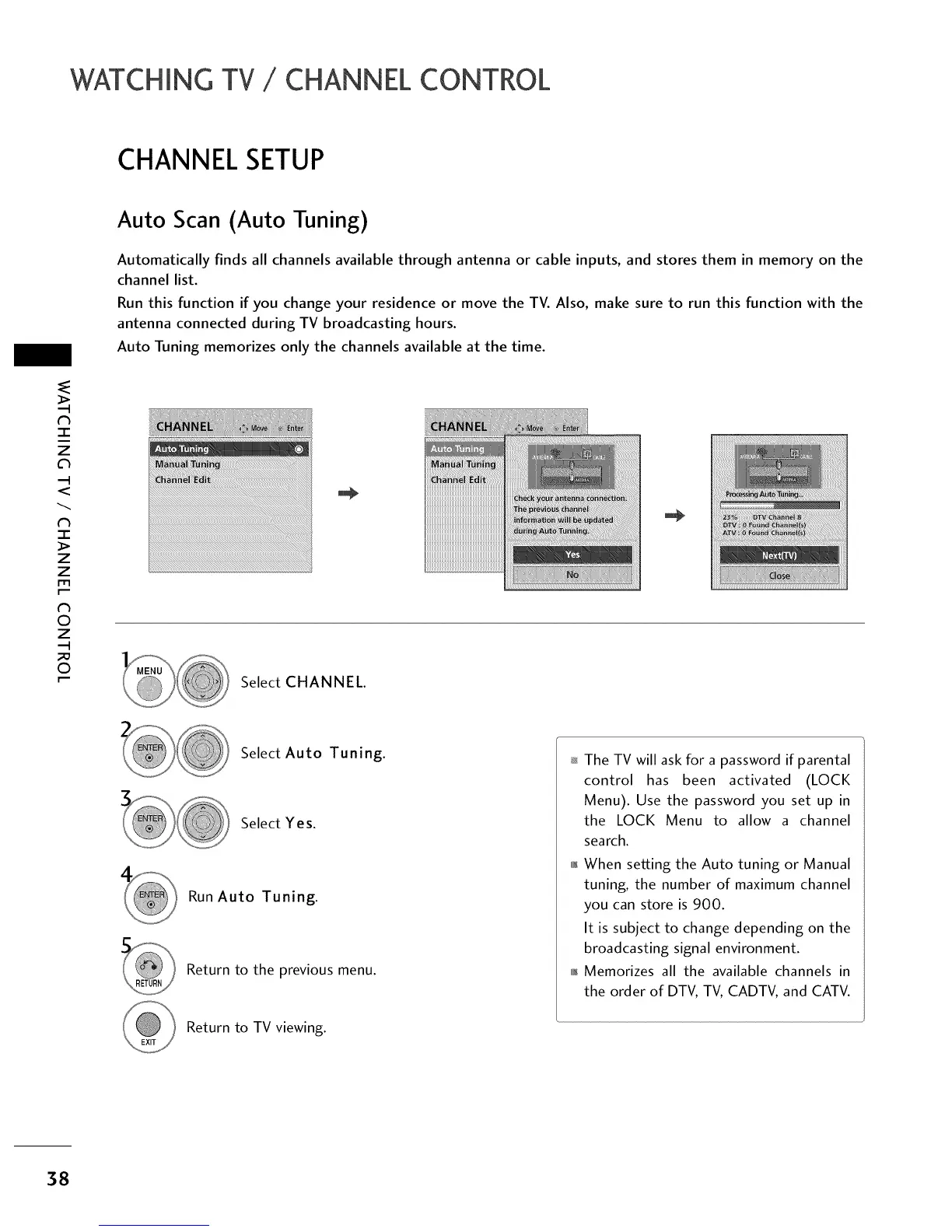
Automatically finds all channels available through antenna or cable inputs, and stores them in memory on the
channel list.
Run this function if you change your residence or move the TV. Also, make sure to run this function with the
antenna connected during TV broadcasting hours.
Auto Tuning memorizes only the channels available at the time.
Select CHANNEL.
Select Auto Tuning.
Select Yes.
Run Auto Tuning.
Return to the previous menu.
Return to TV viewing.
The TV will ask for a password if parental
control has been activated (LOCK
Menu). Use the password you set up in
the LOCK Menu to allow a channel
search.
01_When setting the Auto tuning or Manual
tuning, the number of maximum channel
you can store is 900.
It is subject to change depending on the
broadcasting signal environment.
011_Memorizes all the available channels in
the order of DTV, TV, CADTV, and CATV.
38



 To Next Page